> For the complete documentation index, see [llms.txt](https://library.zoom.com/llms.txt). Markdown versions of documentation pages are available by appending `.md` to page URLs; this page is available as [Markdown](https://library.zoom.com/business-services/zoom-contact-center/expert-insights/unifying-live-and-asynchronous-work-with-work-items.md).
# Unifying Live and Asynchronous Work with Work Items
Authored by Justin Steinberg
### Unifying Live and Asynchronous Work: Introducing Zoom Contact Center Work Items
Contact centers have long wrestled with a fundamental disconnect: live channels like voice and chat flow through sophisticated routing engines, while back-office tasks—tickets, cases, invoices, follow-ups—remain in separate systems. This fragmentation creates operational headaches, forces agents to context-switch between platforms, and makes it difficult to intelligently prioritize all the work your team needs to handle. Zoom Contact Center's Work Item feature changes this paradigm by treating asynchronous tasks as first-class routable channels, just like calls or messages. Let's explore how this works and what it means for your contact center operations.
### The Core Concept: Work Items as Routable Channels
At its heart, the Work Item feature introduces a deceptively simple but powerful idea: what if every piece of work—whether it's a live phone call or a case requiring follow-up three days from now—could flow through the same routing engine? Work Items accomplish this by transforming asynchronous tasks into engagements that Zoom Contact Center can route, queue, and assign using the same omnichannel logic you've already configured for your live channels. This isn't just about viewing tickets in the same interface; it's about applying consistent intelligence logic to every interaction your agents handle.
### Solving Real Operational Problems
Traditional approaches create predictable pain points. When Zoom Contact Center assigns an agent to handle an incoming voice call, other business systems might simultaneously assign that same agent an urgent case or invoice. Since these systems operate independently without visibility into each other's assignments, this leads to workflow conflicts, delayed customer responses, and frustrated agents struggling to manage competing priorities. Separate routing systems also mean separate configuration, reporting, and optimization efforts. You're essentially running multiple contact centers under one roof, each with its own complexity overhead. Work Items help eliminate this fragmentation. When every task flows through the same routing engine, you gain unified capacity management, consistent prioritization logic, and a single source of truth for agent workload.
### Architecture and Integration Pattern
Work Items follow an external-trigger model. Zoom Contact Center doesn't create the tasks themselves—your existing systems (CRM, ERP, ticketing platforms, etc.) continue to own that responsibility. Instead, ZCC focuses on what it does best: routing, queueing, assigning, and reporting. The integration happens through the *Start Engagement API*. When your external system needs to route work to an agent, it makes an API call to Zoom Contact Center with the work item details. From that moment, ZCC takes over the routing and assignment process, blending this asynchronous work automatically with your live channels. This architectural decision is deliberate: your business systems remain the system of record for each work item, while Zoom Contact Center functions as your unified work distribution engine. This supports routing every task—regardless of origin— intelligently based on agent skills, availability, and workload.
### Configuration Deep Dive
Setting up Work Item routing follows the familiar flow-based configuration model that ZCC administrators already know. The process involves five key steps:
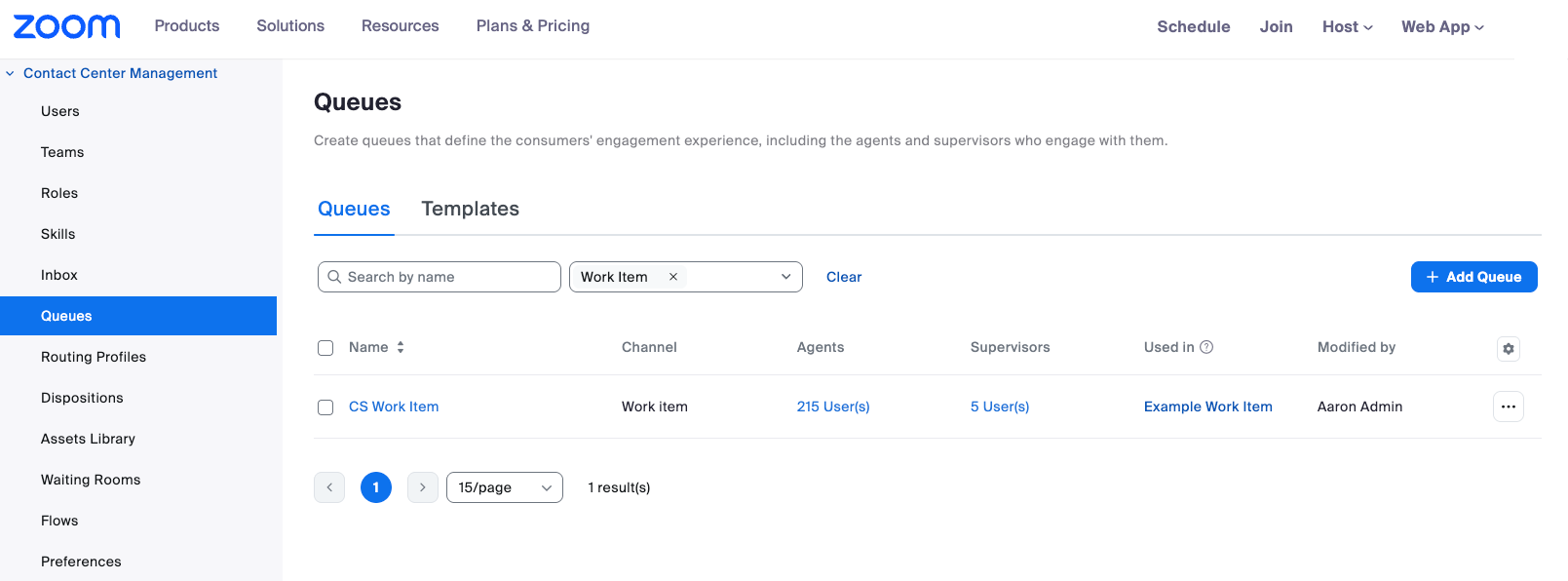
1. **Create a Work Item Queue.** This dedicated queue handles work item engagements separately from your voice or chat queues, allowing you to apply different service-level objectives and staffing strategies to asynchronous work.
Example of creating a Work-Item Queue
2. **Build a Work Item Flow.** Using the standard ZCC flow editor, build a flow like you would for other channels, constructing the routing logic that determines how work items move through your system. This flow connects to your Work Item queue and can include skill-based routing, priority handling, and overflow logic just like any other channel flow.
Example of a creating a Work-Item Flow
3. **Generate an Entry ID.** This unique identifier becomes the API endpoint that external systems will call to inject work items into your contact center.
Example of locating an Entry ID
4. **Link the Entry ID to your Flow.** This association tells ZCC which Flow to use when work items arrive via the API.
Example of linking an Entry ID to a flow
5. **Integrate via the Start Engagement API.** Your external systems begin calling the ZCC API endpoint, passing work item details that get transformed into routable engagements
```plaintext
5. curl https://api.zoom.us/v2/contact_center/engagement \
5. --request POST \
5. --header 'Content-Type: application/json' \
5. --header 'Authorization: Bearer YOUR_SECRET_TOKEN' \
5. --data '{
5. "work_item_variables": {
5. "work_item_id": "24fwet23525",
5. "work_item_name": "Handle invoice request 24fwet23525",
5. "work_item_desc": "Review invoice according to standard rules",
5. "work_item_type_id": 1,
5. "work_item_type": "work_item",
5. "work_item_origin": "invoice system",
5. "work_item_priority": 1,
5. "work_item_transcript_url": "",
5. "work_item_hyperlink": "www.example.com/24fwet23525"
5. },
5. "flow": {
5. "flow_entry_id": "rUCiH99999999zzz"
5. },
5. "language_code": "en-US",
5. "channels": [
5. {
5. "channel": "work_item",
5. "channel_source": "API"
5. }
5. ],
5. "consumers": [
5. {
5. "consumer_external_id": "janet.smith",
5. "consumer_display_name": "Janet Smith",
5. "consumer_email": "janet.smith@example.com",
5. "consumer_number": "+16505557772"
5. }
5. ]
5. }'
```
{% hint style="info" %}
**Note**
We recommend creating a server-to-server app to get started, see our documentation on [server-to-server internal apps](https://developers.zoom.us/docs/internal-apps/).
{% endhint %}
### API Mechanics and Data Mapping
The Start Engagement API enables external systems to create work items within Zoom Contact Center. Each API request includes three categories of information:
* **Flow Entry ID** - Determines which flow will handle the work item request, directing it to the appropriate routing logic and queue
* **Work Item Info** - Includes name, description, and hyperlink for the agent to open and perform the work in an external system, plus additional metadata like priority, due date, and origin
* **Consumer Info** - Name and contact information for the end consumer for whom the work should be performed These fields map to ZCC global variables accessible within your flows, enabling custom routing logic based on work item attributes. For example, you might route high-priority items from specific origins to dedicated specialist queues while handling standard items through your general queue.
* **Duplicate Prevention**: The API enforces uniqueness constraints to prevent duplicate active work items. If you attempt to create a work item with the same combination of work\_item\_id and work\_item\_name as an existing active engagement, the API will reject the request with an error. This safeguard helps ensure that your external systems don't accidentally create redundant work items for the same case or ticket. Once the original engagement is closed, you can create a new work item with those same identifiers if needed. This behavior is particularly important for idempotent retry logic—if your integration needs to retry a failed API call, you should first verify whether the work item was actually created before resubmitting the request. For complete API specifications, field definitions, and integration examples, consult the [Zoom Contact Center API Reference](https://developers.zoom.us/docs/api/contact-center/#tag/engagements/post/contact_center/engagement).
### Agent Experience and Capabilities
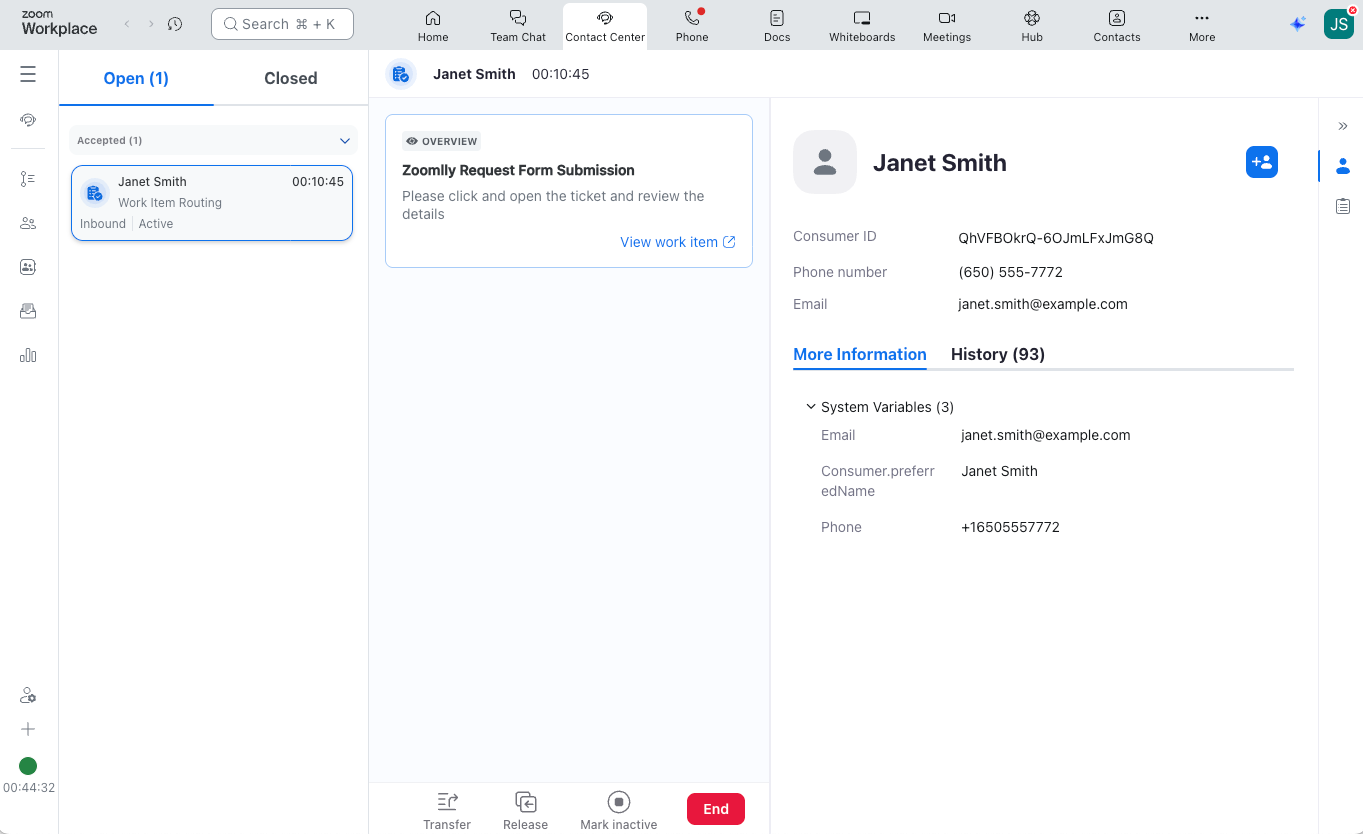
For agents, Work Items appear as engagements in the Zoom Workplace app (available on Windows, macOS, and web). The middle panel displays the work item title and description along with a shortcut URL for quick navigation to detailed information in the source system. The engagement details panel on the right provides access to all variable information passed via the API. Agents have full lifecycle control over Work Items. They can mark items as inactive when pausing work, close engagements upon completion, and access both open and closed engagements at any time for reference or follow up. Transfer capabilities allow routing work items to different queues or flows if reassignment becomes necessary. Supervisors maintain oversight through barge functionality, enabling them to join Work Item engagements when coaching or assistance is needed. This unified interface helps reduce the constant application switching that plagued traditional workflows. Agents work from a single pane of glass whether they're handling a voice call, responding to a chat, or processing a case escalation.
Example of a routed Work Item
### How Work Items Blend Into Other Channels
A critical question for any omnichannel implementation is, "How does the system decide what work to assign next?" When an agent becomes available, should they receive a voice call, a chat message, or a work item? Can agents handle multiple work items simultaneously while on a voice call? The answer: it's fully configurable using existing Zoom Contact Center routing mechanisms. Work items integrate seamlessly with three key ZCC functions:
1. **Consumer Routing Profile** - Controls how engagements from specific consumers are prioritized and routed
2. [Agent Routing Profile (Skills-Based Routing)](https://library.zoom.com/business-services/zoom-contact-center/expert-insights/agent-selection-using-skills-based-routing) - Determines which agents are qualified to handle which types of work based on their skills
3. [Agent Occupied Rules](https://library.zoom.com/business-services/zoom-contact-center/expert-insights/configuring-agent-occupied-rules) - Defines what combinations of concurrent engagements agents can handle These configuration options give you granular control over questions like:
* Which engagement type does an agent receive next—a voice call, work item, or both?
* Can an agent handle more than one work item at a time?
* Can an agent receive a work item while actively on a voice call?
By leveraging these existing ZCC capabilities, work items don't require a separate set of routing rules. Instead, they participate in the same intelligent distribution logic you've already configured for your live channels, ensuring truly unified omnichannel operations.
### Strategic Implications
The true value of Work Items extends beyond technical implementation. By unifying live and asynchronous work through a single routing engine, organizations can fundamentally rethink their operational strategy. Capacity planning becomes holistic. Instead of separately staffing your phone queue and your case backlog, you optimize total agent capacity against total workload, letting the routing engine distribute work intelligently based on real-time conditions. Skills-based routing applies consistently. The same agent skills that route complex voice calls to specialists can route complex cases to those same specialists, so expertise is applied where it's most valuable. Reporting and analytics consolidate. Rather than stitching together metrics from multiple systems, you gain unified visibility into agent productivity, channel performance, and overall operational efficiency.
### Looking Forward
Work Items represent a maturation of contact center architecture. As customer journeys increasingly blend synchronous and asynchronous touchpoints, the artificial separation between "live channels" and "back-office work" becomes a liability rather than a sensible division of labor. By treating all work as routable engagements, Zoom Contact Center positions organizations to handle the full spectrum of customer service efficiently through a single platform. The November 2025 initial release establishes the foundation with API-triggered work items; future enhancements will likely expand capabilities around work item lifecycle management and deeper integration patterns. For technical teams evaluating this feature, the key question isn't whether to adopt Work Items, but how quickly you can integrate your external systems and begin routing asynchronous work through your omnichannel engine. The operational benefits—unified routing, simplified agent experience, consolidated reporting—compound rapidly once implementation is complete.
Refer to Zoom's support center for more information on [managing Zoom Contact Center work item engagements](https://support.zoom.com/hc/en/article?id=zm_kb\&sysparm_article=KB0083708) and [changing Zoom Contact Center work item queue settings](https://support.zoom.com/hc/en/article?id=zm_kb\&sysparm_article=KB0083707).
---
# Agent Instructions
This documentation is published with GitBook. GitBook is the documentation platform designed so that both humans and AI agents can read, navigate, and reason over technical content effectively. Learn more at gitbook.com.
## Querying This Documentation
If you need additional information that is not directly available in this page, you can query the documentation by asking a question.
Perform an HTTP GET request on the following URL with the `ask` and `goal` query parameters:
```
GET https://library.zoom.com/business-services/zoom-contact-center/expert-insights/unifying-live-and-asynchronous-work-with-work-items.md?ask=&goal=
```
`ask` is the immediate question: it should be specific, self-contained, and written in natural language.
`goal` is what the user is ultimately trying to achieve, the reason they need the answer. Sharing it helps GitBook give you a better, more relevant answer. A goal is most helpful when it describes the outcome the user wants rather than restating the question. For example, with `ask=how do I create an API token`, a goal like `automate deployments from our CI pipeline` lets GitBook tailor the answer to that use case.
The response will contain a direct answer to the question and relevant excerpts and sources from the documentation.
Use this mechanism when the answer is not explicitly present in the current page, you need clarification or additional context, or you want to retrieve related documentation sections.