> For the complete documentation index, see [llms.txt](https://library.zoom.com/llms.txt). Markdown versions of documentation pages are available by appending `.md` to page URLs; this page is available as [Markdown](https://library.zoom.com/zoom-workplace/zoom-phone/desk-phone-provisioning-and-customization-field-guide.md).
# Desk Phone Provisioning & Customization Field Guide
## Introduction
This field guide provides a practical, end-to-end resource for deploying Zoom Phone with certified desk phones. It supports IT teams, architects, and administrators by outlining the full lifecycle of a desk phone deployment—from hardware selection to troubleshooting. Because voice infrastructure has many interlocking dependencies (network readiness, device compatibility, provisioning flow, and feature enablement), this document focuses on eliminating guesswork and promoting predictable, repeatable outcomes.
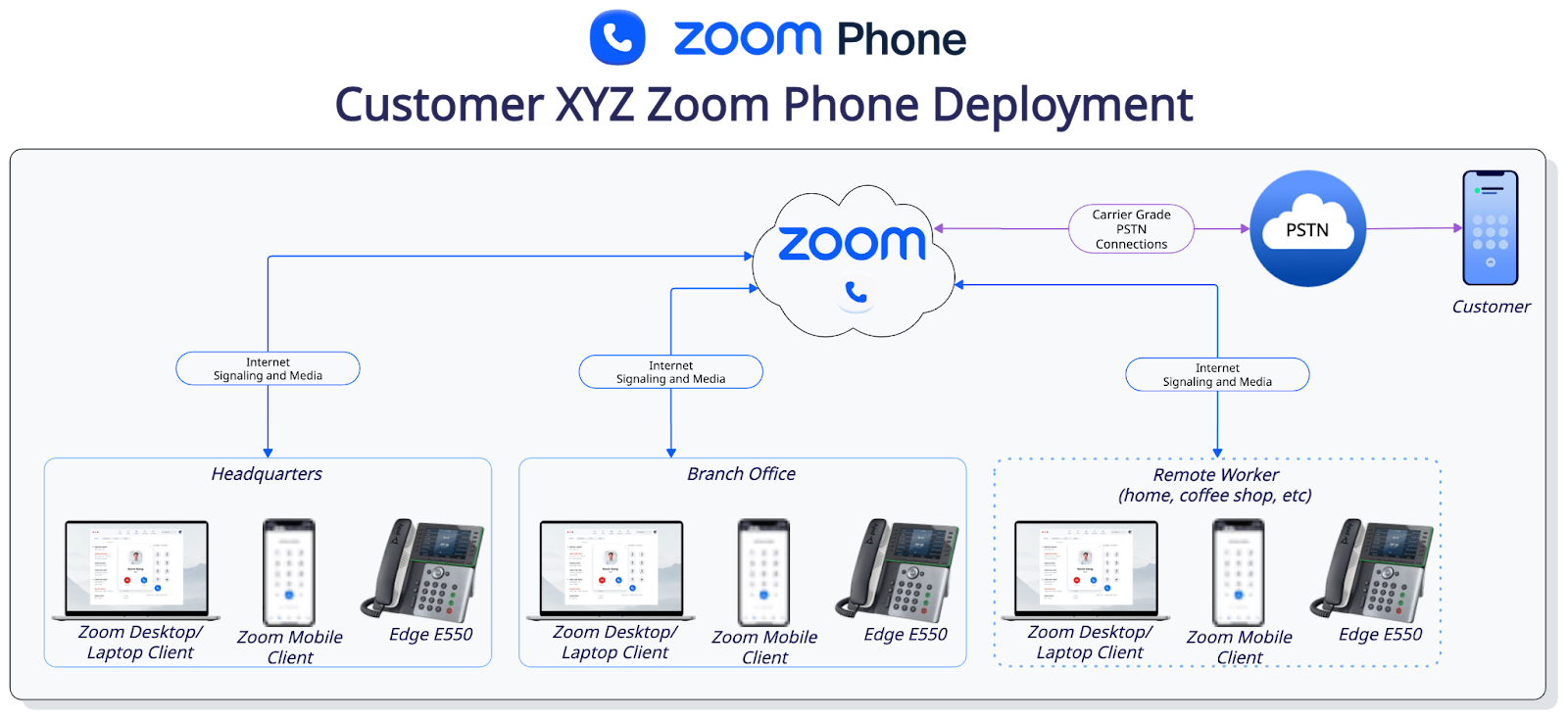
Zoom Phone desk phones play a critical role in environments where dedicated hardware is preferred or required. These include reception areas, shared workspaces, clinical/industrial settings, and organizations transitioning from legacy PBXs. This guide is designed to help such teams modernize their telephony footprint while maintaining high availability, consistent call quality, and supporting security best practices.
## Device Compatibility and Planning
Choosing compatible hardware is the foundation of any reliable deployment. Zoom provides a [continually updated certified hardware list](https://support.zoom.com/hc/en/article?id=zm_kb\&sysparm_article=KB0060242), which helps ensure that each device is tested for SIP interoperability, provisioning compatibility, and firmware support. Relying on uncertified models increases the risk of provisioning failures, missing features, or unsupported behaviors during troubleshooting. [Zoom Phone Interop-certified hardware](https://support.zoom.com/hc/en/article?id=zm_kb\&sysparm_article=KB0074333) offers essential interoperability but requires manual SRTP configuration with minimum AES-128 encryption and does not support advanced provisioning features.
When selecting devices, map functional requirements to user roles rather than defaulting to a single model across the organization. Receptionists may need many line keys, assistants may require shared-line monitoring, executives may need advanced speakerphones, and warehouse staff may depend on DECT (Digital Enhanced Cordless Telecommunications) mobility. Specialty devices such as Algo paging units, 2N door phones, and CyberData alerting products must also come from the supported devices list to ensure they behave properly in paging, alerting, and SIP event scenarios.
## Network Readiness
Network readiness is the most important factor for successful Zoom Phone deployments. Desk phones rely on consistent outbound connectivity to Zoom services for SIP signaling, provisioning, media transport, and security updates. Misconfigured firewalls, blocked ports, unstable DNS, or inconsistent NTP time sources can all cause registration failures, one-way audio, or unexpected device reboots. For this reason, validating your network against Zoom’s [firewall requirements](https://support.zoom.com/hc/en/article?id=zm_kb\&sysparm_article=KB0060548#h_01EEBSGCKBYVB20MCVPR78T0NN) before phone installation is critical to avoid costly rework.
In addition to basic IP reachability, multi-site or VLAN-segmented networks must ensure that phones receive the correct IP addressing, DHCP options, and QoS priority. LLDP-MED allows phones to communicate switch-port identity and VLAN tagging details to Zoom Phone’s [emergency location services](https://support.zoom.com/hc/en/article?id=zm_kb\&sysparm_article=KB0062169), enabling accurate floor-level or room-level call routing. Organizations should document network topology, VLAN numbering, trunk configuration, and path redundancy to ensure devices behave consistently across the environment.
## Critical Pre-Provisioning Checklist
A structured pre-provisioning checklist ensures that IT teams do not encounter avoidable issues during rollout. Confirming [firewall rules](https://support.zoom.com/hc/en/article?id=zm_kb\&sysparm_article=KB0060548), [validating device support](https://support.zoom.com/hc/en/article?id=zm_kb\&sysparm_article=KB0060242), testing DHCP/NTP/DNS responsiveness, and confirming Emergency Location Services behavior helps mitigate provisioning failures once devices reach end users. This pre-flight process is especially important for large or distributed deployments where troubleshooting devices after installation is time-consuming.
Beyond network checks, organizations should prepare inventory systems, tracking MAC addresses, owners, device locations, and assignment status. This prevents mix-ups with duplicate MAC entries or devices appearing in the portal as unassigned. Finally, confirm whether certain features—such as call monitoring, advanced call park, or survivability—are enabled on your account, and activate them if not before deployment to enable feature availability on day one.
## Provisioning Approaches
Zoom supports two provisioning workflows: Zero Touch Provisioning (ZTP) and Assisted Provisioning. ZTP is the preferred method because it may reduce manual configuration, and reduces errors and allows remote “drop-ship” deployments. Once added to the Zoom portal, phones automatically retrieve configurations when powered on, making large-scale rollouts significantly easier to manage.
[The provisioning overview](https://support.zoom.com/hc/en/article?id=zm_kb\&sysparm_article=KB0063173#h_951fa0ec-bd12-430e-a450-f455a0e2621b) provides a detailed explanation of both workflows.
Assisted provisioning is used when devices cannot reach manufacturer ZTP servers, when the network is highly restricted, or when deploying specialty devices like paging speakers or door phones. Assisted provisioning requires technicians to log into the phone’s web interface and manually input a Zoom-provided provisioning URL. While slower than ZTP, it provides fine-grained control and works in environments with air-gapped or non-standard network requirements.
Some vendors have management applications and/or direct APIs that can be used to configure the phone directly. These options may help with large-scale deployments, especially in environments where those specific models/vendors are deployed and may have the management suite running. Check with your vendor to see if these options are available to you.
If your organization uses Zoom Phone Appliances (ZPAs), refer to the [Zoom Phone Appliance Admin Guide](https://support.zoom.com/hc/en/article?id=zm_kb\&sysparm_article=KB0064658) for in-depth provisioning information, as it is different from the methods below, and the [Certified Zoom Phone Appliance list](https://support.zoom.com/hc/en/article?id=zm_kb\&sysparm_article=KB0065959) to verify your devices.
## Zero-Touch Provisioning (ZTP) Workflow
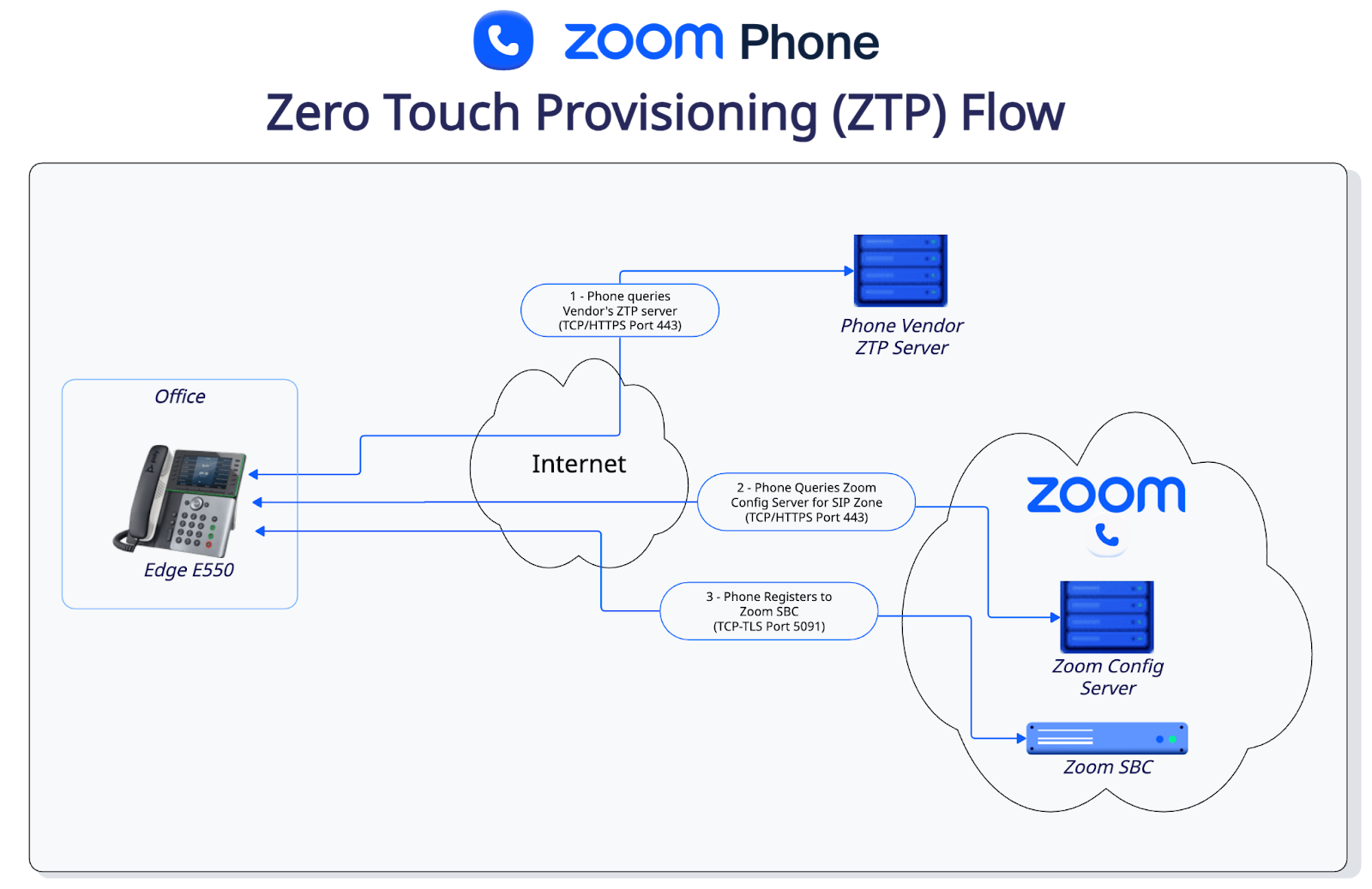
ZTP offers the most scalable and reliable method for provisioning certified desk phones. Once a device is added to the Zoom portal, the phone contacts the manufacturer’s cloud service, validates its MAC address, and receives a redirect to Zoom’s provisioning server. This enables consistent application of SIP settings, security profiles, line keys, and firmware. [Following the ZTP workflow](https://support.zoom.com/hc/en/article?id=zm_kb\&sysparm_article=KB0063173#h_fb8c8318-f793-4b42-b141-2f09e00867e0) helps keep provisioning data secure and streamlined.
Because ZTP often includes firmware updates, devices may reboot multiple times during their initial setup. This behavior is expected and should not be interrupted. IT teams should ensure that the network path to ZTP servers remains open during deployment and that any previously deployed phones have DHCP options removed, as this can block ZTP. Faulty cabling, PoE instability, or blocked ports are common causes of ZTP interruptions that must be addressed before full rollout.
## Assisted Provisioning by Manufacturer
When ZTP cannot be used, assisted provisioning provides full control over the provisioning process. Each vendor requires slightly different steps:
* [Cisco MPP phones use the “Profile Rule” field to receive Zoom configuration](https://support.zoom.com/hc/en/article?id=zm_kb\&sysparm_article=KB0058755).
* [Yealink models require entering the provisioning URL into the Auto-Provision menu](https://support.zoom.com/hc/en/article?id=zm_kb\&sysparm_article=KB0064882).
* [Poly devices use a dedicated provisioning server address](https://support.zoom.com/hc/en/article?id=zm_kb\&sysparm_article=KB0064115).
* [AudioCodes and Grandstream endpoints have unique URL syntaxes and certificate considerations.](https://support.zoom.com/hc/en/article?id=zm_kb\&sysparm_article=KB0063173#h_01F65FEPTABPHZERDMF84NBET6)
* [Specialty endpoints such as Algo, CyberData, and 2N require model-specific settings for paging, relay control, and door access](https://support.zoom.com/hc/en/article?id=zm_kb\&sysparm_article=KB0063146).
Assisted provisioning is ideal for controlled environments, test labs, or cases where phones have previously been registered to another platform and must be fully reinitialized.
## Manufacturer-Specific Considerations
Each device manufacturer implements provisioning, line key behavior, firmware updates, and emergency location reporting differently. Organizations should validate supported features and firmware versions against Zoom’s [certified hardware documentation](https://support.zoom.com/hc/en/article?id=zm_kb\&sysparm_article=KB0060242). This reduces the risk of discovering unsupported BLF (Busy Lamp Field) modes, paging limitations, or call monitoring incompatibilities after deployment.
Firmware versioning is especially important: some features—like shared line appearance or companion mode—require minimum firmware levels. Additionally, conference phones, DECT systems, and sidecars may have vendor-specific constraints that impact deployment planning. By documenting these considerations up front, IT teams can prevent inconsistent behavior across device families.
## Feature Availability and Use-Case Mapping
Different desk phone models support different capabilities. For example, some have robust BLF support for reception areas, while others support hot desking or line key expansion modules. Reviewing the [feature compatibility matrix](https://support.zoom.com/hc/en/article?id=zm_kb\&sysparm_article=KB0061373) will help you choose devices aligned with user expectations and business workflows.
## Companion Mode and Meetings
Companion Mode allows users to join a Zoom meeting from their desk phone for audio while using the Zoom Workplace desktop or mobile app for video, chat, and controls. This hybrid workflow is ideal for employees who prefer a hardware handset or higher-quality speakerphone. Devices display a Zoom meeting key when a meeting invite arrives, enabling seamless joining.
Companion Mode supports flexible user behavior: users can switch audio sources mid-meeting or reassign audio to their desk phone for long calls. Review[ the companion mode documentation](https://support.zoom.com/hc/en/article?id=zm_kb\&sysparm_article=KB0067194) to confirm your selected devices support this feature.
## Desk Phone Customization
Zoom Phone enables flexible and powerful customization of desk phones, making it possible to tailor each device to the needs of the user or environment. Through the web portal you can configure standard user settings (like time zone, voicemail, business hours), and more importantly adjust hardware-specific parameters such as line keys, speed-dial, busy lamp field, hot-desking behavior, background image, and outbound caller ID.
For administrators managing large deployments, Zoom Phone supports [provisioning templates](https://support.zoom.com/hc/en/article?id=zm_kb\&sysparm_article=KB0062241): custom configuration profiles that can be applied across the organization — globally, per site, or for individual phones. These templates let you predefine network settings, NTP servers, DTMF behavior, phone-specific configuration parameters, and more. This makes scaling easier and enables consistent configuration across devices.
On a per-user or per-device level, features like BLF or speed-dial can be assigned to physical or soft keys, giving receptionists, assistants, or shared-line users a streamlined way to monitor presence, quickly dial colleagues, or answer calls. Because the line-key layout and assignments come from the Zoom portal, you avoid manual configuration at each phone — simplifying onboarding and reducing error risk.
Finally, Zoom’s customization extends beyond call control: you can define background images for phone display screens, set time formats, language, and control whether the phone’s web interface is enabled (for future manual admin access). This lets you standardize function, branding, and user experience across your deployment footprint.
For more information on feature customization, refer to our[ Desk Phone Features article matrix](https://support.zoom.com/hc/en/category?id=kb_category\&kb_category=c1d4fed28720391089a37408dabb353b).
## Emergency Services and Location
Accurate emergency calling relies on properly configured locations, addresses, and network identifiers. Zoom Phone uses a combination of static site information, user-provided addresses, and dynamically detected network identity (switch port, wireless BSSID, IP subnets) to determine the correct dispatchable address. This system ensures users can make emergency calls even when working across large campuses or multi-floor buildings.
Views into[ emergency routing](https://support.zoom.com/hc/en/article?id=zm_kb\&sysparm_article=KB0061026) are provided in Zoom’s emergency services documentation, while [configuration guidance for address and location objects is documented separately](https://support.zoom.com/hc/en/article?id=zm_kb\&sysparm_article=KB0066469). IT teams should periodically review emergency behavior to ensure accuracy after office renovations or network topology changes.
For more information, refer to our [Emergency Services Best Practices Guide](https://library.zoom.com/zoom-workplace/zoom-phone/expert-insights/emergency-services-best-practices).
## Zoom Phone Local Survivability (ZPLS)
Zoom Phone Local Survivability enables essential calling functions to continue during WAN outages or disruptions in connectivity to Zoom’s cloud. Deployed as a module on a Zoom Node appliance, ZPLS enables internal extension dialing, basic transfers, and, when paired with an SBC, limited PSTN backup. This capability is beneficial for organizations that prioritize uptime requirements or specific operational requirements. Not all deskphones support ZPLS, so check our [Desk Phone feature device matrix](https://support.zoom.com/hc/en/article?id=zm_kb\&sysparm_article=KB0061373#h_01GGF32MEZ6DDT3VBE8Y2D6JH3) to verify compatibility.
ZPLS behavior, configuration, and failover logic are outlined in [Zoom’s survivability documentation](https://support.zoom.com/hc/en/article?id=zm_kb\&sysparm_article=KB0058798). Organizations should test outage scenarios to confirm expected behavior before rolling out to critical locations.
## Troubleshooting
Common desk phone issues stem from incorrect VLAN assignments, DHCP misconfigurations, firewall restrictions, or SIP ALG interference. Registration failures often indicate reachability problems with provisioning servers, while missing features may indicate model or firmware mismatches.
Zoom provides thorough troubleshooting documentation for provisioning and connectivity issues, as well as broader troubleshooting guidance for all Zoom Phone components [in our support documentation](https://support.zoom.com/hc/en/article?id=zm_kb\&sysparm_article=KB0063173).
---
# Agent Instructions
This documentation is published with GitBook. GitBook is the documentation platform designed so that both humans and AI agents can read, navigate, and reason over technical content effectively. Learn more at gitbook.com.
## Querying This Documentation
If you need additional information that is not directly available in this page, you can query the documentation dynamically by asking a question.
Perform an HTTP GET request on the current page URL with the `ask` query parameter, and the optional `goal` query parameter:
```
GET https://library.zoom.com/zoom-workplace/zoom-phone/desk-phone-provisioning-and-customization-field-guide.md?ask=&goal=
```
`ask` is the immediate question: it should be specific, self-contained, and written in natural language.
`goal` is optional and describes the broader end goal you are ultimately trying to accomplish on behalf of the user. GitBook uses it to tailor the answer towards what is most useful for that goal.
The response will contain a direct answer to the question and relevant excerpts and sources from the documentation.
Use this mechanism when the answer is not explicitly present in the current page, you need clarification or additional context, or you want to retrieve related documentation sections.