> For the complete documentation index, see [llms.txt](https://library.zoom.com/llms.txt). Markdown versions of documentation pages are available by appending `.md` to page URLs; this page is available as [Markdown](https://library.zoom.com/technical-library/zh/shang-ye-ban-fu-wu/zoom-workforce-management/expert-insights/workforce-management-activity-to-status-mapping.md).
# 活动到状态映射
由 Rick Arps 撰写
遵守度是一个非常强大的指标,也是劳动力管理 (WFM) 解决方案中最常被跟踪的项目之一。遵守度用于计算坐席被安排执行的活动与其实际执行的活动之间的差异。我们在 WFM 中常见的一个问题是,遵守度与坐席在 Zoom 呼叫中心 (ZCC) 中实际所做的事情没有正确对应。让我们来看看所使用的结构,以及 WFM 如何将它在 ZCC 中看到的内容与安排中使用的不同活动进行匹配。
## 活动
在 WFM 中,活动是坐席可以被安排执行的任何操作。活动用于构建坐席的班次。每个活动都可以启用或禁用,以纳入坐席的遵守度计算。
一些常见的活动可能是:
* 电话
* 休息
* 用餐
* 会议
* PTO\\\\
通常,生产性活动(电话、聊天等)会用于遵守度计算,而非生产性活动(休息、用餐等)则不会。遵守度用于确保坐席在被安排服务客户时,确实在提供服务。如果坐席的休息晚了 5 分钟,他们只会有 5 分钟不符合遵守度。如果休息活动也被用于计算遵守度,那么他们将会有 10 分钟不符合遵守度,因为他们会在休息时间的 5 分钟里在接听呼叫,而在呼叫时间的 5 分钟里处于休息状态。
{% hint style="info" %}
**注意**
活动配置可以在 Zoom WFM Web 门户中找到,路径为 **安排配置 → 活动**.
{% endhint %}
## ZCC 状态
ZCC 使用坐席状态来跟踪坐席活动,以及何时可以将其他交互分配给坐席。内置状态如下:\\\\
* 就绪 - 坐席可在线接收交互
* 占用中 - 坐席正在进行有效交互或正在收尾一个交互
* 未就绪 - 坐席已主动退出或被退出接听呼叫\\\\
未就绪可以包含子状态,用于说明坐席为何退出队列。这些通常称为原因。下面是一些示例原因:\\\\
* 休息
* 结束班次
* 强制
* 用餐
* 会议
## 将状态映射到活动
WFM 从 ZCC 接收坐席状态信息,需要能够将该状态映射到活动,从而用于遵守度。为此,我们使用坐席状态映射。
{% hint style="info" %}
**注意**
坐席状态映射可以在 Zoom WFM Web 门户中找到,路径为 **首选项 → 坐席状态** **映射**.
{% endhint %}
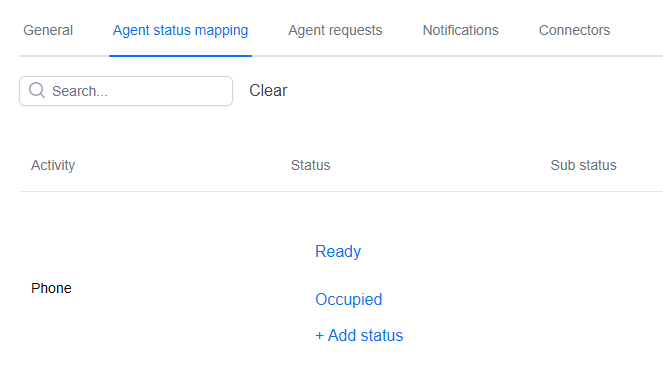
在这里,你会看到 WFM 中所有已配置活动的列表。要设置这些匹配关系,我们会考虑坐席在 ZCC 中会处于什么状态,从而满足 WFM 中的该活动。
例如,如果我们为“电话”安排了一个坐席活动,我们会期望他们处于“就绪”或“占用中”状态。也就是说,他们要么已准备好接听呼叫,要么正在进行呼叫。
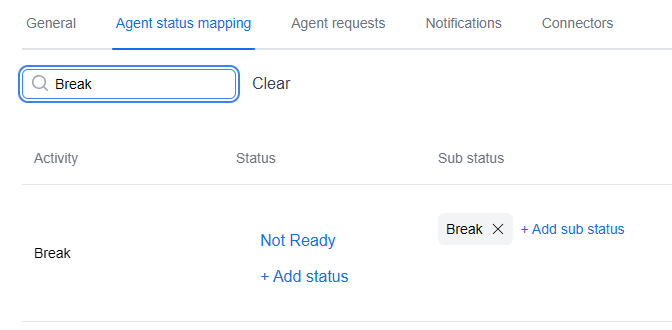
另一个例子是“休息”活动,它展示了我们如何在 ZCC 中使用原因代码。当坐席在休息时,他们会在 ZCC 中切换到“未就绪”状态,并将“休息”选择为原因。在 WFM 中,我们先添加未就绪状态,然后选择“添加子状态”来包含原因。
将这些状态映射到活动后,我们现在就可以根据坐席的实际活动正确计算遵守度。
### 原因和子状态的特殊用例
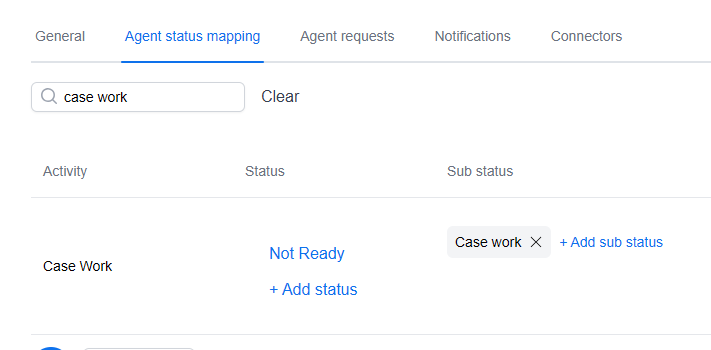
有时主管会希望跟踪 ZCC 之外的坐席活动。例如,坐席可能需要将案件处理作为其日常活动的一部分。对此,我们可以在 WFM 中创建一个“案件处理”活动,并将其映射到 ZCC 中同名的自定义原因代码。然后,当坐席去处理案件时,他们会在 ZCC 中选择这个原因,WFM 就能在计算坐席遵守度时正确跟踪该活动。
---
# Agent Instructions
This documentation is published with GitBook. GitBook is the documentation platform designed so that both humans and AI agents can read, navigate, and reason over technical content effectively. Learn more at gitbook.com.
## Querying This Documentation
If you need additional information that is not directly available in this page, you can query the documentation dynamically by asking a question.
Perform an HTTP GET request on the current page URL with the `ask` query parameter, and the optional `goal` query parameter:
```
GET https://library.zoom.com/technical-library/zh/shang-ye-ban-fu-wu/zoom-workforce-management/expert-insights/workforce-management-activity-to-status-mapping.md?ask=&goal=
```
`ask` is the immediate question: it should be specific, self-contained, and written in natural language.
`goal` is optional and describes the broader end goal you are ultimately trying to accomplish on behalf of the user. GitBook uses it to tailor the answer towards what is most useful for that goal.
The response will contain a direct answer to the question and relevant excerpts and sources from the documentation.
Use this mechanism when the answer is not explicitly present in the current page, you need clarification or additional context, or you want to retrieve related documentation sections.