> For the complete documentation index, see [llms.txt](https://library.zoom.com/llms.txt). Markdown versions of documentation pages are available by appending `.md` to page URLs; this page is available as [Markdown](https://library.zoom.com/technical-library/zh/shang-ye-ban-fu-wu/zoom-contact-center/expert-insights/integrate-zoom-contact-center-features-into-your-website/web-chat-and-video-configuration-tasks/advanced-features.md).
# 高级功能
Zoom CX Web SDK 提供高级功能/特性,可增强解决方案的整体效果。尽管这些功能/特性是可选的,但它们对打造更全面的体验有很大帮助。
***
### 将数据从您的网站传递到 Zoom CX
有两种在线方法可用于将您网站中的数据共享到 Zoom CX:
* 使用 From Website Data 功能/特性进行网站数据收集
* 消费者身份验证
这两种方法都可让您将信息存储到 Zoom CX 全局变量中,但它们的用途和安全级别不同。
#### **使用 From Website Data 功能/特性进行网站数据收集**
此方法允许您从访客的浏览器中提取通用数据,包括:
* JavaScript 变量
* LocalStorage
* 会议存储
* Cookie
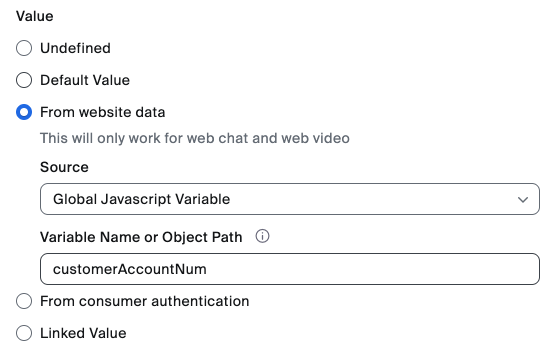
作为 ZCX 全局变量配置的一部分,管理员可以在上述网站数据组件与 ZCX 全局变量之间配置映射,如下例所示。
一旦存储在 Zoom CX 全局变量中,提取的数据即可用于以下用途:
* 传递常规网页信息(例如:当前网页信息、购物车中的商品等)
* 为所有访客启用个性化体验
#### **消费者身份验证**
此方法专为从您的网站向 Zoom CX 安全传输经过身份验证的用户信息而设计。它使用签名的 JWT(JSON Web Tokens)来确保数据完整性和真实性,非常适合用于:
* 识别已知用户
* 传递敏感客户信息
* 为经过身份验证的访客启用个性化体验
这两种方法都会将数据存储到 Zoom CX 全局变量中,但消费者身份验证会通过证书验证增加一层安全保护,从而使敏感的客户身份识别数据保持受保护状态。下图展示了如何从 JWT 中提取数据并将其存储在全局变量中。在此示例中,我们从 JWT JSON 字段 name.first 中提取用户的名字。
Consumer 身份验证 功能/特性要求您的网站开发团队构建一个专用端点,用于提供 Consumer 身份验证数据,包括签名的 JWT。
有关更多信息,请参阅以下 Zoom 支持文章:
* [全局变量](https://support.zoom.com/hc/en/article?id=zm_kb\&sysparm_article=KB0059058)
* [网站数据](https://support.zoom.com/hc/en/article?id=zm_kb\&sysparm_article=KB0059058)
* [消费者身份验证](https://support.zoom.com/hc/en/article?id=zm_kb\&sysparm_article=KB0057542)
***
### Campaign SDK 方法/事件
让开发人员能够通过程序化控制 Zoom CX Web SDK,高效管理互动窗口和邀请。
借助此功能/特性,开发人员可以利用其网站的 JavaScript 前端代码,无缝管理 Zoom CX 邀请和互动窗口,包括自动打开、关闭或隐藏它们。
有关这些方法和事件的更多信息,请查看以下开发者文档:
* [Zoom 呼叫中心](https://developers.zoom.us/docs/contact-center/)
* [Zoom Virtual Agent](https://developers.zoom.us/docs/virtual-agent/web/reference/)
---
# Agent Instructions
This documentation is published with GitBook. GitBook is the documentation platform designed so that both humans and AI agents can read, navigate, and reason over technical content effectively. Learn more at gitbook.com.
## Querying This Documentation
If you need additional information that is not directly available in this page, you can query the documentation by asking a question.
Perform an HTTP GET request on the following URL with the `ask` and `goal` query parameters:
```
GET https://library.zoom.com/technical-library/zh/shang-ye-ban-fu-wu/zoom-contact-center/expert-insights/integrate-zoom-contact-center-features-into-your-website/web-chat-and-video-configuration-tasks/advanced-features.md?ask=&goal=
```
`ask` is the immediate question: it should be specific, self-contained, and written in natural language.
`goal` is what the user is ultimately trying to achieve, the reason they need the answer. Sharing it helps GitBook give you a better, more relevant answer. A goal is most helpful when it describes the outcome the user wants rather than restating the question. For example, with `ask=how do I create an API token`, a goal like `automate deployments from our CI pipeline` lets GitBook tailor the answer to that use case.
The response will contain a direct answer to the question and relevant excerpts and sources from the documentation.
Use this mechanism when the answer is not explicitly present in the current page, you need clarification or additional context, or you want to retrieve related documentation sections.