> For the complete documentation index, see [llms.txt](https://library.zoom.com/llms.txt). Markdown versions of documentation pages are available by appending `.md` to page URLs; this page is available as [Markdown](https://library.zoom.com/technical-library/zh/shang-ye-ban-fu-wu/zoom-contact-center/expert-insights/integrate-zoom-contact-center-features-into-your-website/scheduled-callbacks-cobrowse-and-zoom-cx-web-sdk.md).

# 计划回呼、Cobrowse 和 Zoom CX Web SDK

本主题讨论定时回拨、CoBrowse 和 Zoom CX Web SDK。

***

### 定时回拨

定时回拨可让您的网站访客安排语音或视频通话与您的呼叫中心联系。此功能通过在 Web Campaign 和您的队列之间建立连接来实现，无需进行 Flow 配置。

要启用 Zoom CX 定时回拨功能，请按照以下基本步骤：

1. 根据您的通信需求配置一个或多个 Zoom 呼叫中心队列，因为定时回拨支持语音和视频队列。
2. 在您的队列上启用定时回拨功能，包括可用的日程和时间段。
3. 为定时回拨配置一个 Zoom CX Web Campaign，它将定义邀请按钮以及网站访客可启动定时回拨流程的位置。

有关设置 Zoom CX 定时回拨功能的更多详情，请参阅 [启用定时回拨](https://support.zoom.com/hc/en/article?id=zm_kb\&sysparm_article=KB0075288) Zoom 支持文章。

***

### Cobrowse

Cobrowse 允许坐席实时查看客户的屏幕，提升服务效率。

CoBrowse 工作流的运作方式与前面讨论的其他渠道不同。传统渠道要求网站访问者通过 Web Campaign 按钮或链接，先与呼叫中心发起互动，而 CoBrowse 会议则是在消费者已经与 Zoom 呼叫中心坐席连接后开始。如果在互动过程中需要网站导航方面的帮助，坐席可以引导消费者完成发起 co-browse 会议的过程。

Zoom CX Cobrowse 功能/特性集成了数据遮罩功能，使您的网站能够控制哪些字段对坐席可见，哪些字段被遮罩。这一关键功能可防止坐席访问应保持机密的信息。

Zoom CX Cobrowse 功能/特性通过相同的 Zoom CX Web SDK 运行，该 SDK 提供网页聊天和视频功能。

有关设置 Zoom CX Cobrowse 功能/特性的更多详情，请参阅 [配置 Zoom Cobrowse](https://support.zoom.com/hc/en/article?id=zm_kb\&sysparm_article=KB0077376) Zoom 支持文章。

{% hint style="info" %}
**注意**

截至本文发布时，Zoom CX Cobrowse 功能/特性受语音和网页聊天渠道支持。
{% endhint %}

***

### Zoom CX Web SDK

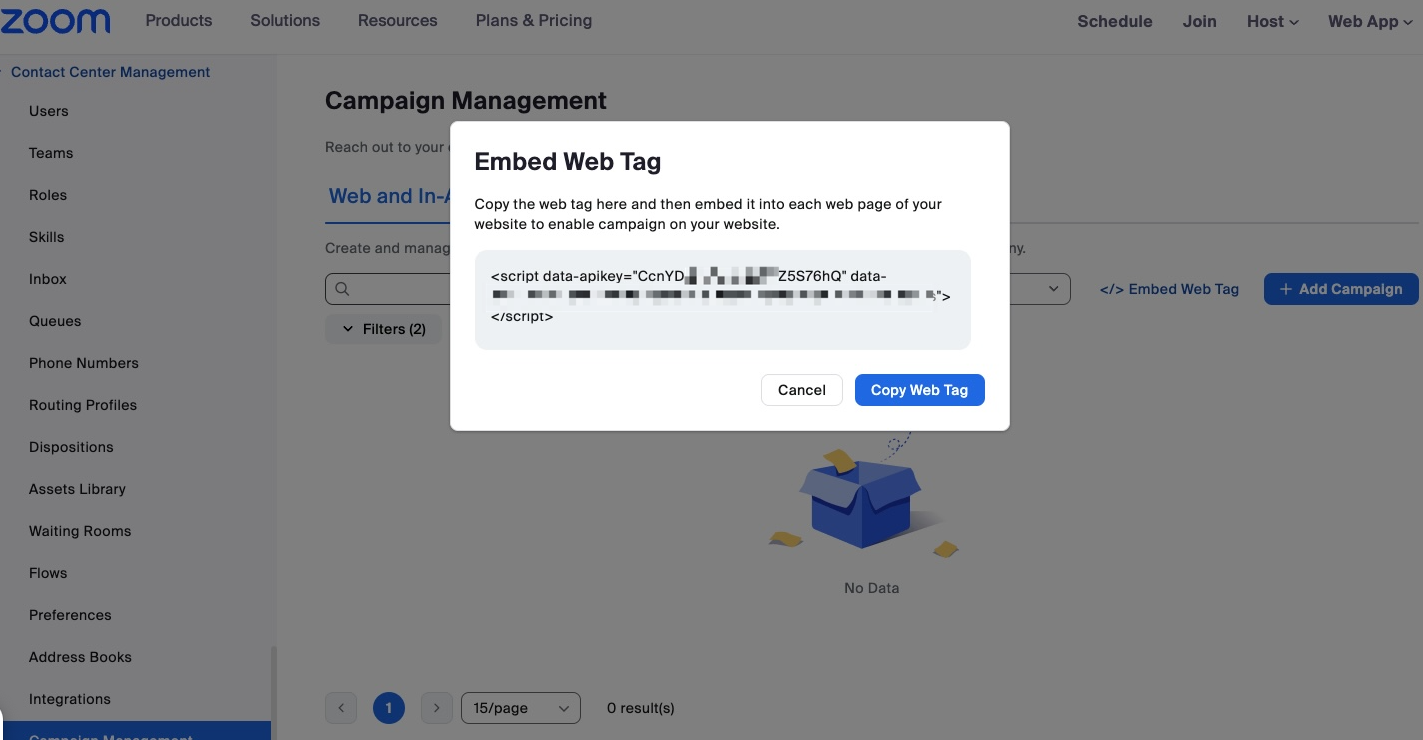
完成上述 Zoom CX 配置后，请从您的 Zoom 账户中向网站添加一行 JavaScript 代码，以完成您的集成：

1. 找到代码。点击：
   1. 呼叫中心管理
   2. 活动管理
   3. \</> 嵌入 Web 标签链接。
2. 将代码粘贴到您网站的 HTML 中。

请看下面的示例：

<figure><img src="/files/c6f3e93f92a150eb69d5469af474b9c1cde00924" alt="Screen display showing the Embed Web Tag screen."><figcaption></figcaption></figure>

上面演示的 \<script> 代码是所有前面讨论过的功能的基础。

{% hint style="info" %}
**注意**

如果您启用 Cobrowse 功能/特性，请务必包含额外的标签 `data-启用-zcb="true"` 在你的 \<script> 代码中。
{% endhint %}

#### <mark style="color:蓝色;">你知道吗？</mark>

* Zoom CX 的 Web 聊天流程允许你在必要时将正在进行的 Web 聊天升级为视频呼叫，从而根据客户需求提供灵活性并提升服务。
* 如果你的公司使用 Apple 或 Google 原生移动 SDK 为 iPhone 和 Android 开发自己的移动应用，你可以使用 Zoom CX Mobile SDK 轻松将呼叫中心功能直接嵌入到你的移动应用中。


---

# Agent Instructions
This documentation is published with GitBook. GitBook is the documentation platform designed so that both humans and AI agents can read, navigate, and reason over technical content effectively. Learn more at gitbook.com.

## Querying This Documentation
If you need additional information that is not directly available in this page, you can query the documentation dynamically by asking a question.

Perform an HTTP GET request on the current page URL with the `ask` query parameter, and the optional `goal` query parameter:

```
GET https://library.zoom.com/technical-library/zh/shang-ye-ban-fu-wu/zoom-contact-center/expert-insights/integrate-zoom-contact-center-features-into-your-website/scheduled-callbacks-cobrowse-and-zoom-cx-web-sdk.md?ask=<question>&goal=<endgoal>
```

`ask` is the immediate question: it should be specific, self-contained, and written in natural language.
`goal` is optional and describes the broader end goal you are ultimately trying to accomplish on behalf of the user. GitBook uses it to tailor the answer towards what is most useful for that goal.

The response will contain a direct answer to the question and relevant excerpts and sources from the documentation.

Use this mechanism when the answer is not explicitly present in the current page, you need clarification or additional context, or you want to retrieve related documentation sections.