> For the complete documentation index, see [llms.txt](https://library.zoom.com/llms.txt). Markdown versions of documentation pages are available by appending `.md` to page URLs; this page is available as [Markdown](https://library.zoom.com/technical-library/zh/guan-li-yuan-zhuan-qu/third-party-integrations/zoom-calendaring-integration-explainer/provider-specific-details.md).
# 提供商专属详细信息
### Microsoft Exchange Online 和混合部署
#### 你们使用哪些 Microsoft 365 API 来处理日历?
Zoom 日历集成依赖 Microsoft Graph API (MGAPI)。Microsoft 已开始 [逐步淘汰 Exchange Web Services (EWS) 方法](https://techcommunity.microsoft.com/blog/exchange/retirement-of-exchange-web-services-in-exchange-online/3924440) 这些方法此前可用于将 Microsoft 365 数据与 Zoom 服务连接。Zoom 将这些 EWS 方法视为旧版选项。
#### 如何识别用于会议室的官方 Zoom 应用程序?
Zoom 的会议室日历应用程序可在 Entra ID 企业版应用程序目录中找到,并根据 Graph API 配置方法使用以下应用程序 ID 注册:
* `a651cfda-cbdd-4a39-bd03-fa829c3c1b29` (完全委派访问)
* `f56e91e5-5a82-452f-b435-d4d78aeaf064` (应用程序权限)
{% hint style="warning" %}
**Zoom 建议**
无需从 Entra ID 门户手动添加应用程序。通过 Zoom 网页界面请求并批准权限请求,将自动把应用程序添加到你的租户中。
{% endhint %}
**完全委派访问与应用程序权限有何区别?**
通常,Zoom 建议将 Microsoft Graph API 与应用程序权限配合使用,因为这种配置方式由管理员进行设置和维护所需的工作量显著较少,而且不需要专用服务账户。不过,它会在整个账户范围内应用权限。
应用程序权限(也称为仅应用访问)是 Microsoft 为在后台服务中运行、且所需数据无法限定到单个用户的企业版应用程序推荐的方式。
Microsoft Graph API 搭配完全委派访问是另一种选择,但需要专用服务账户,并且初始设置和后续维护的工作量更大。
{% hint style="info" %}
这些示意图仅展示适用于桌面端和移动端集成的委托式与基于应用程序的 Microsoft Graph API 方法。Zoom Rooms 使用不同的令牌存储和检索模型。有关各端点类型如何检索日历数据的详情,请参阅 [Zoom 日历概述](https://library.zoom.com/technical-library/zh/guan-li-yuan-zhuan-qu/third-party-integrations/zoom-calendaring-integration-explainer/zoom-calendaring-overview.md#how-does-the-calendaring-integration-work)关于 [Zoom 日历概述](https://library.zoom.com/technical-library/zh/guan-li-yuan-zhuan-qu/third-party-integrations/zoom-calendaring-integration-explainer/zoom-calendaring-overview.md) 页面的部分。
{% endhint %}
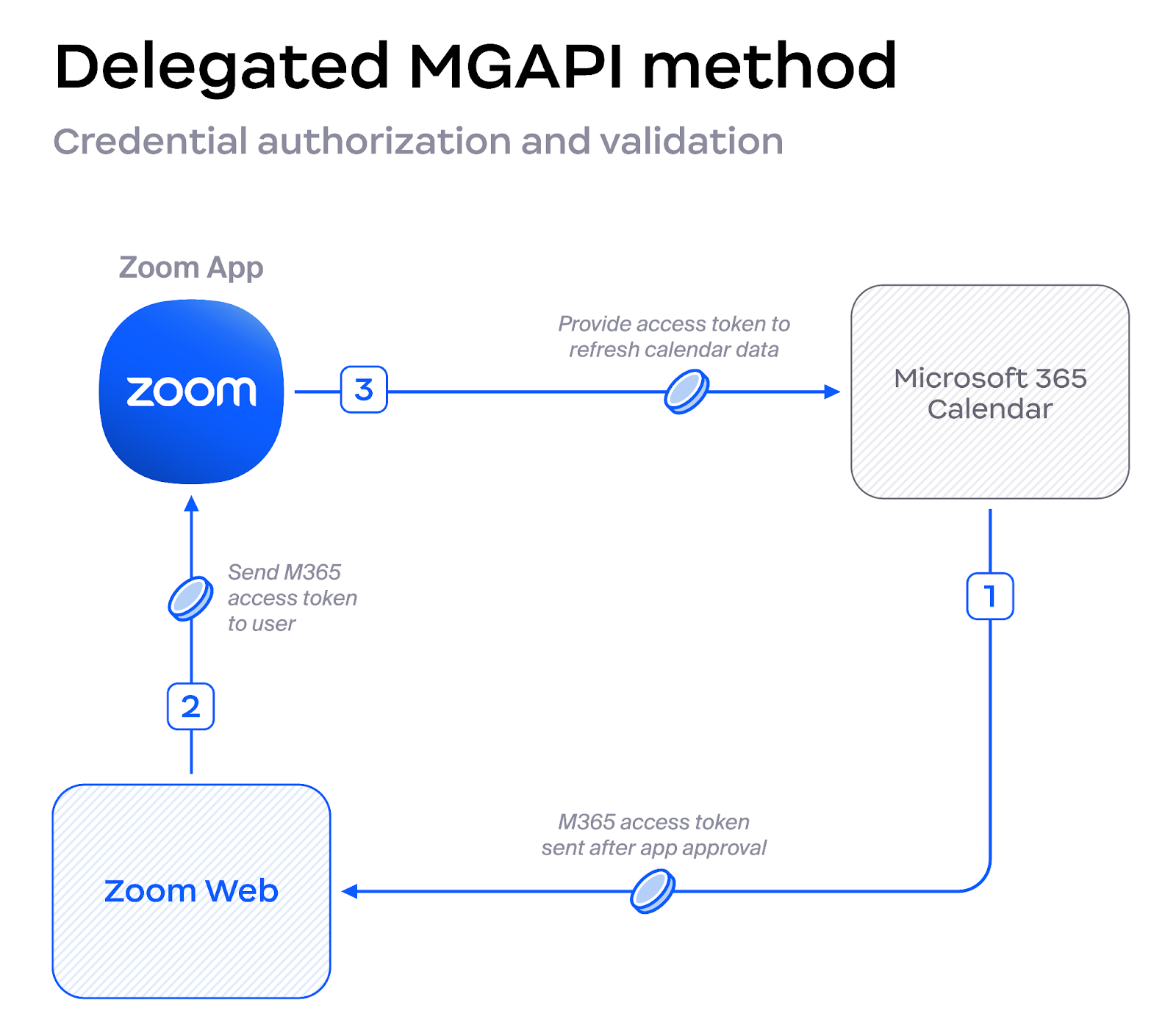
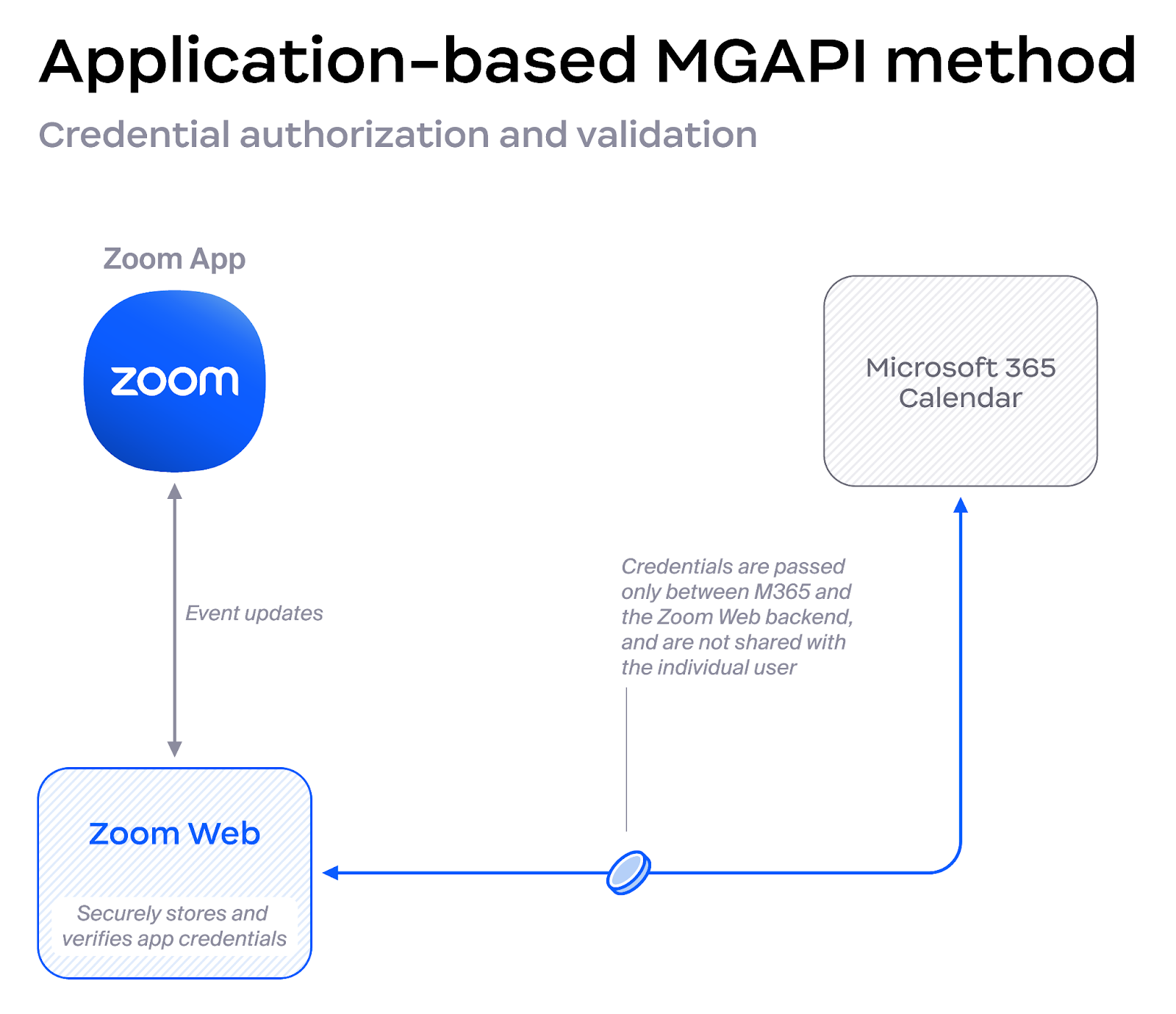
以下图示展示了凭据在传输过程中的委派式和基于应用程序的方法。
委派式方法虽然提供了授权,但确实会将凭据发送到 Zoom 应用。
一种更具可扩展性的方法——基于应用程序的授权,可防止用户凭据或令牌直接到达 Zoom 应用程序。
#### 如何识别用于日历和联系人集成的官方 Zoom 应用程序?
Zoom 的日历和联系人应用程序可在 Entra ID 企业应用程序目录中找到,并根据 Graph API 配置方法使用以下应用程序 ID 注册:
* `f46ceaed-fb2d-4694-803b-6341837f0ed2` (应用程序权限)
* `fc108d3f-543d-4374-bbff-c7c51f651fe5` (OAuth 委托式访问)
**Microsoft Graph API 集成方法有哪些限制?**
基于应用程序权限的日历集成方法仍在积极开发中,预计会逐步添加功能。截至本文发布之日,尚不支持以下功能:
* 多个日历(仅支持用户的主日历)
* 在日历的设置下创建日历
* 在日历中执行搜索
* 包含附件
* 建议新的时间
* 查找时间
* 建议的时间
#### 需要哪种 Entra ID 同意?
组织可以选择允许用户同意 Zoom 应用访问公司数据,也可以要求具有全局管理员权限的管理员先代表整个公司作出同意。此外,还可以使用 Entra ID 用户同意策略,允许用户同意应用访问被认定为“低影响”的 API 权限,而无需管理员采取操作。
{% hint style="info" %}
**Zoom 建议**
为您的组织选择最合适的选项。请避免允许用户针对特定请求申请管理员同意的选项,因为此工作流程可能无法正确应用权限。
您的组织可以选择限制或允许用户同意设置。Zoom 建议采用简化的权限方法,允许用户自行同意 Entra ID 应用。不过,无论选择哪种方式,组织都必须确保 Entra ID 选项与 Zoom 管理端的配套选项相匹配。
{% endhint %}
#### 需要哪些 API 权限?
同意流程的关键部分是向应用程序授予特定的 API 权限。具体权限取决于您使用 Graph API 还是 EWS API,下表列出了两者的要求。
**用于个人日历和联系人的 Graph API**
| 资源应用程序 | 权限 | 说明 | 原因 |
| --------------- | ------------------- | ------------------ | ---------------- |
| Microsoft Graph | 离线访问 | 保持对您已授予其访问权限的数据的访问 | 允许访问刷新令牌 |
| Microsoft Graph | openid | 用户登录 | 对用户进行身份验证并签发访问令牌 |
| Microsoft Graph | Calendars.ReadWrite | 对用户日历的完全访问权限 | 同步日历事件 |
| Microsoft Graph | Contacts.ReadWrite | 对用户联系人的完全访问权限 | 同步联系人 |
**用于会议室集成的 Graph API**
| 资源应用程序 | 权限 | 说明 | 原因 |
| --------------- | ------------------- | ------------------ | ---------------- |
| Microsoft Graph | 离线访问 | 保持对您已授予其访问权限的数据的访问 | 允许访问刷新令牌 |
| Microsoft Graph | openid | 用户登录 | 对用户进行身份验证并签发访问令牌 |
| Microsoft Graph | Calendars.ReadWrite | 对用户日历的完全访问权限 | 同步日历事件 |
| Microsoft Graph | Place.Read.All | 读取所有公司地点 | 获取会议室列表 |
| Microsoft Graph | Contacts.ReadWrite | 对用户联系人的完全访问权限 | 同步联系人 |
### Microsoft Exchange Server
#### 支持哪些 Exchange Server 版本?
Zoom 支持与 Exchange Server 2007、2010、2013、2016 和 2019 集成日历。
#### Exchange Server 集成支持哪些身份验证方法?
Zoom 与本地 Exchange 服务器之间的日历集成仅支持基础身份验证。
#### 能否避免存储凭据?
Zoom 应用可以选择使用 MAPI 连接与本地 Outlook 客户端通信,以获取日历数据。此方法限制极多:仅适用于 Windows(不支持 macOS 或移动设备),不支持联系人数据,并且要求 Outlook 客户端也处于运行状态。此外,如果 Zoom 客户端在 Outlook 启动前启动,用户会看到 Outlook 安全警告。有关详情,请参阅支持文章 [基于客户端的日历集成](https://support.zoom.com/hc/en/article?id=zm_kb\&sysparm_article=KB0068389).
---
# Agent Instructions
This documentation is published with GitBook. GitBook is the documentation platform designed so that both humans and AI agents can read, navigate, and reason over technical content effectively. Learn more at gitbook.com.
## Querying This Documentation
If you need additional information that is not directly available in this page, you can query the documentation by asking a question.
Perform an HTTP GET request on the following URL with the `ask` and `goal` query parameters:
```
GET https://library.zoom.com/technical-library/zh/guan-li-yuan-zhuan-qu/third-party-integrations/zoom-calendaring-integration-explainer/provider-specific-details.md?ask=&goal=
```
`ask` is the immediate question: it should be specific, self-contained, and written in natural language.
`goal` is what the user is ultimately trying to achieve, the reason they need the answer. Sharing it helps GitBook give you a better, more relevant answer. A goal is most helpful when it describes the outcome the user wants rather than restating the question. For example, with `ask=how do I create an API token`, a goal like `automate deployments from our CI pipeline` lets GitBook tailor the answer to that use case.
The response will contain a direct answer to the question and relevant excerpts and sources from the documentation.
Use this mechanism when the answer is not explicitly present in the current page, you need clarification or additional context, or you want to retrieve related documentation sections.