> For the complete documentation index, see [llms.txt](https://library.zoom.com/llms.txt). Markdown versions of documentation pages are available by appending `.md` to page URLs; this page is available as [Markdown](https://library.zoom.com/technical-library/zh/gao-ji-qi-ye-fu-wu/zoom-node/zoom-meetings-hybrid.md).

# Zoom Meetings 混合版

### 概述 <a href="#eljucxhee1d0" id="eljucxhee1d0"></a>

Zoom Meetings Hybrid 是一种本地部署的混合解决方案，可在企业网络内重新分发会议或网络研讨会的音频、视频和屏幕共享流，从而节省带宽。Zoom Meetings Hybrid 可通过两种不同模式实现这一点： **混合模式** 和 **私有模式**，两种模式均支持本地生存能力。

### 混合模式

#### <mark style="color:蓝色;">混合模式通过在网络内整合和重新分发媒体流来减少带宽消耗</mark>

**混合模式** 是对 Meetings Hybrid 服务进行带宽优化的一种使用方式：网络内用户连接到一台中间的本地设备（即 Zoom Node），该设备可以独立接收、复用并重新分发用户与 Zoom 云之间的拨入和外拨媒体流。

例如，在标准的基于云的 Zoom 会议中（即未使用 Meetings Hybrid 或 Zoom Node 的会议），每位用户都必须独立连接到 Zoom 云。这意味着，如果有 100 位网络内用户参加同一场会议，每位用户都必须与 Zoom 云建立独立的音频、视频和/或屏幕共享连接，这会占用大量带宽，并产生约 300 个单独的外拨连接。

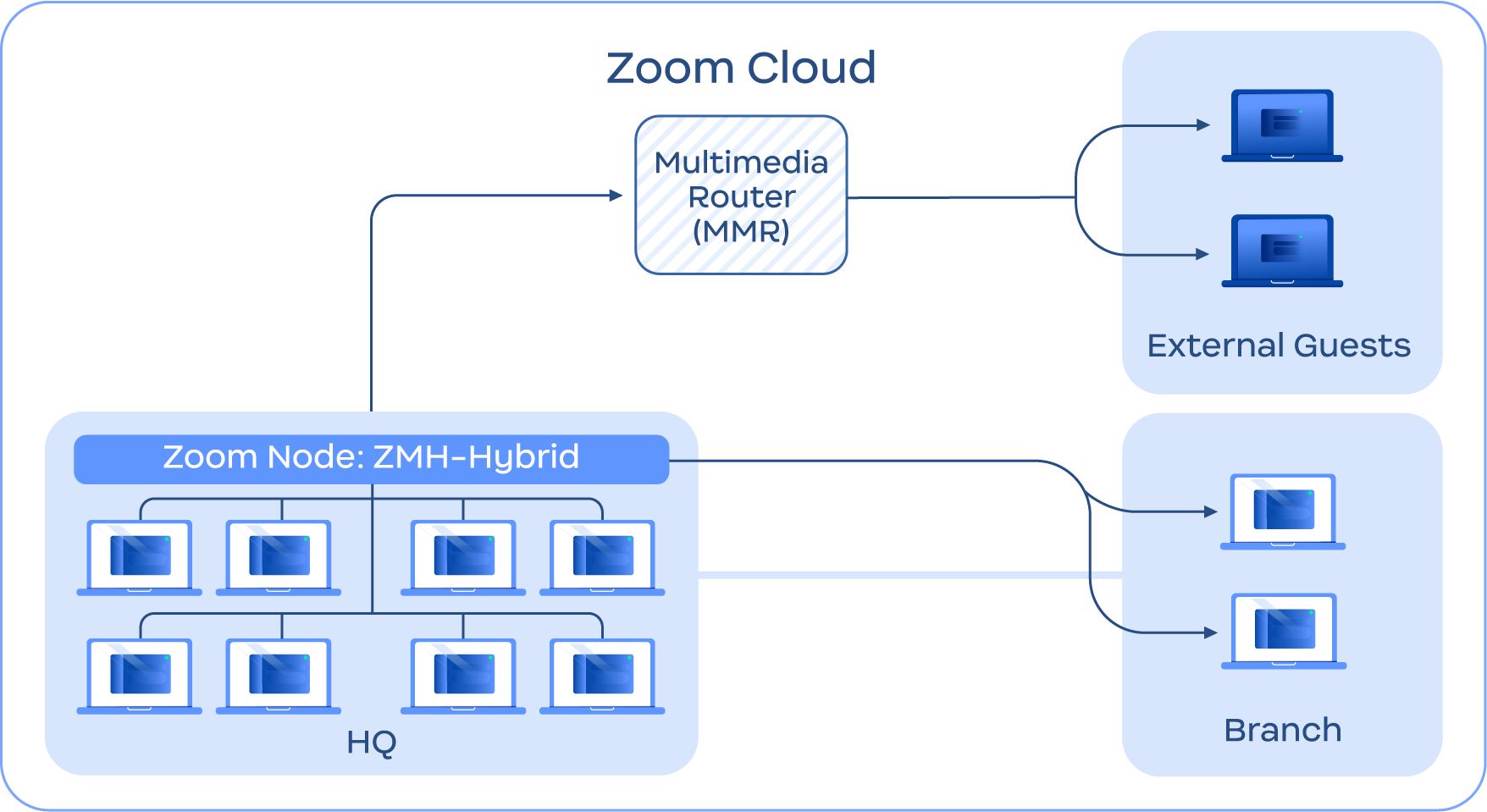
在 Hybrid Mode 下使用 Zoom Meetings Hybrid 时，该模块充当网络内用户与 Zoom 云之间的中间连接点。对于每场有效会议，Meetings Hybrid 模块会针对每个频道（音频、视频和屏幕共享）向 Zoom 云发送一条媒体流，并从 Zoom 云接收一条媒体流。采用这种设计后， **外拨** 数据会在网络内所有已连接用户之间进行复用和汇总，而 **拨入** 数据则会在网络内本地重新分发给所有已连接用户。这意味着，如果有 100 位网络内用户参加同一场会议，每位用户都会连接到网络内的 Meetings Hybrid 模块，由该模块向已连接用户重新分发拨入媒体流。理论上，这可以将外部媒体连接数从 300 个减少到 3 个。

下图概述了此功能，其中位于 **总部** 和 **分支** 位置会连接到 Zoom Meetings Hybrid 模块，该模块与基于云的多媒体路由器 (MMR) 交互，由 MMR 代表所有参会者托管会议。此设置可尽量减少外部云媒体连接，从而降低外部带宽消耗，并增强组织的安全性。

<figure><img src="https://2325962437-files.gitbook.io/~/files/v0/b/gitbook-x-prod.appspot.com/o/spaces%2FctBXUMeBy4rtLMmMkKRG%2Fuploads%2Fgit-blob-7b03b9a6988cfab5bc550127d03fee7b6fa05d94%2F4.png?alt=media" alt="Diagram depicting hybrid routing" width="563"><figcaption><p>混合模式示意图</p></figcaption></figure>

### **私有模式**

<mark style="color:蓝色;">**私有模式为客户提供脱离云端的本地隐私保护**</mark>

**私有模式** 是一种注重隐私和合规性的 Meetings Hybrid 服务使用方式。与允许用户连接到 Zoom 云中的会议的混合模式不同，私有模式允许用户在本地部署环境中托管会议，且不会向 Zoom 云发送任何媒体。

{% hint style="info" %}
**注意**

虽然私有模式通常不允许访问 Zoom 云，但如有需要，客户可以为私有模式会议启用 Zoom 云访问，以使用转写、翻译或其他基于云的功能。
{% endhint %}

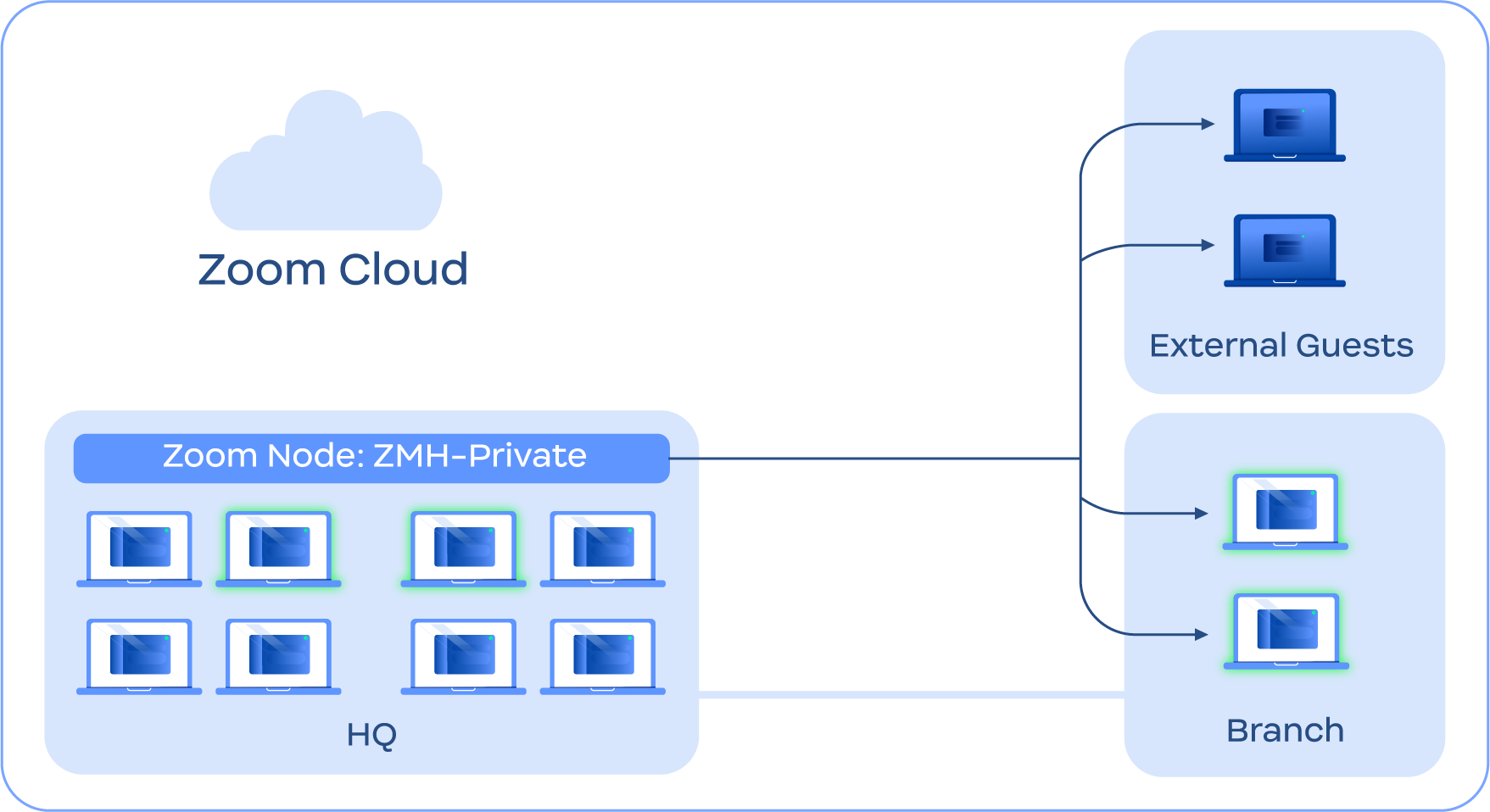
在安排会议的过程中选择私有模式后，用户将不会连接到 Zoom 云参加会议。相反， *内部* 用户将通过本地网络连接到 Meetings Hybrid 模块，连接至其私有内部 IP；而 *外部* 用户通过该模块的公网 IP 进行连接。

这可以让客户通过 Meetings Hybrid 服务在本地主持私密、保密的会议，为敏感讨论提供更高的安全性，并满足会议相关的合规性或隐私要求。

下图概述了此函数，其中 **所有用户**、内部、分支和外部直接连接到 Meetings Hybrid 模块，绕过媒体转发连接至 Zoom 云。

<figure><img src="https://2325962437-files.gitbook.io/~/files/v0/b/gitbook-x-prod.appspot.com/o/spaces%2FctBXUMeBy4rtLMmMkKRG%2Fuploads%2Fgit-blob-d8186c7d1eb2d9ca1ee922df7a00d77de3c2537b%2F5.png?alt=media" alt="Diagram depicting private mode routing" width="563"><figcaption><p>私有模式示意图</p></figcaption></figure>

{% hint style="info" %}
**注意**

用户通过 Zoom 云的后端服务路由到 Meetings Hybrid 模块，但此过程不涉及媒体传输。为了保持连接，Meetings Hybrid 模块必须与 Zoom 云维持持续的信令（非媒体）连接。
{% endhint %}

### **本地容灾**

#### <mark style="color:蓝色;">**本地生存能力可在无法访问 Zoom 数据中心时保持会议运行**</mark>

Zoom 会议生存能力 (ZMS) 是 Meetings Hybrid Service 中的一项集成功能，可在互联网或服务中断且无法连接 Zoom 数据中心时，为企业提供有限的本地 Zoom Meetings 功能。借助 ZMS，用户可以继续通过熟悉的工作流程加入 Zoom 会议，并支持每次最长 30 天的离线生存能力。

在可生存性事件期间，ZMS 组件可以通过多种方式维持本地网络内的会议。

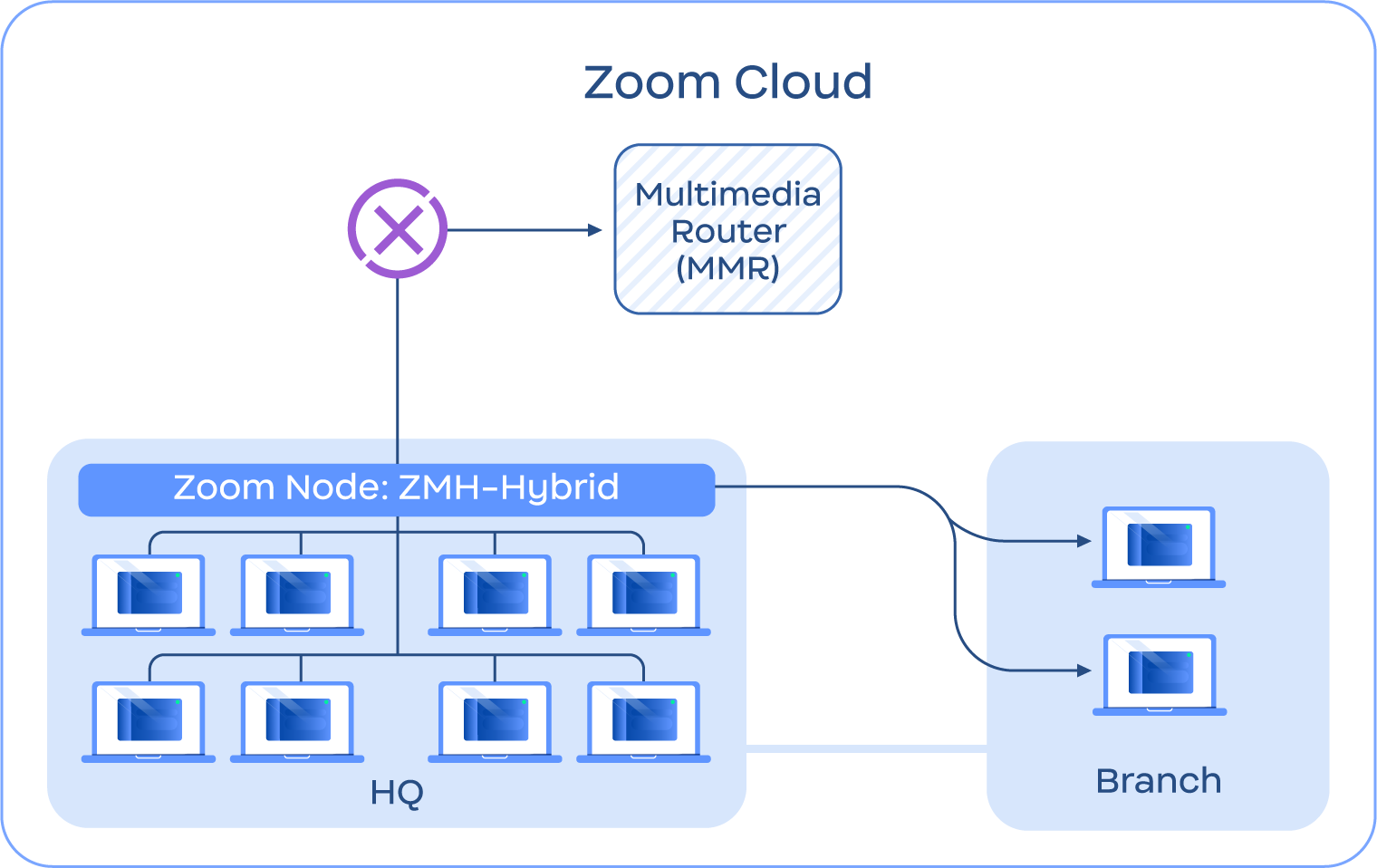
1. 如果您的网络无法访问 Zoom 云，网络内的用户可以使用 Meetings Hybrid 基础设施主持本地（即非云端）会议。如果不同地点的用户可通过广域网或园区网访问 Zoom Node 设备，他们也可以加入本地托管的会议，从而保持通信畅通。下图展示了此场景示例。\\

   <figure><img src="https://2325962437-files.gitbook.io/~/files/v0/b/gitbook-x-prod.appspot.com/o/spaces%2FctBXUMeBy4rtLMmMkKRG%2Fuploads%2Fgit-blob-a1281a4746201881b49c820c7ebd176d376af0a7%2F6.png?alt=media" alt="Diagram depicting local survivability" width="563"><figcaption><p>本地生存能力示意图</p></figcaption></figure>
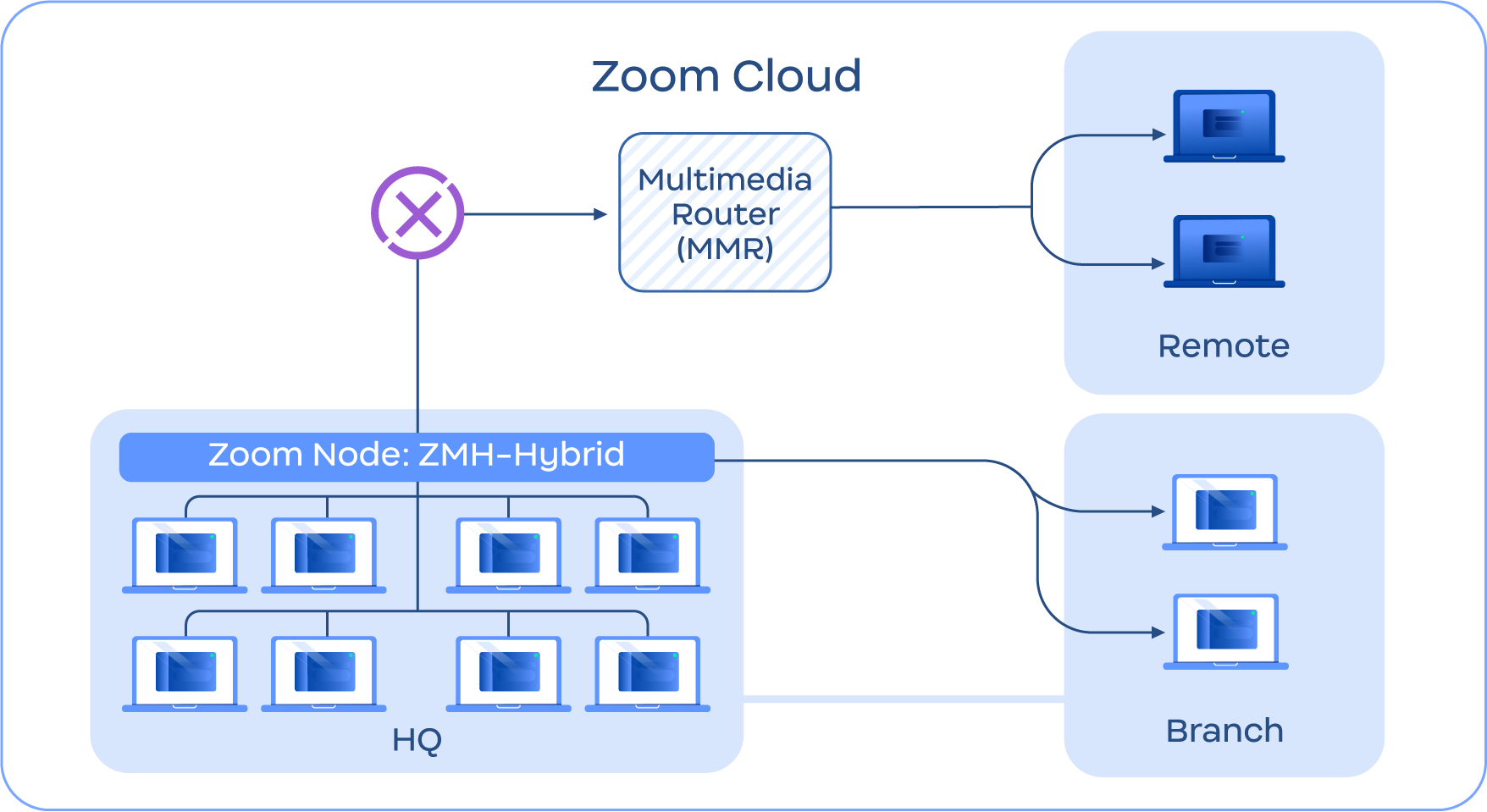
2. 如果同一网络中的用户 *暂时* 与基于云的会议断开连接，ZMS 模块会创建该会议的本地版本，网络内的所有用户都会自动切换到本地版本。如果在云端会议仍在进行时恢复连接，用户将自动重新加入云端会议。下图展示了此场景示例。\\

   <figure><img src="https://2325962437-files.gitbook.io/~/files/v0/b/gitbook-x-prod.appspot.com/o/spaces%2FctBXUMeBy4rtLMmMkKRG%2Fuploads%2Fgit-blob-c4242ef4670f769f573dcd5d50cf904a4f33b5d3%2F7.png?alt=media" alt="Diagram depicting local survivability" width="563"><figcaption><p>本地生存能力示意图</p></figcaption></figure>
3. 账户可以保留并指定特定会议号，用于生存能力事件。例如，公司领导可以在紧急情况下加入专用会议号。\\
4. 用户可以创建临时离线会议，即使云服务不可用，也能进行协作。\\
5. 可以将会议指定为具备生存能力的会议，帮助确保无论网络状况如何都能使用，只要用户处于同一网络中，并且能够与必要的设备通信即可。

有关可生存性会议场景的更多信息，请咨询您的 Zoom 账户团队。

### **其他功能**

Zoom Meetings 混合模式还包括以下功能：

* **云端功能照常使用**：混合会议仍可使用 Zoom 云功能，例如白板、云录制和 AI 工具。\\
* **最多支持 400 名用户同时使用**：Zoom Meetings Hybrid 模块单个设备节点最多可同时支持 400 名用户。\\
* **级联混合会议**：多个 Zoom Meetings Hybrid 模块可以通过网络互连，为规模更大的会议支持更多用户。使用多个模块时，用户数量不再受限于 400 人。\\
* **访客加入**：如果主持私有会议，主持人可以指定可加入会议的外部访客（即属于其他 Zoom 账户的成员）。\\
* **生存模式公告板**：如果已启用生存模式，账户管理员可以通过 Zoom Workplace 应用向用户发送消息，提供最新信息和说明，直至问题解决。


---

# Agent Instructions
This documentation is published with GitBook. GitBook is the documentation platform designed so that both humans and AI agents can read, navigate, and reason over technical content effectively. Learn more at gitbook.com.

## Querying This Documentation
If you need additional information that is not directly available in this page, you can query the documentation by asking a question.

Perform an HTTP GET request on the following URL with the `ask` and `goal` query parameters:

```
GET https://library.zoom.com/technical-library/zh/gao-ji-qi-ye-fu-wu/zoom-node/zoom-meetings-hybrid.md?ask=<question>&goal=<user_goal>
```

`ask` is the immediate question: it should be specific, self-contained, and written in natural language.
`goal` is what the user is ultimately trying to achieve, the reason they need the answer. Sharing it helps GitBook give you a better, more relevant answer. A goal is most helpful when it describes the outcome the user wants rather than restating the question. For example, with `ask=how do I create an API token`, a goal like `automate deployments from our CI pipeline` lets GitBook tailor the answer to that use case.

The response will contain a direct answer to the question and relevant excerpts and sources from the documentation.

Use this mechanism when the answer is not explicitly present in the current page, you need clarification or additional context, or you want to retrieve related documentation sections.