> For the complete documentation index, see [llms.txt](https://library.zoom.com/llms.txt). Markdown versions of documentation pages are available by appending `.md` to page URLs; this page is available as [Markdown](https://library.zoom.com/technical-library/zh/gao-ji-qi-ye-ban-fu-wu/zoom-node/zoom-conference-room-connector-hybrid.md).

# Zoom 会议室连接器混合部署

#### <mark style="color:蓝色;">Zoom 会议室连接器 Hybrid：面向会议室的混合会议</mark> <a href="#vwn78dbs8d9m" id="vwn78dbs8d9m"></a>

Zoom 的会议室连接器 Hybrid 与 Zoom 的 [混合会议](/technical-library/zh/gao-ji-qi-ye-ban-fu-wu/zoom-node/zoom-meetings-hybrid.md) 解决方案，包括对混合和私有会议的支持，但它不支持 Zoom Workplace 应用，而是提供对传统 SIP 和 H.323 会议室系统的支持。

借助此产品，多个会议室可以连接到本地部署的混合 Zoom Node 设备，该设备可以同时接收、复用并重新分发拨入和外拨媒体流到 Zoom 云，默认情况下每个模块最多支持 8 个同时高清会议室。会议室连接器 Hybrid 模块还支持会议体验中的其他重要功能，包括会议中聊天、表情反应、布局控制以及一键加入功能支持。

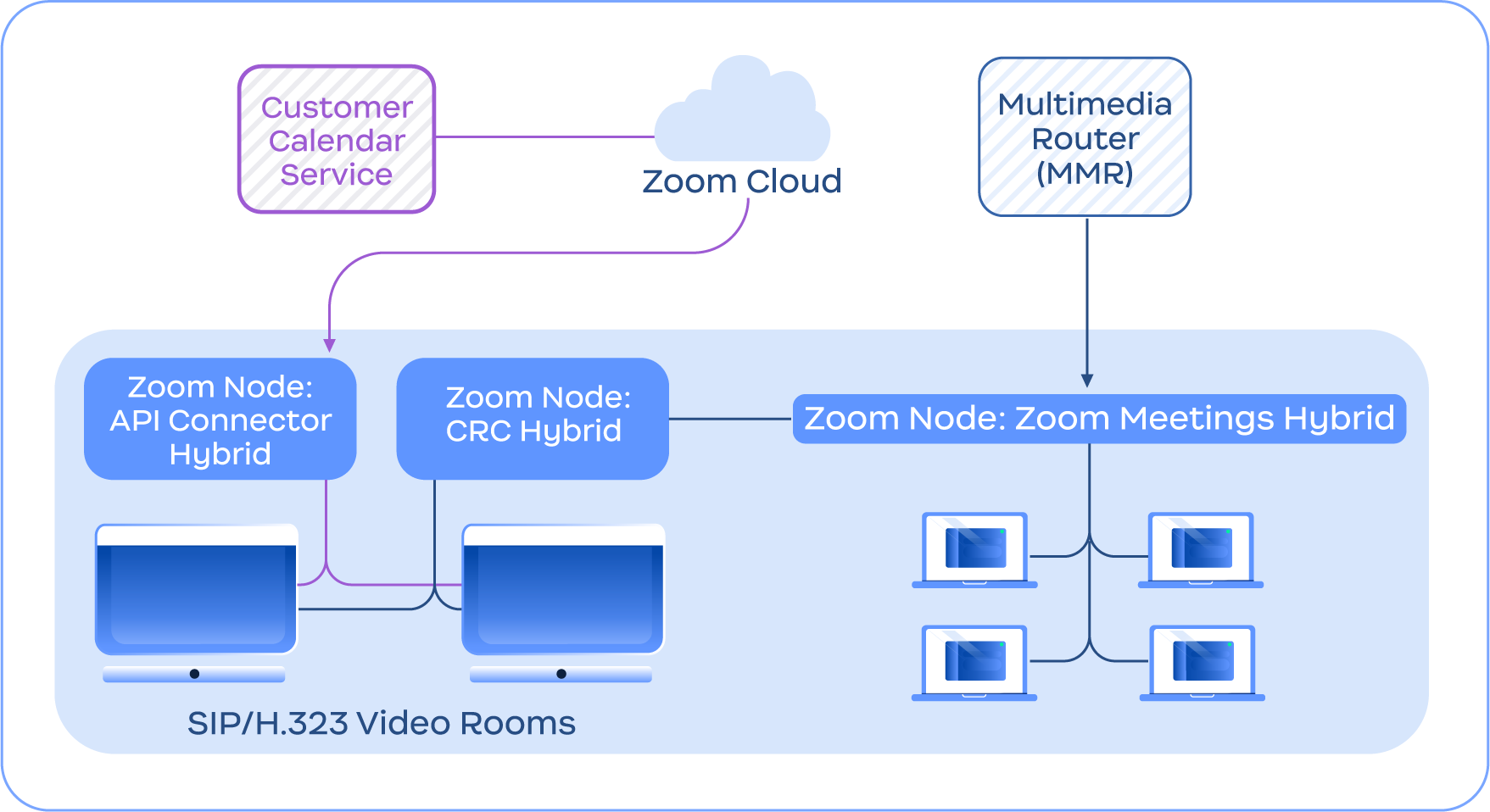
下图展示了会议室连接器 Hybrid 服务与 Meetings Hybrid 服务的集成，以及其他会议室连接器 Hybrid 功能，例如用于集成日历的 API 连接器 Hybrid。

<figure><img src="https://2325962437-files.gitbook.io/~/files/v0/b/gitbook-x-prod.appspot.com/o/spaces%2FctBXUMeBy4rtLMmMkKRG%2Fuploads%2Fgit-blob-f1ba193991649171c56f065cc7909c4ed5ec9213%2F10.png?alt=media" alt="Diagram depicting the Conference Room Connector Hybrid service connecting with the Zoom Cloud and Meetings Hybrid module" width="563"><figcaption><p>描绘会议室连接器 Hybrid 服务正在连接 Zoom 云和 Meetings Hybrid 模块的示意图</p></figcaption></figure>

{% hint style="info" %}
**注意**

会议室连接器 Hybrid 不需要 Zoom Meetings Hybrid，仅用于说明。
{% endhint %}


---

# Agent Instructions
This documentation is published with GitBook. GitBook is the documentation platform designed so that both humans and AI agents can read, navigate, and reason over technical content effectively. Learn more at gitbook.com.

## Querying This Documentation
If you need additional information that is not directly available in this page, you can query the documentation dynamically by asking a question.

Perform an HTTP GET request on the current page URL with the `ask` query parameter, and the optional `goal` query parameter:

```
GET https://library.zoom.com/technical-library/zh/gao-ji-qi-ye-ban-fu-wu/zoom-node/zoom-conference-room-connector-hybrid.md?ask=<question>&goal=<endgoal>
```

`ask` is the immediate question: it should be specific, self-contained, and written in natural language.
`goal` is optional and describes the broader end goal you are ultimately trying to accomplish on behalf of the user. GitBook uses it to tailor the answer towards what is most useful for that goal.

The response will contain a direct answer to the question and relevant excerpts and sources from the documentation.

Use this mechanism when the answer is not explicitly present in the current page, you need clarification or additional context, or you want to retrieve related documentation sections.