> For the complete documentation index, see [llms.txt](https://library.zoom.com/llms.txt). Markdown versions of documentation pages are available by appending `.md` to page URLs; this page is available as [Markdown](https://library.zoom.com/technical-library/zh/archive-content/emergency-services-best-practices/overview.md).
# 概述
Zoom Phone 系统内置了若干与紧急通话相关的功能。以下各节将全面概述紧急 路由、紧急 事件 & 活动 &直播 通知以及内部安全响应团队的配置最佳实践。
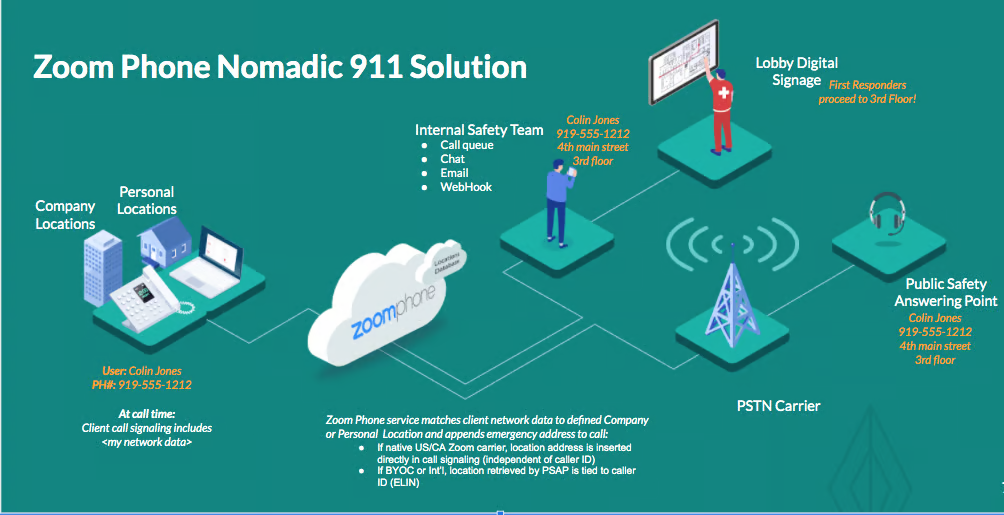
游牧式紧急服务允许系统检测用户位置,并在发生紧急呼叫时提供实际地址。本文档介绍了适用于美国和加拿大的 Zoom Phone “原生”服务、自带运营商选项,以及美国和加拿大以外的市场和站点的游牧式紧急服务。
下图表示 Zoom Phone E911 解决方案的组件:
---
# Agent Instructions
This documentation is published with GitBook. GitBook is the documentation platform designed so that both humans and AI agents can read, navigate, and reason over technical content effectively. Learn more at gitbook.com.
## Querying This Documentation
If you need additional information that is not directly available in this page, you can query the documentation by asking a question.
Perform an HTTP GET request on the following URL with the `ask` and `goal` query parameters:
```
GET https://library.zoom.com/technical-library/zh/archive-content/emergency-services-best-practices/overview.md?ask=&goal=
```
`ask` is the immediate question: it should be specific, self-contained, and written in natural language.
`goal` is what the user is ultimately trying to achieve, the reason they need the answer. Sharing it helps GitBook give you a better, more relevant answer. A goal is most helpful when it describes the outcome the user wants rather than restating the question. For example, with `ask=how do I create an API token`, a goal like `automate deployments from our CI pipeline` lets GitBook tailor the answer to that use case.
The response will contain a direct answer to the question and relevant excerpts and sources from the documentation.
Use this mechanism when the answer is not explicitly present in the current page, you need clarification or additional context, or you want to retrieve related documentation sections.