> For the complete documentation index, see [llms.txt](https://library.zoom.com/llms.txt). Markdown versions of documentation pages are available by appending `.md` to page URLs; this page is available as [Markdown](https://library.zoom.com/technical-library/zh-tw/shang-wu-fu-wu/zoom-workforce-management/expert-insights/workforce-management-activity-to-status-mapping.md).
# 活動到狀態對應
作者:Rick Arps
遵循度是一項強大的指標,也是工作力管理(WFM)解決方案中最常追蹤的項目之一。遵循度會計算座席被排定要執行的活動與其實際正在執行的活動之間的差異。我們在 WFM 中常見的一個問題是,遵循度與座席在 Zoom Contact Center(ZCC)中的實際活動沒有正確對應。讓我們看看所使用的結構,以及 WFM 如何將它在 ZCC 中看到的內容與排程中使用的不同活動進行匹配。
## 活動
在 WFM 中,活動是指座席可以被排定執行的任何動作。活動用來組成座席的班次。每個活動都可以啟用或停用,以納入該座席的遵循度計算。
一些常見的活動可能包括:
* 電話
* 休息
* 餐點
* 會議
* PTO\\
一般而言,生產性活動(電話、聊天等)會用於遵循度計算,而非生產性活動(休息、用餐等)則不會。遵循度用來確保座席在排定的時間內為客戶提供服務。如果座席的休息時間晚了 5 分鐘,那麼他們只會有 5 分鐘被標記為未遵循。如果休息活動也被用來計算遵循度,那麼就會將他們標記為未遵循 10 分鐘,因為他們會在休息時間的 5 分鐘內處於電話中,而在 5 分鐘的電話時間內處於休息狀態。
{% hint style="info" %}
**附註**
活動設定可在 Zoom WFM 網頁入口網站中的以下位置找到: **排程設定 → 活動**.
{% endhint %}
## ZCC 狀態
ZCC 會使用座席狀態來追蹤座席活動,以及何時可以將額外的互動轉派給座席。內建狀態如下:\\
* 就緒 - 座席可接受互動
* 忙碌 - 座席正在進行互動,或正在收尾某個互動
* 未就緒 - 座席已選擇退出,或已被設定為不接聽來電\\
未就緒可以有子狀態,用來表示座席為何退出佇列。這些通常稱為原因。以下是一些範例原因:\\
* 休息
* 班次結束
* 強制
* 餐點
* 會議
## 將狀態對應到活動
WFM 會從 ZCC 接收座席狀態資訊,並需要能夠將此狀態對應到活動,進而對應到遵循度。為了做到這一點,我們使用座席狀態對應。
{% hint style="info" %}
**附註**
座席狀態對應可在 Zoom WFM 網頁入口網站中的以下位置找到: **偏好設定 → 座席狀態** **對應**.
{% endhint %}
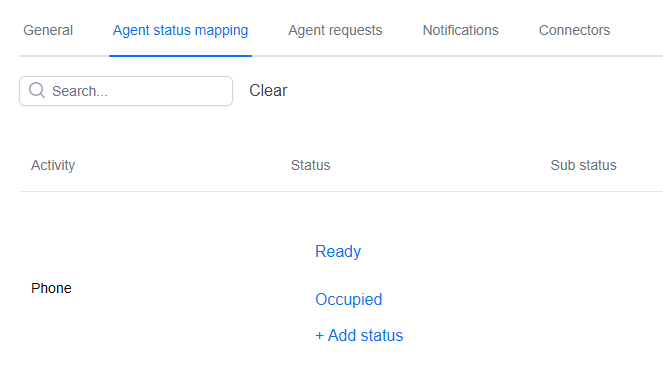
在這裡,您會看到 WFM 中所有已設定活動的清單。若要設定這些匹配,我們會思考座席在 ZCC 中會處於什麼狀態,才能滿足 WFM 中的活動。
例如,如果我們將座席排定為「電話」活動,我們預期他們會處於「就緒」或「忙碌」狀態。也就是說,他們不是準備接聽電話,就是正在通話中。
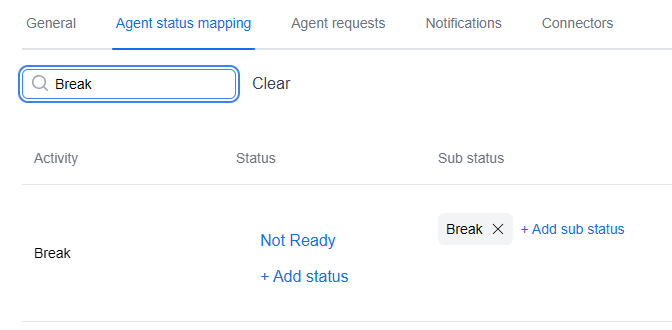
另一個例子是「休息」活動,它說明了我們如何使用 ZCC 中的原因代碼。當座席休息時,他們會在 ZCC 中切換到「未就緒」狀態,並選擇「休息」作為原因。在 WFM 中,我們先新增未就緒狀態,然後選取「新增子狀態」以包含該原因。
將這些狀態對應到活動後,我們現在就可以根據座席的實際活動正確計算遵循度。
### 原因與子狀態的特殊使用情境
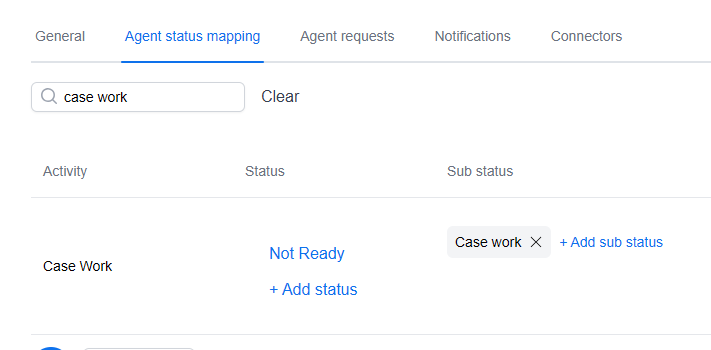
有時主管會希望追蹤 ZCC 以外的座席活動。例如,座席可能需要將案件處理作為其日常工作的一部分。為此,我們可以在 WFM 中建立一個「案件處理」活動,並將其對應到 ZCC 中同名的自訂原因代碼。接著,當座席開始處理案件時,他們會在 ZCC 中選取這個原因,而 WFM 就能在計算座席遵循度時正確追蹤此活動。
---
# Agent Instructions
This documentation is published with GitBook. GitBook is the documentation platform designed so that both humans and AI agents can read, navigate, and reason over technical content effectively. Learn more at gitbook.com.
## Querying This Documentation
If you need additional information that is not directly available in this page, you can query the documentation dynamically by asking a question.
Perform an HTTP GET request on the current page URL with the `ask` query parameter, and the optional `goal` query parameter:
```
GET https://library.zoom.com/technical-library/zh-tw/shang-wu-fu-wu/zoom-workforce-management/expert-insights/workforce-management-activity-to-status-mapping.md?ask=&goal=
```
`ask` is the immediate question: it should be specific, self-contained, and written in natural language.
`goal` is optional and describes the broader end goal you are ultimately trying to accomplish on behalf of the user. GitBook uses it to tailor the answer towards what is most useful for that goal.
The response will contain a direct answer to the question and relevant excerpts and sources from the documentation.
Use this mechanism when the answer is not explicitly present in the current page, you need clarification or additional context, or you want to retrieve related documentation sections.