> For the complete documentation index, see [llms.txt](https://library.zoom.com/llms.txt). Markdown versions of documentation pages are available by appending `.md` to page URLs; this page is available as [Markdown](https://library.zoom.com/technical-library/zh-tw/shang-wu-fu-wu/zoom-contact-center/zoom-customer-experience/analytics-and-reporting/zoom-workforce-management-reports.md).
# Zoom Workforce Management 報表
### **歷史遵循報表**
歷史遵循報表提供特定時間範圍內的客服人員遵循表現摘要,每份報表最多涵蓋 30 天。
如果報表包含多天資料,起初會顯示使用者在指定時間範圍內的平均遵循率。主管可以展開使用者的平均報表,並檢視其每日遵循情況。
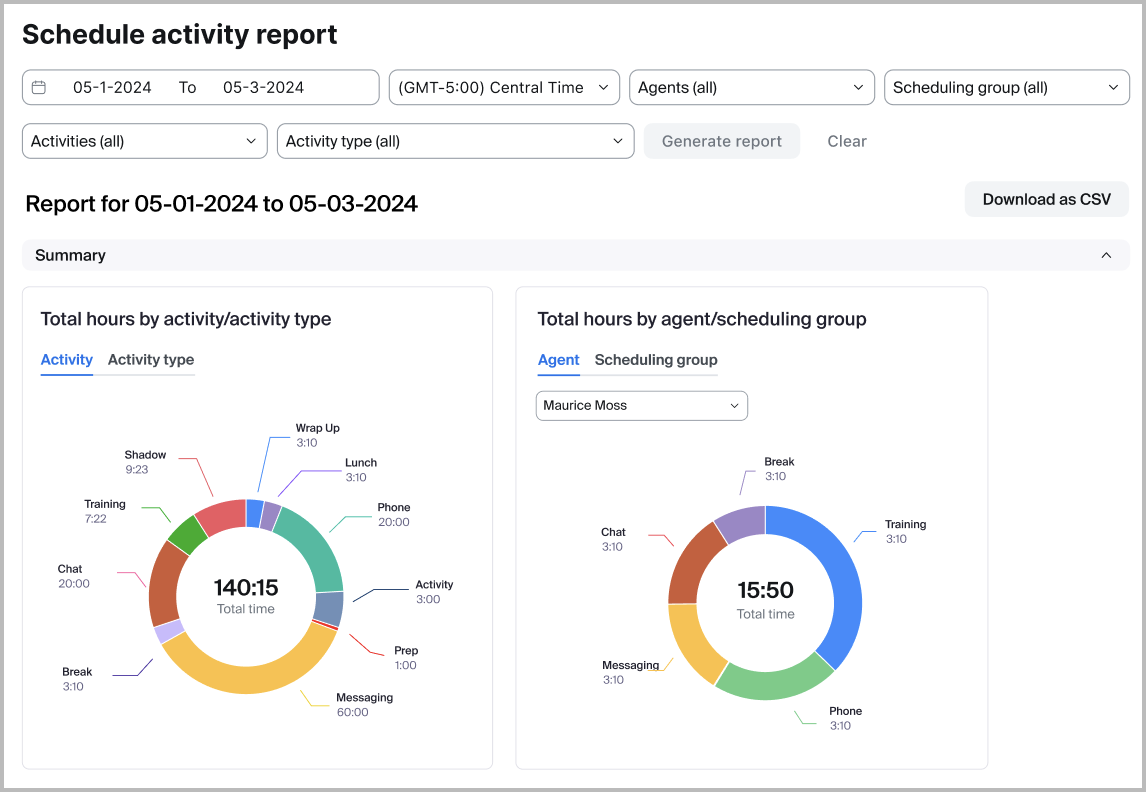
### **排班活動報表**
排班活動報表提供過去與未來日期之已排定客服人員活動的詳細摘要,顯示每項活動每天分配的時間。主管可以依個別人員、特定活動以及排班群組篩選報表,以協助確保人力配置正確並維持服務水準。此報表也可匯出為 CSV,方便協作與深入檢視工作排程,並提升資源管理與規劃能力。
### **預測與實際報表**
主管可以在預測與實際報表中,輕鬆比較所選期間的預測與實際量、平均處理時長(AHD)以及人力配置。此報表可協助團隊找出差異並改善未來規劃。資料可依每日、每週或每月檢視,並包含百分比差異。為了更精確地比較人力配置,主管可以為短期預測設定班次時長,以計算每天的獨立人員數。
### **日內報表**
管理員和主管可以檢視日內報表,將排班的預測準確度與前一日或當日的互動量進行比較。這讓主管能夠識別預測差異,並在某日的互動量明顯偏離預測時做出動態的人力配置決策。
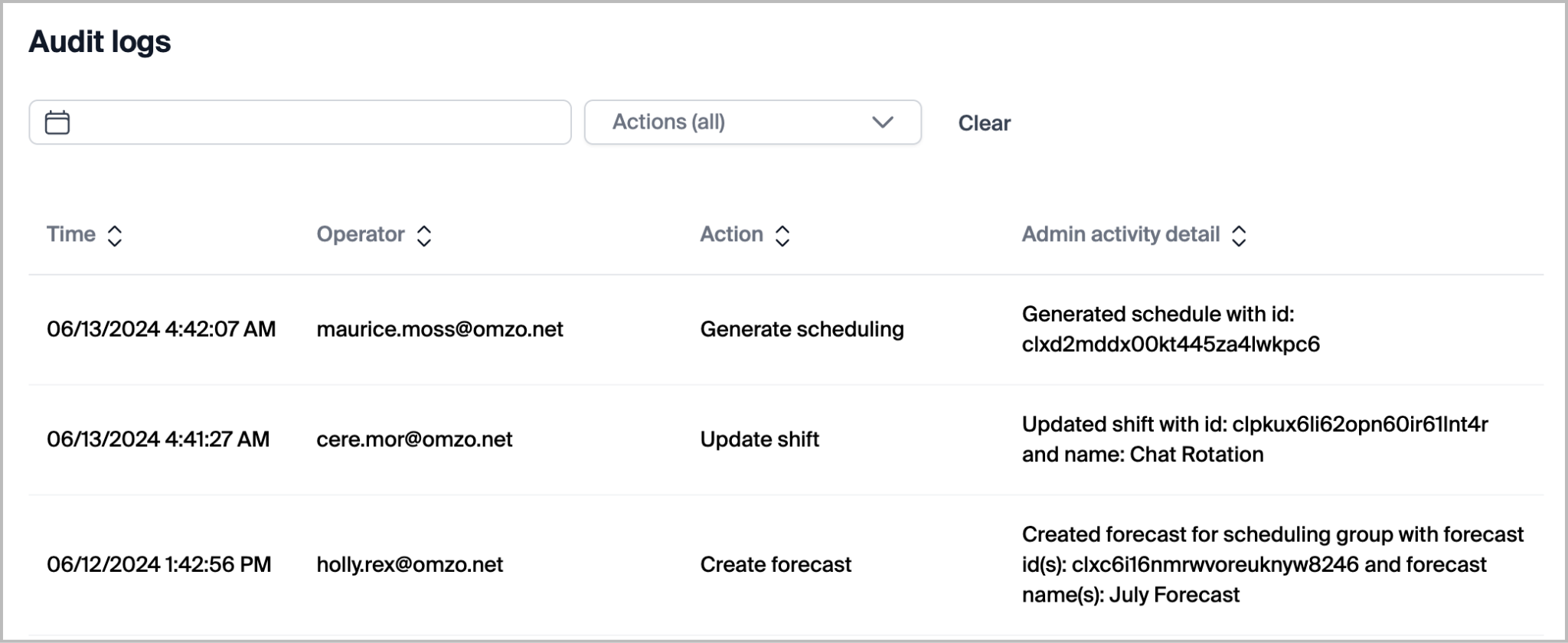
### **稽核記錄**
具備足夠權限的勞動力管理管理員和主管可以存取稽核記錄報表。此報表包含產品內管理員、主管與使用者所執行動作的完整清單。可存取稽核記錄的使用者可依日期或特定執行動作進行篩選。報表中包含的記錄有:
| - 取消客服人員排班變更請求
- 取消休假申請
- 建立活動
- 建立客服人員排班變更請求
- 建立預測
- 建立佇列
- 建立排班群組
- 建立班次
- 建立休假申請
- 刪除活動
- 刪除預測
- 刪除佇列
- 刪除排班群組
- 刪除班次
- 刪除未發佈的排程
- 複製排程
| - 變更每週的第一天
- 產生排班
- 停用排程
- 發佈排程
- 重新發佈排程
- 更新活動
- 更新客服人員排班變更請求狀態
- 更新佇列
- 更新排班群組
- 更新排班群組客服人員
- 更新排班群組佇列
- 更新班次
- 更新班次客服人員
- 更新狀態對應
- 更新休假申請狀態
|
| ----------------------------------------------------------------------------------------------------------------------------------------------------------------------------------------------------------------------------------------------------- | -------------------------------------------------------------------------------------------------------------------------------------------------------------------------------------------------------------------------------------------------- |
---
# Agent Instructions
This documentation is published with GitBook. GitBook is the documentation platform designed so that both humans and AI agents can read, navigate, and reason over technical content effectively. Learn more at gitbook.com.
## Querying This Documentation
If you need additional information that is not directly available in this page, you can query the documentation by asking a question.
Perform an HTTP GET request on the following URL with the `ask` and `goal` query parameters:
```
GET https://library.zoom.com/technical-library/zh-tw/shang-wu-fu-wu/zoom-contact-center/zoom-customer-experience/analytics-and-reporting/zoom-workforce-management-reports.md?ask=&goal=
```
`ask` is the immediate question: it should be specific, self-contained, and written in natural language.
`goal` is what the user is ultimately trying to achieve, the reason they need the answer. Sharing it helps GitBook give you a better, more relevant answer. A goal is most helpful when it describes the outcome the user wants rather than restating the question. For example, with `ask=how do I create an API token`, a goal like `automate deployments from our CI pipeline` lets GitBook tailor the answer to that use case.
The response will contain a direct answer to the question and relevant excerpts and sources from the documentation.
Use this mechanism when the answer is not explicitly present in the current page, you need clarification or additional context, or you want to retrieve related documentation sections.