> For the complete documentation index, see [llms.txt](https://library.zoom.com/llms.txt). Markdown versions of documentation pages are available by appending `.md` to page URLs; this page is available as [Markdown](https://library.zoom.com/technical-library/zh-tw/shang-wu-fu-wu/zoom-contact-center/expert-insights/integrate-zoom-contact-center-features-into-your-website/scheduled-callbacks-cobrowse-and-zoom-cx-web-sdk.md).

# 排程回撥、CoBrowse 與 Zoom CX Web SDK

本主題討論排程回呼、CoBrowse 和 Zoom CX Web SDK。

***

### 排程回呼

排程回呼可讓您的網站訪客安排與您的聯絡中心進行語音或視訊通話。此功能透過在 Web Campaign 與您的佇列之間建立連線來運作，而無需 Flow 設定。

若要啟用 Zoom CX 排程回呼功能，請依照以下高層次步驟進行：

1. 依據您的通訊需求設定一個或多個 Zoom Contact Center 佇列，因為排程回呼支援語音與視訊佇列。
2. 在您的佇列上啟用排程回呼功能，包括可用排程與時段。
3. 為排程回呼設定一個 Zoom CX Web Campaign，這將定義網站訪客可開始排程回呼流程的邀請按鈕與位置。

如需設定 Zoom CX 排程回呼功能的更多詳細資訊，請參閱 [啟用排程回呼](https://support.zoom.com/hc/en/article?id=zm_kb\&sysparm_article=KB0075288) Zoom 支援文章。

***

### CoBrowse

CoBrowse 可讓客服人員即時查看客戶的畫面，提升服務效率。

CoBrowse 的工作流程與前述其他通道不同。傳統通道要求網站訪客透過 Web Campaign 按鈕或連結主動與聯絡中心建立互動，而 CoBrowse 工作階段則是在消費者已經連線至 Zoom Contact Center 客服人員後開始。若在互動過程中需要網站導覽協助，客服人員可以引導消費者啟動共用瀏覽工作階段。

Zoom CX CoBrowse 功能包含資料遮罩能力，讓您的網站可控管哪些欄位對客服人員可見、哪些欄位會被遮罩。這項關鍵功能可防止客服人員存取應保持機密的資訊。

Zoom CX CoBrowse 功能是透過同一套 Zoom CX Web SDK 運作，該 SDK 提供網頁聊天與視訊功能。

如需設定 Zoom CX CoBrowse 功能的更多詳細資訊，請參閱 [設定 Zoom Cobrowse](https://support.zoom.com/hc/en/article?id=zm_kb\&sysparm_article=KB0077376) Zoom 支援文章。

{% hint style="info" %}
**注意**

在本文發布時，Zoom CX CoBrowse 功能支援語音與網頁聊天通道。
{% endhint %}

***

### Zoom CX Web SDK

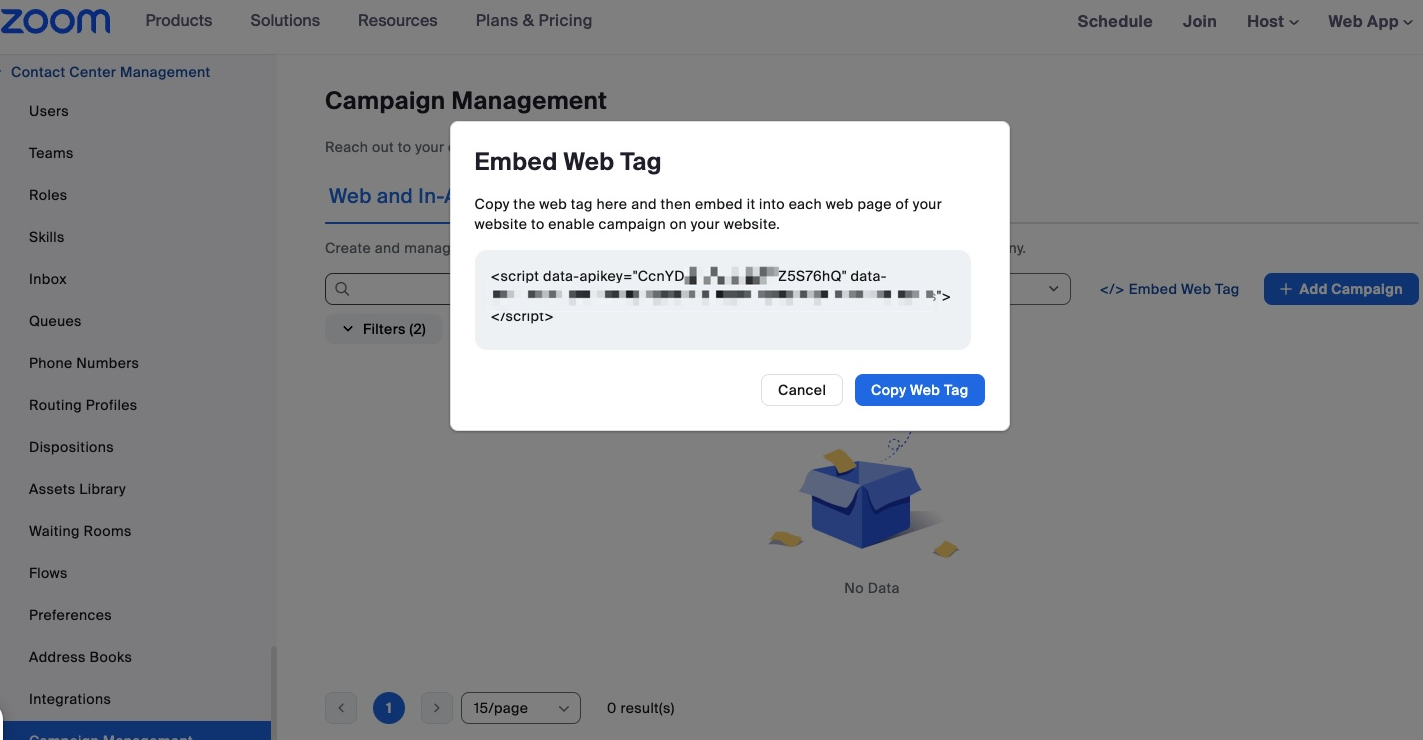
完成上述 Zoom CX 設定後，將您 Zoom 帳戶中的一行 JavaScript 程式碼加入網站，即可完成整合：

1. 找到程式碼。按一下：
   1. 聯絡中心管理
   2. Campaign 管理
   3. \</> 嵌入 Web Tag 連結。
2. 將程式碼貼入您網站的 HTML 中。

請參見以下範例：

<figure><img src="/files/80f3c217e6e1ee82495fbde86caba3261bd83cee" alt="Screen display showing the Embed Web Tag screen."><figcaption></figcaption></figure>

上方示範的 \<script> 程式碼是前述所有功能的基礎。

{% hint style="info" %}
**注意**

如果您啟用 CoBrowse 功能，請務必加入額外的標籤 `data-enable-zcb="true"` 於您的 \<script> 程式碼中。
{% endhint %}

#### <mark style="color:藍色;">您知道嗎？</mark>

* Zoom CX 的網頁聊天流程可讓您在必要時將進行中的網頁聊天升級為視訊通話，根據客戶需求提供彈性並提升服務品質。
* 如果您的公司使用 Apple 或 Google 原生行動 SDK 為 iPhone 和 Android 開發自己的行動應用程式，您可以使用 Zoom CX Mobile SDK，輕鬆將聯絡中心功能直接嵌入您的行動應用程式中。


---

# Agent Instructions
This documentation is published with GitBook. GitBook is the documentation platform designed so that both humans and AI agents can read, navigate, and reason over technical content effectively. Learn more at gitbook.com.

## Querying This Documentation
If you need additional information that is not directly available in this page, you can query the documentation dynamically by asking a question.

Perform an HTTP GET request on the current page URL with the `ask` query parameter, and the optional `goal` query parameter:

```
GET https://library.zoom.com/technical-library/zh-tw/shang-wu-fu-wu/zoom-contact-center/expert-insights/integrate-zoom-contact-center-features-into-your-website/scheduled-callbacks-cobrowse-and-zoom-cx-web-sdk.md?ask=<question>&goal=<endgoal>
```

`ask` is the immediate question: it should be specific, self-contained, and written in natural language.
`goal` is optional and describes the broader end goal you are ultimately trying to accomplish on behalf of the user. GitBook uses it to tailor the answer towards what is most useful for that goal.

The response will contain a direct answer to the question and relevant excerpts and sources from the documentation.

Use this mechanism when the answer is not explicitly present in the current page, you need clarification or additional context, or you want to retrieve related documentation sections.