> For the complete documentation index, see [llms.txt](https://library.zoom.com/llms.txt). Markdown versions of documentation pages are available by appending `.md` to page URLs; this page is available as [Markdown](https://library.zoom.com/technical-library/zh-tw/shang-wu-fu-wu/zoom-contact-center/expert-insights/configuring-agent-occupied-rules/maximum-concurrent-engagement-capacity.md).
# 最大同時互動容量
最大互動並行數與「已占用規則」搭配運作,以控制代理人容量。當「已占用規則」決定代理人何時無法接收新的互動時,並行設定則定義了代理人在各種頻道類型中可同時處理的互動數上限。
### 依頻道而定的限制
**語音與視訊頻道**: 最大並行互動數一律為 1。這些都是即時、高專注度的頻道,需要專注處理。
**電子郵件與訊息頻道**: 可設定的最大並行互動限制。限制可根據代理人技能等級、頻道複雜度及組織標準來設定
### 頻道設定互動容量範例
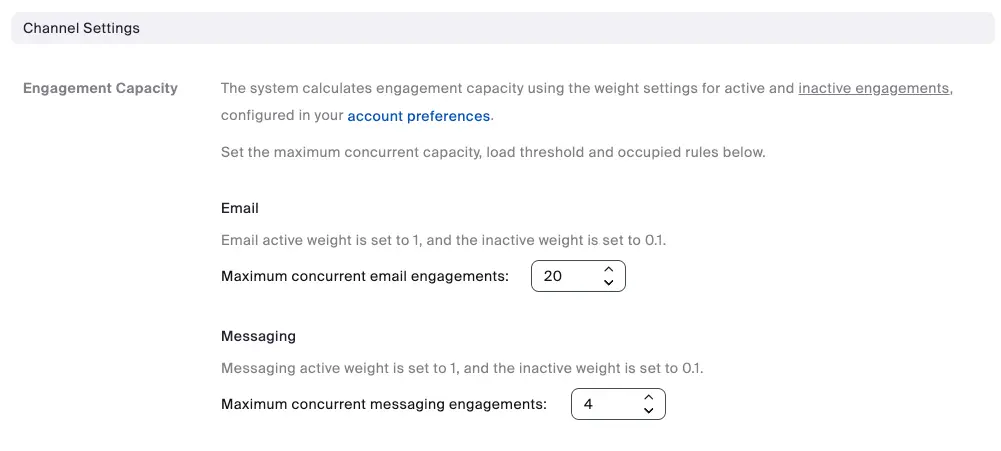
下方顯示了一個代理人互動容量的範例。在此範例中,代理人最多可處理 20 筆電子郵件互動,以及最多 4 筆訊息互動。當代理人達到這些限制中的任一項時,即使代理人處於「就緒」狀態,也不會再收到該特定頻道的任何新進線互動。
### 頻道類型之間的互動
向「就緒」代理人派送新的語音或視訊互動,取決於其目前的電子郵件/訊息負載設定。此設計可讓組織:
* 讓代理人專注於電子郵件/訊息工作,不受語音/視訊中斷
* 在需要時,確保語音/視訊通話獲得適當的優先順序
* 在不同頻道類型之間平衡工作負載
#### 語音與視訊頻道設定範例
在下方範例中,只有當代理人的電子郵件頻道負載低於或等於 100%,且訊息頻道負載低於或等於 50% 時,才會收到新的語音或視訊通話。將電子郵件閾值設為 100%,表示即使代理人已達到其電子郵件容量上限(例如,10 封正在處理中的電子郵件中已處理 10 封),仍然可以接收新的語音或視訊通話。這可確保電子郵件——作為非即時頻道——不會阻塞語音或視訊路由,而較低的訊息閾值則有助於保護對進行中的即時對話的專注。
---
# Agent Instructions
This documentation is published with GitBook. GitBook is the documentation platform designed so that both humans and AI agents can read, navigate, and reason over technical content effectively. Learn more at gitbook.com.
## Querying This Documentation
If you need additional information that is not directly available in this page, you can query the documentation by asking a question.
Perform an HTTP GET request on the following URL with the `ask` and `goal` query parameters:
```
GET https://library.zoom.com/technical-library/zh-tw/shang-wu-fu-wu/zoom-contact-center/expert-insights/configuring-agent-occupied-rules/maximum-concurrent-engagement-capacity.md?ask=&goal=
```
`ask` is the immediate question: it should be specific, self-contained, and written in natural language.
`goal` is what the user is ultimately trying to achieve, the reason they need the answer. Sharing it helps GitBook give you a better, more relevant answer. A goal is most helpful when it describes the outcome the user wants rather than restating the question. For example, with `ask=how do I create an API token`, a goal like `automate deployments from our CI pipeline` lets GitBook tailor the answer to that use case.
The response will contain a direct answer to the question and relevant excerpts and sources from the documentation.
Use this mechanism when the answer is not explicitly present in the current page, you need clarification or additional context, or you want to retrieve related documentation sections.