> For the complete documentation index, see [llms.txt](https://library.zoom.com/llms.txt). Markdown versions of documentation pages are available by appending `.md` to page URLs; this page is available as [Markdown](https://library.zoom.com/technical-library/zh-tw/shang-wu-fu-wu/zoom-contact-center/expert-insights/boosting-customer-reach-with-whatsapp-for-business-messaging-integration-for-zoom-contact-center.md).
# WhatsApp 商務訊息整合
由 Mehdi Jatlaoui 撰寫
現今客戶溝通涵蓋多個平台,包括訊息應用程式、電子郵件與社群媒體。為了提供有效支援,企業必須出現在客戶偏好的管道上。
本指南將帶您完成 [設定此整合](https://support.zoom.com/hc/en/article?id=zm_kb\&sysparm_article=KB0074621),讓您的企業在運用 Zoom 強大的聯絡中心功能的同時,也能善用 WhatsApp 龐大的使用者群。
## 術語
**WhatsApp 商業平台:**\
\
WhatsApp 商業平台是一項雲端式訊息解決方案,企業可透過與 Zoom 等 WhatsApp Business 解決方案供應商整合來加以運用。\
\
**WhatsApp 商業帳號(WABA):**\
\
WhatsApp 商業帳號是一種專為企業設計的帳號,讓企業能透過 WhatsApp 訊息平台與客戶溝通。**WhatsApp 商業檔案:**\
\
WhatsApp 商業檔案是供使用 WhatsApp Business 的企業使用的詳細檔案,可協助客戶輕鬆存取與企業相關的資訊,進而提升溝通與信任。\
\
**商業解決方案供應商(BSP):**\
\
WhatsApp Business 解決方案供應商(BSP)是經 WhatsApp 授權、可為企業提供 WhatsApp Business API 存取權的第三方公司。\
\
Zoom 是 WhatsApp Business 解決方案供應商(BSP)。
## 必要條件
開始前,請確認您已符合以下需求。
* **Zoom 聯絡中心:** 請確認您擁有具管理員權限的帳號。
* **授權:** 包含 WhatsApp 在內的社群訊息管道需要 Zoom Contact Center Premium 或 Elite 方案。
* **代理人:** 已設定代理人角色的聯絡中心使用者。
* **Zoom Marketplace 存取權:** 可存取 Zoom App Marketplace 的管理員權限。
* **Meta 前置需求:** 與您的 WhatsApp 商業帳號相關聯的有效電話號碼。
* 可接聽國際來電的市話號碼
* 手機號碼
* 透過 Zoom 購買的虛擬服務號碼(VSN)(需具備語音/簡訊功能)—截至出版時,支援美國、英國與澳洲號碼。
您必須能透過要註冊的電話號碼接聽國際來電或接收簡訊。該號碼不應已註冊於其他 WhatsApp 使用者/帳號。若您已在其他地方使用該 WhatsApp 號碼,並希望在 Zoom 聯絡中心中重複使用, [請將 WhatsApp 號碼自您的 WhatsApp 商業帳號中移除](https://faq.whatsapp.com/209248051996804).
## 逐步指南
### **設定 Meta 帳號並新增使用者**
{% stepper %}
{% step %}
建立並驗證 WhatsApp 商業帳號
**注意:** 您也可以使用既有帳號。
請依照以下 Meta 程序建立 [WhatsApp 商業帳號](https://www.facebook.com/business/help/1710077379203657?id=180505742745347\&checkpoint_src=any) 以及 [驗證該帳號](https://www.facebook.com/business/help/308979828303560?id=579726174359330).
{% endstep %}
{% step %}
新增使用者與權限
請依照以下 Meta [程序 ](https://www.facebook.com/business/help/2169003770027706)將使用者與權限新增至您的企業帳號
{% endstep %}
{% endstepper %}
{% hint style="info" %}
**注意**
對於既有的 WhatsApp 商業帳號和新帳號,必須將 Zoom 在該帳號上指定為 BSP。
{% endhint %}
### **設定 Zoom App Marketplace 整合**
**建立 Zoom 聯絡中心與 Meta 之間的連線**
{% stepper %}
{% step %}
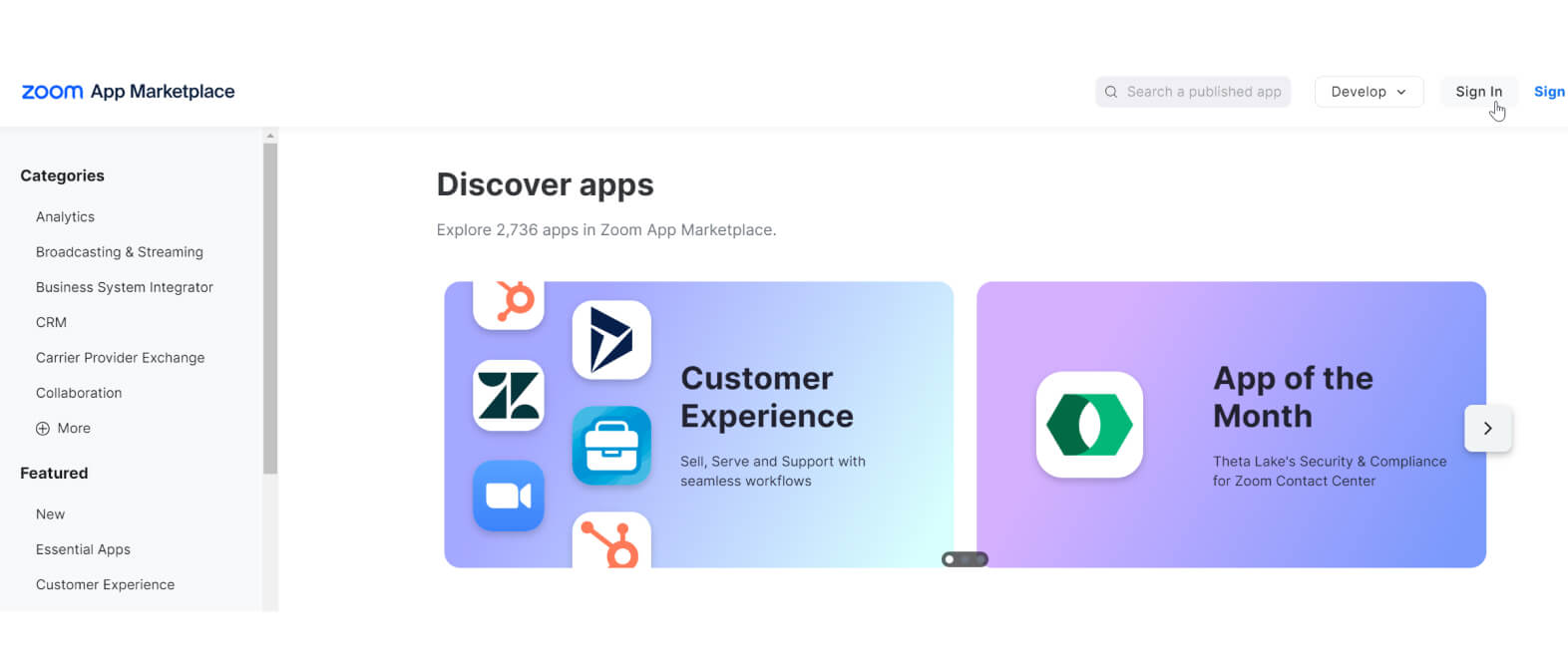
登入 [Zoom App Marketplace](https://marketplace.zoom.us/?_ga=2.103251648.1154531521.1721647878-1617708441.1707226255\&optimizely_user_id=efe7866fa2ae9ac46f7e6b8bb8e98da9) 並使用管理員憑證登入。
{% endstep %}
{% step %}
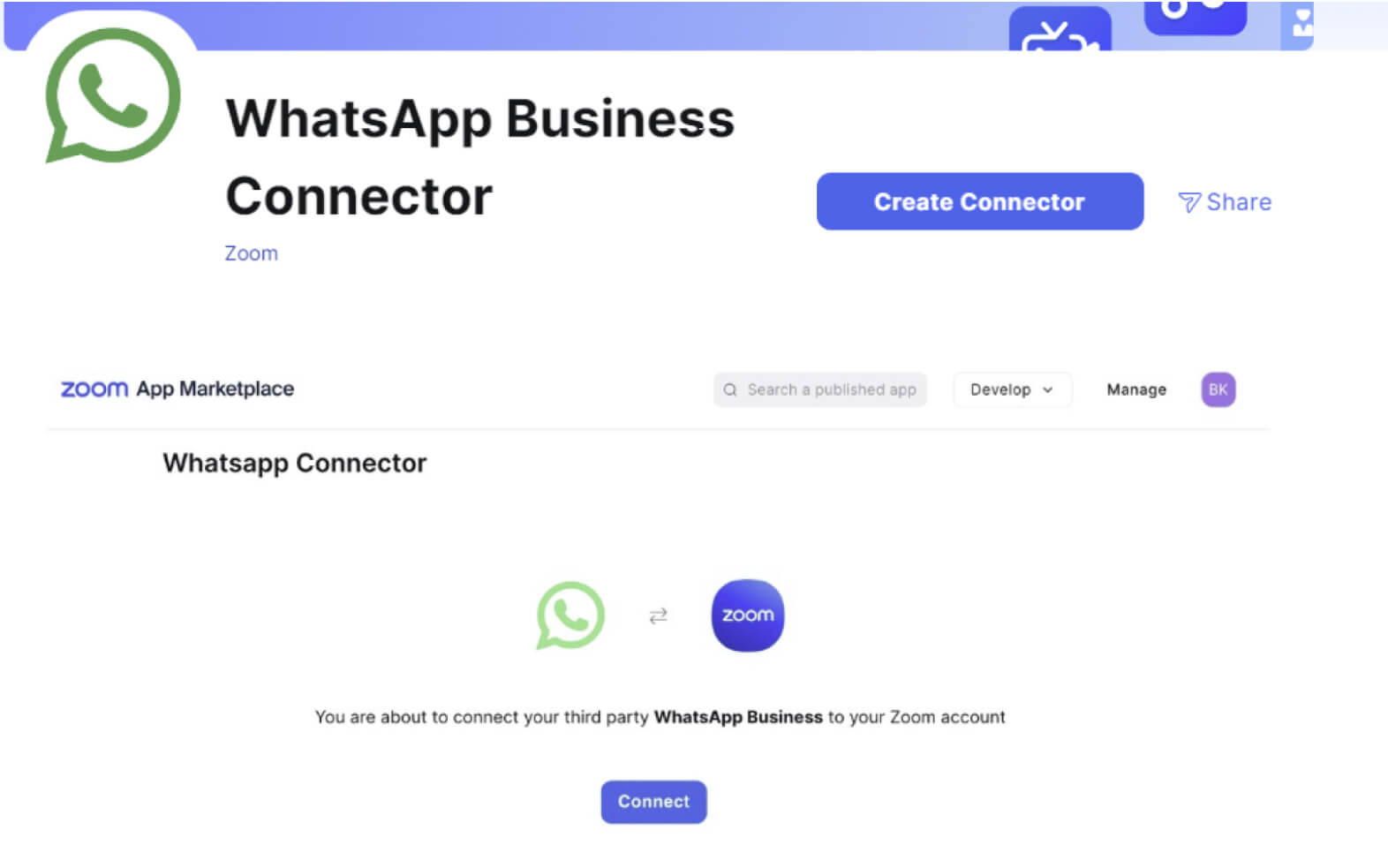
使用搜尋框尋找 **WhatsApp Business Connector** 應用程式。
點擊應用程式圖示或名稱以存取。
{% endstep %}
{% step %}
按一下 **建立連接器**.
{% endstep %}
{% step %}
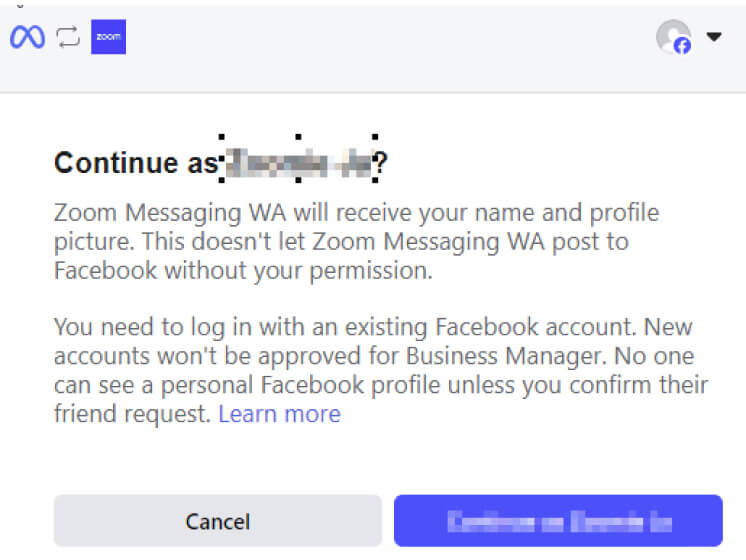
將會開啟一個新視窗並載入 WhatsApp Embedded Signup Flow(來自 Meta)。
* 輸入您的 Meta 管理員憑證,然後按下 **以 \[您的管理員帳號] 繼續**.
* 下一頁會提醒您整合所需的權限,請按下 **開始使用**.
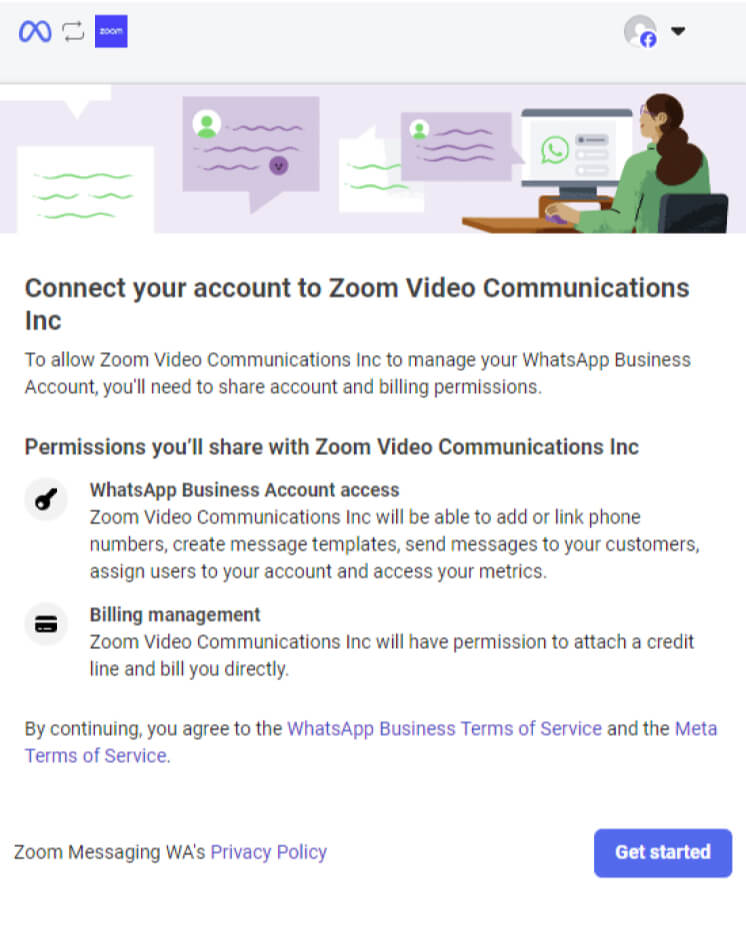
* 您可以選擇先前建立的 **WhatsApp 商業帳號** (Meta 前置需求)或從那時起開始建立新帳號的流程。
當將 WhatsApp Business Account(WABA)與像 Zoom 這類的 Business Service Provider(BSP)共享時,請記住一次只能有一個 WABA 連結到一個 BSP,因此您可以為 Zoom 建立新的 WABA,或移除目前 WABA 上現有的付款方式以繼續
{% endstep %}
{% step %}
建立新的 **WhatsApp 商業檔案** 並驗證您想要與您的 **WhatsApp 商業檔案**相關聯的電話號碼。此號碼將與您的品牌關聯,消費者可透過其個人 WhatsApp 帳號使用此號碼找到您的商業檔案並傳送訊息。
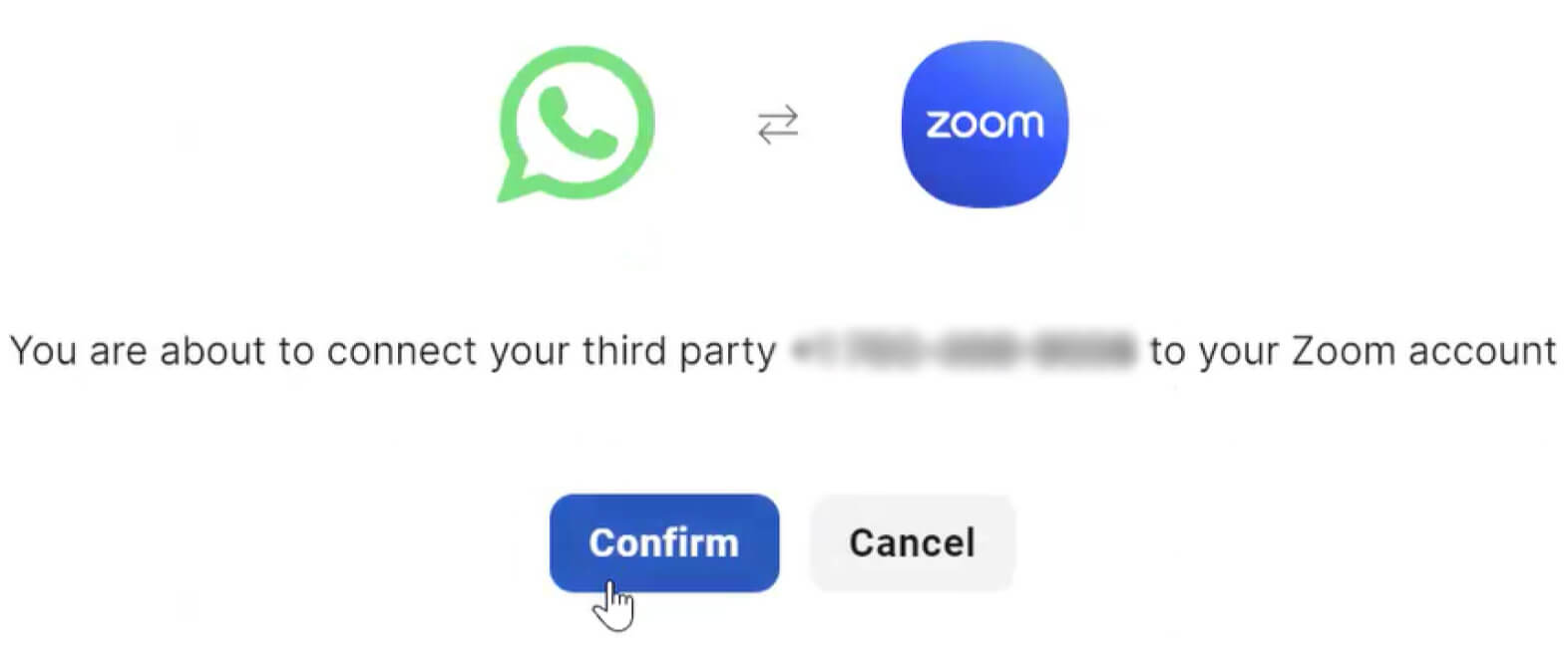
{% endstep %}
{% step %}
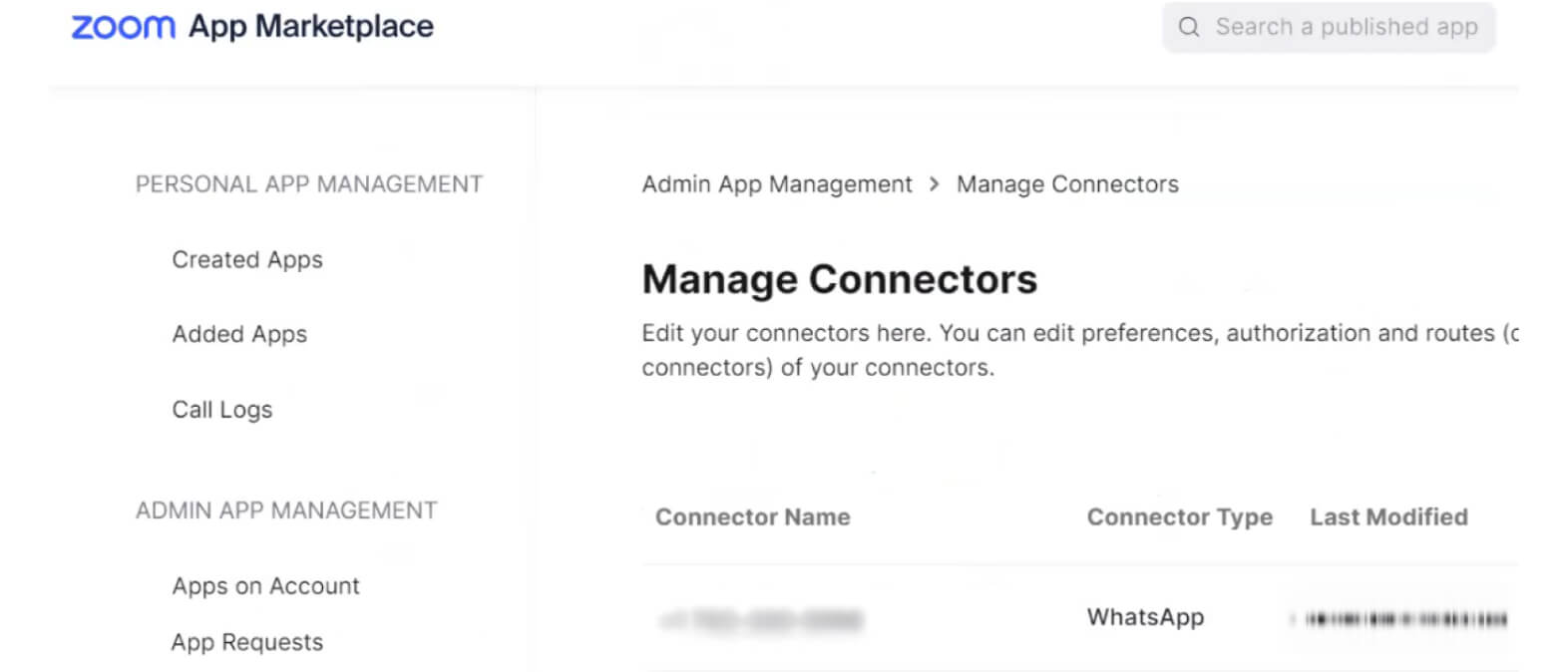
最後,連接器狀態將會顯示。
{% endstep %}
{% step %}
驗證完成後,您的 Meta 帳號與 Zoom 聯絡中心之間的連線即完成。
{% endstep %}
{% endstepper %}
### **建立消費者體驗**
**建立訊息佇列**
{% hint style="info" %}
**注意**
如果訊息佇列已建立,您可以略過此步驟。
{% endhint %}
我們將建立一個訊息佇列來處理消費者的互動。
{% stepper %}
{% step %}
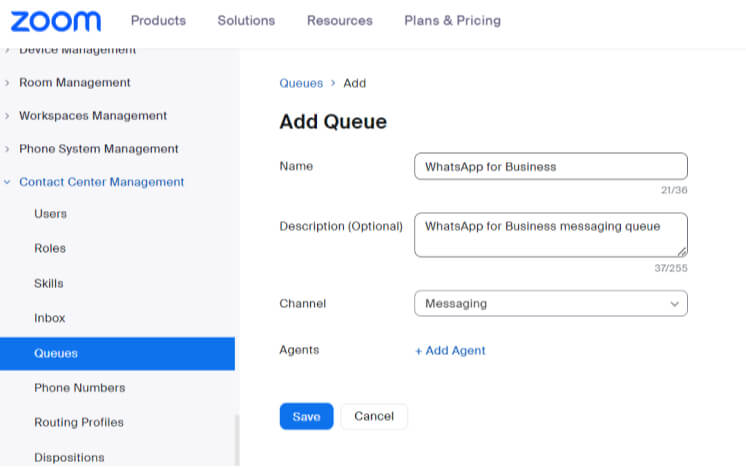
在 [**管理中心**](https://zoom.com/account) → **CX 管理** → **聯絡中心** → [**佇列**](https://zoom.com/cci/index/admin#/admin-queues) → 點擊 **+新增佇列**.
{% endstep %}
{% step %}
將您現有的代理人加入佇列,然後按一下儲存。
{% endstep %}
{% step %}
**選用:** 自訂佇列設定以符合您的偏好。
{% endstep %}
{% endstepper %}
#### **建立 WhatsApp for Business Flow**
此 Flow 可用於讓消費者完全自助服務、直接將他們導向佇列,或先蒐集資訊以進行資格判定,再將他們導向適當的人員。
以下是一個 Flow 範例,它會先判定請求類型,再將消費者傳送到正確的佇列。
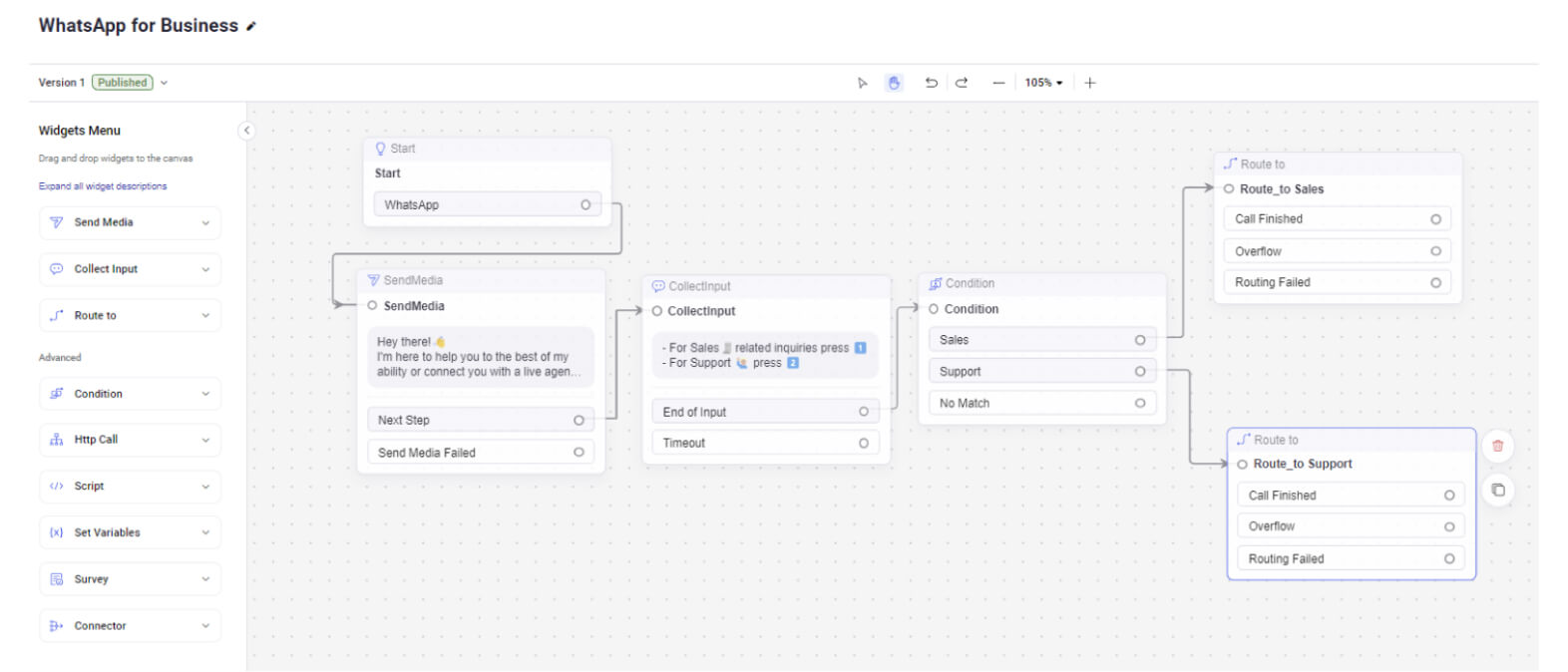
**開始小工具:**
開始小工具是工作流程中互動開始的起點。它用於定義客戶互動的進入點,為後續動作與流程奠定基礎。
**傳送媒體:**
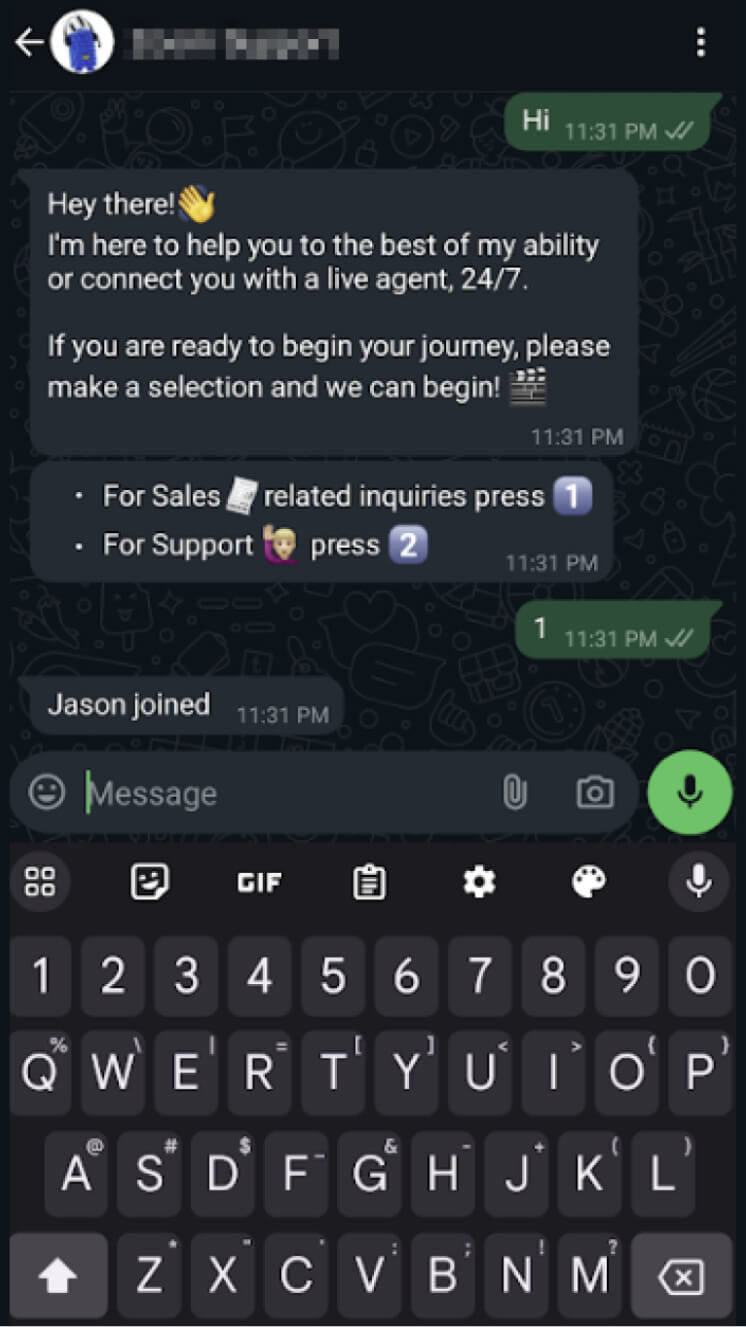
傳送媒體小工具可讓管理員傳送自動訊息。在我們的範例中,一旦收到消費者的訊息,我們會自動回覆這則第一則訊息
> *"嘿,你好!👋*
>
> *我會盡我所能協助您,或將您與真人客服聯繫,全年無休。"*
**蒐集輸入:**
蒐集輸入小工具用於從消費者收集資訊。這些資料可用於做出明智決策並適當路由互動。在我們的範例中,它用於顯示以下訊息:
> * 與銷售🧾相關的詢問請按 1️⃣
> * 如需支援 🙋🏼♂️ 請按 2️⃣
**條件:**
條件小工具用於評估工作流程中的特定準則或條件。根據評估結果,它可將互動導向不同路徑,從而實現客製化回應與動作。我們將檢視從 **收集輸入小工具** 中收集到的值,並將互動路由至兩個不同的出口。
* 如果值為 1 Route\_to\_Sales
* 如果值為 2 Rout\_to\_Support
**路由至**
路由至小工具用於將客戶互動導向聯絡中心中的適當流程、佇列或代理人。它有助於確保客戶的查詢由最合適的代理人或群組處理。
在此範例中,兩個「路由至」小工具實際上都路由到同一個佇列,但在實際情境中,每條路由都應有不同的目的地。
{% file src="/files/5b9ad453d2e2e865a3285c816ec25536bffca36b" %}
### **將已啟用 WhatsApp 的電話號碼與您的新 Flow 連結**
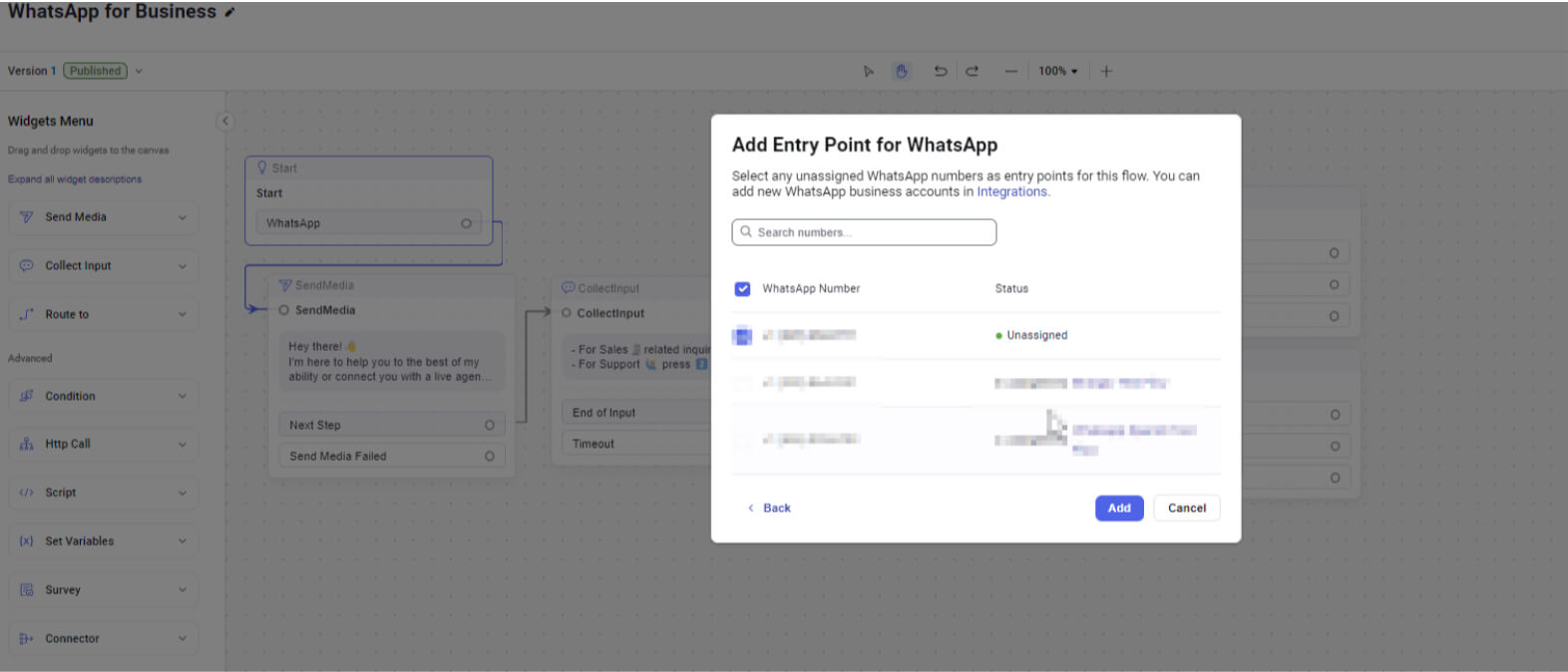
最後一部分是將 WhatsApp 電話號碼與 WhatsApp Flow 關聯。
{% stepper %}
{% step %}
按一下開始小工具,並選擇您要使用之 WhatsApp for Business 帳號所關聯的電話號碼。
{% endstep %}
{% step %}
完成後,使用 WhatsApp 的客戶即可開始與您的企業聯繫。
{% endstep %}
{% endstepper %}
#### **來電互動範例**
**WhatsApp 上的消費者**
**正在處理互動的 Zoom 聯絡中心代理人**
**WhatsApp 範本**
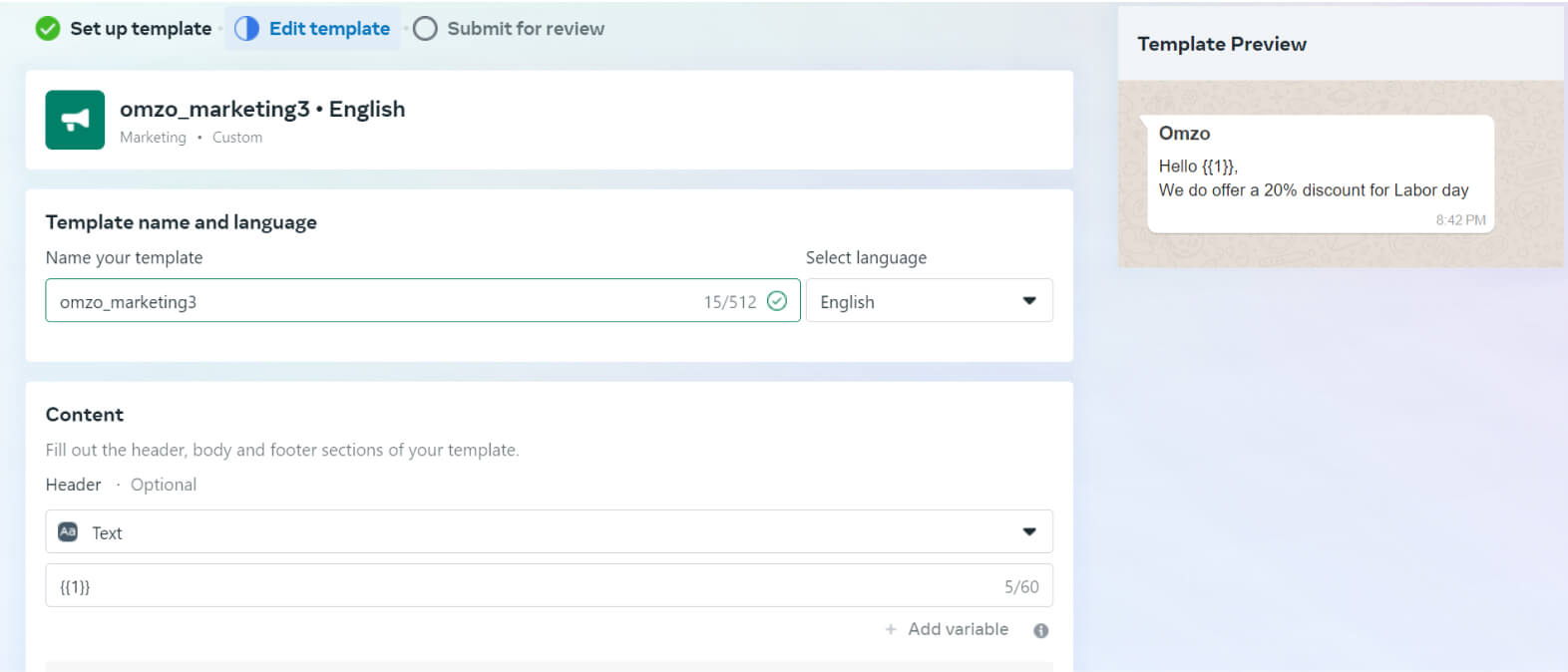
WhatsApp 訊息範本供代理人用於與消費者發起外撥 WhatsApp 互動。這些範本會在您的 WhatsApp 商業帳號中建立與管理。範本的作用類似「已儲存回覆」,可協助即使超過時間限制後,仍能維持順暢溝通。
這些範本不僅定義所傳送訊息的類型,也有助於有效管理帳單。
#### **WhatsApp 使用費用**
我們的 [WhatsApp 費率表](https://zoom.us/billing/pbx/rates?audioProduct=ZCC\&optimizely_user_id=efe7866fa2ae9ac46f7e6b8bb8e98da9) 為支援的國家/地區提供每種範本、每次對話的詳細定價資訊。它根據範本類型與各支援國家/地區提供清楚的費用明細。
**主要優點**
* **彈性的管道升級:** 代理人可順暢地將 WhatsApp 對話轉接為語音或視訊通話,在不需要任何額外授權的情況下,輕鬆切換到其他管道。
* **輕鬆的 AI 驅動支援:** 代理人可運用 AI Companion 取得即時對話摘要與情緒分析,並搭配 AI Expert Assist 獲得主動式指引與關鍵洞察,從而簡化互動並提升效率。
* **強化的支援與客戶體驗:** 主管可在互動期間使用插話、監看或接管功能,即時協助代理人。此能力可加快處理並提供更有依據的解決方案,進而提升客戶滿意度與更具個人化的服務體驗。
* **全面的報告與分析:** WhatsApp 互動可無縫擷取至 Zoom 聯絡中心,為管理者提供有價值的資料與洞察,以利做出明智決策並優化效能。
---
# Agent Instructions
This documentation is published with GitBook. GitBook is the documentation platform designed so that both humans and AI agents can read, navigate, and reason over technical content effectively. Learn more at gitbook.com.
## Querying This Documentation
If you need additional information that is not directly available in this page, you can query the documentation by asking a question.
Perform an HTTP GET request on the following URL with the `ask` and `goal` query parameters:
```
GET https://library.zoom.com/technical-library/zh-tw/shang-wu-fu-wu/zoom-contact-center/expert-insights/boosting-customer-reach-with-whatsapp-for-business-messaging-integration-for-zoom-contact-center.md?ask=&goal=
```
`ask` is the immediate question: it should be specific, self-contained, and written in natural language.
`goal` is what the user is ultimately trying to achieve, the reason they need the answer. Sharing it helps GitBook give you a better, more relevant answer. A goal is most helpful when it describes the outcome the user wants rather than restating the question. For example, with `ask=how do I create an API token`, a goal like `automate deployments from our CI pipeline` lets GitBook tailor the answer to that use case.
The response will contain a direct answer to the question and relevant excerpts and sources from the documentation.
Use this mechanism when the answer is not explicitly present in the current page, you need clarification or additional context, or you want to retrieve related documentation sections.