> For the complete documentation index, see [llms.txt](https://library.zoom.com/llms.txt). Markdown versions of documentation pages are available by appending `.md` to page URLs; this page is available as [Markdown](https://library.zoom.com/technical-library/vi/goc-quan-tri-vien/third-party-integrations/microsoft-365-calendaring-field-guide/troubleshooting.md).
# Khắc phục sự cố
Các vấn đề thường gặp và cách khắc phục.
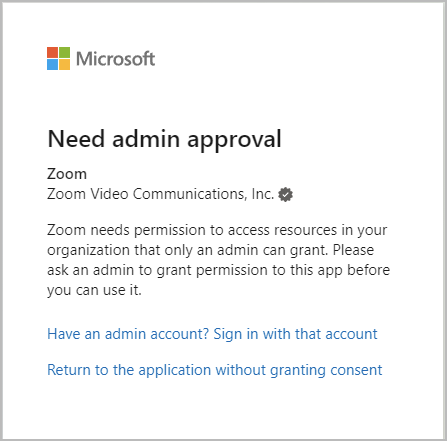
### Cần phê duyệt của quản trị viên
Khi kiểm tra các cấu hình tích hợp lịch, người dùng có thể gặp lỗi phê duyệt Microsoft 365, cho biết rằng Thành phần tích hợp yêu cầu phê duyệt của quản trị viên. Điều này có thể xảy ra nếu quyền đồng ý của người dùng giữa Azure và Zoom Workplace không khớp, hoặc nếu người dùng có cookie phiên từ một lần xác thực trước đó trước khi ứng dụng được phê duyệt.
Kiểm tra Thành phần tích hợp bằng cách bắt đầu một **duyệt web riêng tư** **phiên**, rồi lặp lại quy trình tích hợp lịch và người liên hệ cá nhân. Nếu thành công, lỗi là do cookie phiên Microsoft 365 trước đó và không có lỗi cấu hình. Nếu không thành công, hãy xác nhận rằng cài đặt quyền giữa Azure và Zoom Workplace khớp nhau. Nếu cài đặt quyền khớp nhau và lỗi vẫn tiếp diễn, phải khởi động lại quy trình cấu hình.
### Khởi động lại quy trình cấu hình
Việc khởi động lại yêu cầu API và quy trình phê duyệt yêu cầu xóa ứng dụng Zoom khỏi các ứng dụng Doanh nghiệp lớn của Azure.
1. Sử dụng tài khoản quản trị viên Microsoft 365 để điều hướng đến [Ứng dụng Doanh nghiệp lớn](https://portal.azure.com/#blade/Microsoft_AAD_IAM/StartboardApplicationsMenuBlade/AllApps/menuId/) phần trong cổng Azure.
2. Xác định các mã ứng dụng sau tùy theo phương thức thiết lập MGAPI của bạn:
1. *f46ceaed-fb2d-4694-803b-6341837f0ed2* (Quyền ứng dụng, Lịch cá nhân)
2. *f56e91e5-5a82-452f-b435-d4d78aeaf064* (Quyền ứng dụng, Zoom Rooms)
3. *fc108d3f-543d-4374-bbff-c7c51f651fe5* (Quyền truy cập ủy quyền OAuth, Lịch cá nhân)
4. *a651cfda-cbdd-4a39-bd03-fa829c3c1b29* (Quyền truy cập ủy quyền đầy đủ, Zoom Rooms)
3. Mở ứng dụng và Chọn **Thuộc tính**.
4. **Xóa** các ứng dụng.
5. Bắt đầu một phiên duyệt web riêng tư mới và cấu hình lại Thành phần tích hợp, bắt đầu từ phần đầu của tài liệu này.
Nếu lỗi vẫn tiếp diễn sau khi cấu hình lại ứng dụng, hãy liên hệ Hỗ trợ Zoom để được hỗ trợ thêm.
---
# Agent Instructions
This documentation is published with GitBook. GitBook is the documentation platform designed so that both humans and AI agents can read, navigate, and reason over technical content effectively. Learn more at gitbook.com.
## Querying This Documentation
If you need additional information that is not directly available in this page, you can query the documentation dynamically by asking a question.
Perform an HTTP GET request on the current page URL with the `ask` query parameter, and the optional `goal` query parameter:
```
GET https://library.zoom.com/technical-library/vi/goc-quan-tri-vien/third-party-integrations/microsoft-365-calendaring-field-guide/troubleshooting.md?ask=&goal=
```
`ask` is the immediate question: it should be specific, self-contained, and written in natural language.
`goal` is optional and describes the broader end goal you are ultimately trying to accomplish on behalf of the user. GitBook uses it to tailor the answer towards what is most useful for that goal.
The response will contain a direct answer to the question and relevant excerpts and sources from the documentation.
Use this mechanism when the answer is not explicitly present in the current page, you need clarification or additional context, or you want to retrieve related documentation sections.