> For the complete documentation index, see [llms.txt](https://library.zoom.com/llms.txt). Markdown versions of documentation pages are available by appending `.md` to page URLs; this page is available as [Markdown](https://library.zoom.com/technical-library/vi/dich-vu-kinh-doanh/zoom-contact-center/zoom-customer-experience/agent-experience/zoom-workforce-management.md).
# Zoom Quản lý nhân sự
Phần này cung cấp tổng quan ngắn gọn về trải nghiệm của nhân viên trong Quản lý nhân sự Zoom.
{% hint style="info" %}
**Ghi chú**\
Phần này giả định rằng người dùng được cấp giấy phép Quản lý nhân sự Zoom và sản phẩm được cấu hình đầy đủ trong một tài khoản, bao gồm các tính năng chính như Dự báo, Lên lịch, Hoạt động, Ca làm việc, và nhiều hơn nữa. Các quy trình được mô tả trong phần này không toàn diện và nhằm cung cấp sự hiểu biết chung về cách sử dụng sản phẩm hằng ngày. Độc giả có câu hỏi được khuyến khích tham khảo [phần Giải thích về Quản lý nhân sự Zoom](/technical-library/vi/dich-vu-kinh-doanh/zoom-workforce-management.md) để có cái nhìn tổng quan toàn diện về sản phẩm và các thành phần cơ bản của nó, hoặc trao đổi với đội ngũ Tài khoản Zoom của họ để biết thêm thông tin.
{% endhint %}
## Xem Lên lịch
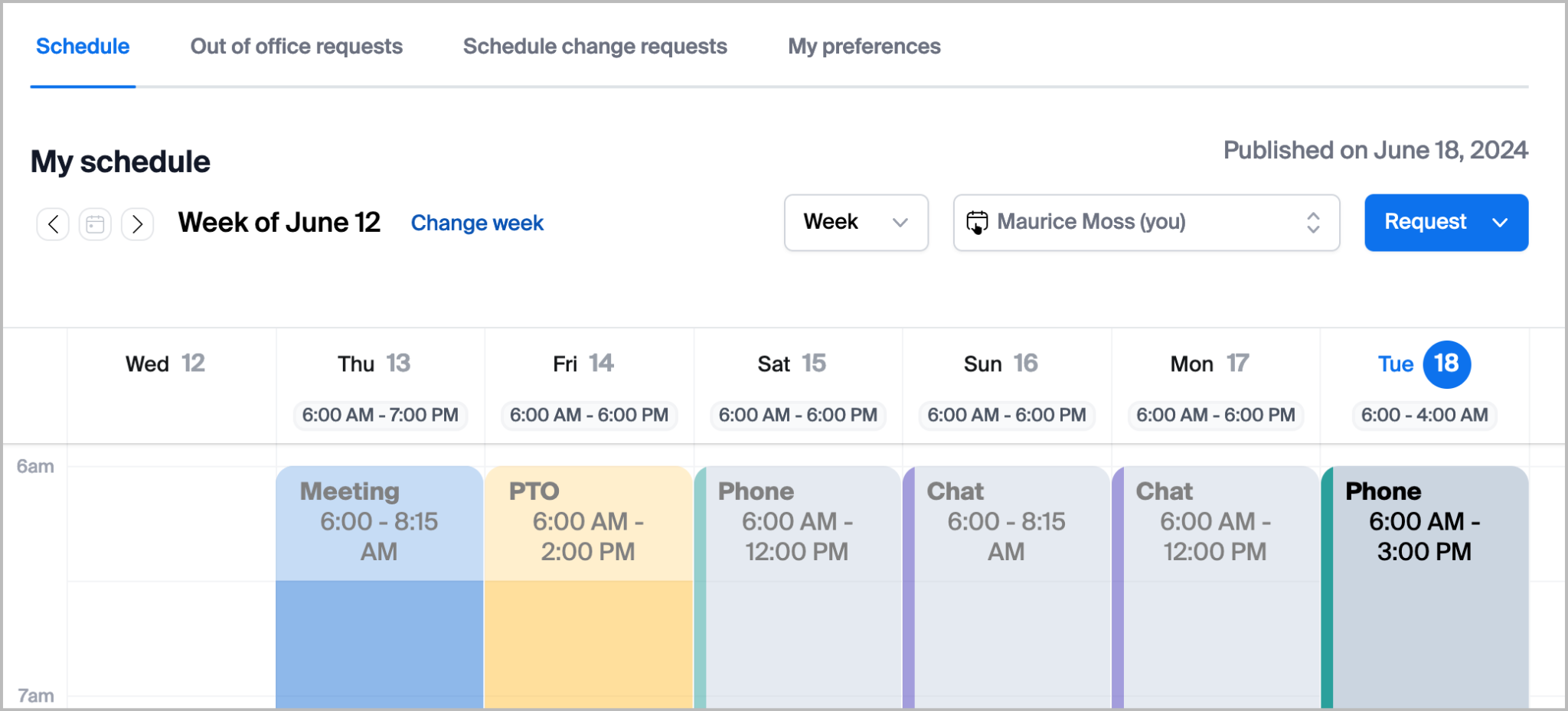
Từ cả cổng web và ứng dụng Zoom Workplace (phiên bản tối thiểu 6.7.5), các nhân viên Quản lý nhân sự có thể xem các Lên lịch đã được công bố, bao gồm các Hoạt động đã được lên lịch của họ trong suốt thời gian ca làm việc. Các nhân viên được ủy quyền có thể xem Lên lịch của các nhân viên khác trong cùng nhóm đang lên lịch.
## Yêu cầu Thay đổi Lên lịch
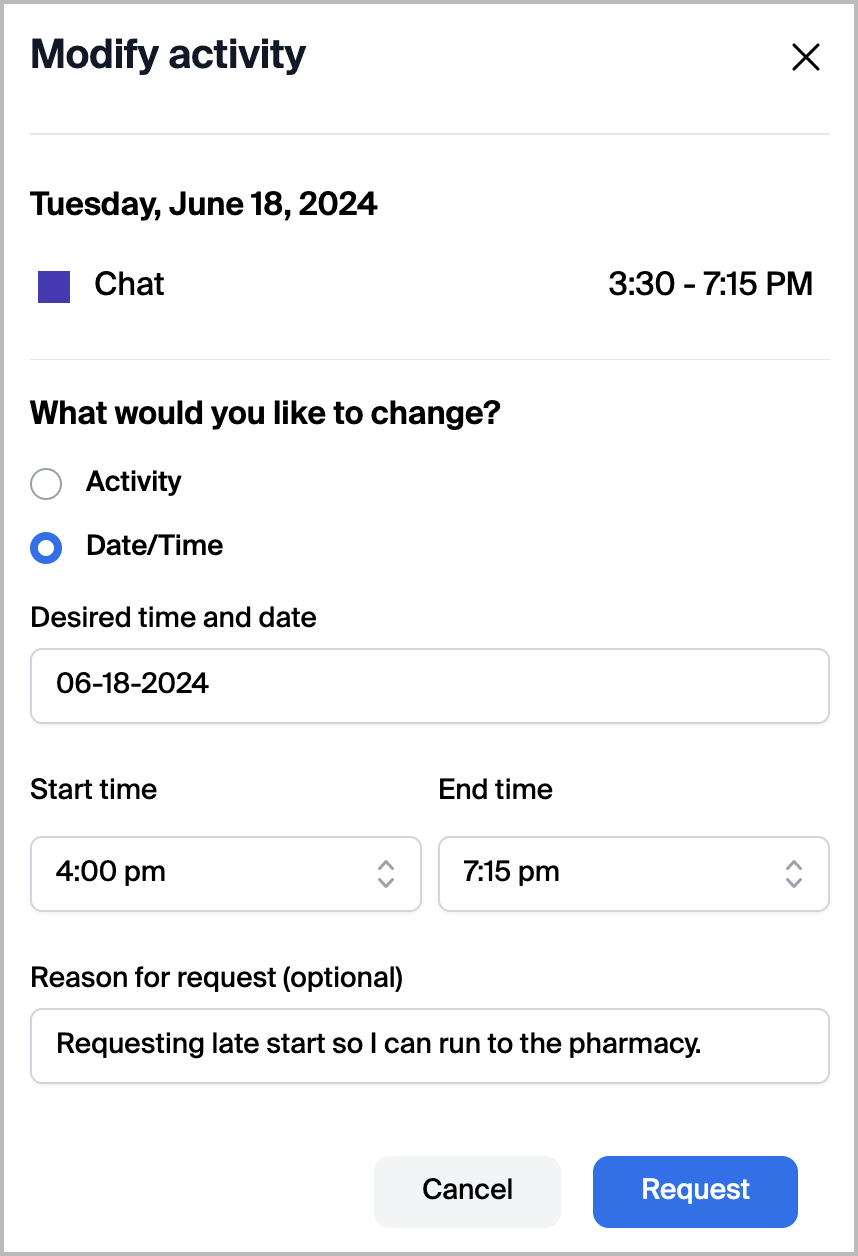
Các nhân viên được ủy quyền có thể yêu cầu Thêm, Thay đổi hoặc xóa Hoạt động đã được lên lịch của họ hoặc thời gian bắt đầu/kết thúc của một Hoạt động từ Lên lịch của họ. Điều này mang lại cho nhân viên sự linh hoạt để yêu cầu thay đổi Lên lịch theo tình huống khi có hoàn cảnh không lường trước hoặc để chuyển giờ nghỉ sang thời điểm khác. Nếu được một giám sát viên phê duyệt, điều này sẽ tự động áp dụng Hoạt động đã được sửa đổi vào Lên lịch của người dùng.
## Yêu cầu Ngoài văn phòng
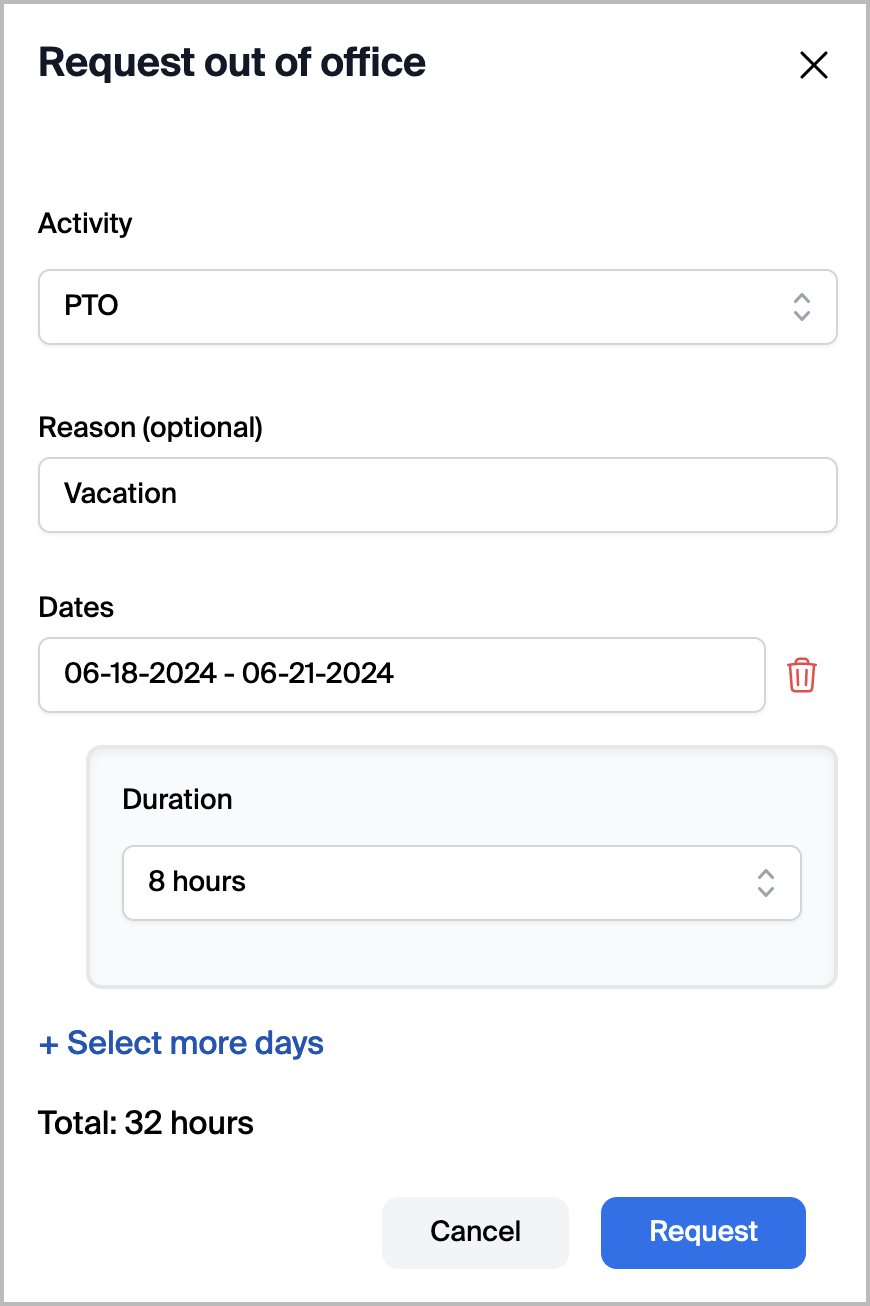
Tương tự như các Yêu cầu Thay đổi Lên lịch, nhân viên có thể sử dụng cổng web Quản lý nhân sự của họ để yêu cầu nghỉ phép. Nếu được một giám sát viên phê duyệt, điều này sẽ tự động áp dụng Hoạt động ngoài văn phòng liên quan vào Lên lịch của người dùng.
## Bảng của nhân viên
#### Nhân viên có thể sử dụng Bảng điều khiển Nhân viên để truy cập các cơ hội ca làm việc và quản lý các thay đổi Lên lịch
Bảng điều khiển Nhân viên cung cấp cho nhân viên một không gian làm việc để xem các đề nghị ca làm việc đang Đang rảnh, theo dõi các yêu cầu đã gửi và phản hồi tin nhắn của giám sát viên. Nhân viên tương tác với Bảng điều khiển Nhân viên để nhận thêm ca làm việc, yêu cầu nghỉ tự nguyện hoặc khởi tạo trao đổi ca với các nhân viên khác.
#### Nhân viên nhận các đề nghị được tạo bởi giám sát viên
Giao diện Bảng điều khiển Nhân viên hiển thị các đề nghị do giám sát viên tạo. Các đề nghị này có thể bao gồm thêm ca làm việc khi trung tâm liên hệ thiếu nhân sự, hoặc các cơ hội nghỉ tự nguyện khi trung tâm liên hệ thừa nhân sự. Nhân viên xem xét các đề nghị hiện có và gửi yêu cầu đối với những đề nghị họ muốn chấp nhận.
#### Các yêu cầu chờ phê duyệt sau khi gửi
Sau khi một nhân viên nhận một đề nghị, yêu cầu đó sẽ bước vào trạng thái xem xét. Một số yêu cầu được phê duyệt tự động dựa trên các quy tắc tự động hóa được xác định trước. Các yêu cầu khác cần được giám sát viên phê duyệt thủ công. Nhân viên có thể theo dõi trạng thái của các yêu cầu đã gửi thông qua giao diện Bảng điều khiển Nhân viên.
#### Yêu cầu hoán đổi cho phép nhân viên tìm đối tác trao đổi
Yêu cầu hoán đổi cho phép nhân viên đăng yêu cầu trao đổi ca khi họ không có một đối tác trao đổi cụ thể trong đầu. Nhân viên đăng yêu cầu hoán đổi thông qua giao diện Bảng điều khiển Nhân viên, giúp chúng hiển thị cho các nhân viên khác, những người có thể đề xuất một trao đổi. Điều này khác với các hoán đổi trực tiếp một-một, mà nhân viên thương lượng độc lập.
{% hint style="info" %}
Các trao đổi trực tiếp diễn ra bên ngoài giao diện Bảng điều khiển Nhân viên. Nhân viên có thể thương lượng trao đổi ca một-một với các nhân viên khác thông qua giao diện Lên lịch, không phải Bảng điều khiển Nhân viên. Các trao đổi trực tiếp chỉ giới hạn ở việc trao đổi nguyên cả ngày.
{% endhint %}
---
# Agent Instructions
This documentation is published with GitBook. GitBook is the documentation platform designed so that both humans and AI agents can read, navigate, and reason over technical content effectively. Learn more at gitbook.com.
## Querying This Documentation
If you need additional information that is not directly available in this page, you can query the documentation by asking a question.
Perform an HTTP GET request on the following URL with the `ask` and `goal` query parameters:
```
GET https://library.zoom.com/technical-library/vi/dich-vu-kinh-doanh/zoom-contact-center/zoom-customer-experience/agent-experience/zoom-workforce-management.md?ask=&goal=
```
`ask` is the immediate question: it should be specific, self-contained, and written in natural language.
`goal` is what the user is ultimately trying to achieve, the reason they need the answer. Sharing it helps GitBook give you a better, more relevant answer. A goal is most helpful when it describes the outcome the user wants rather than restating the question. For example, with `ask=how do I create an API token`, a goal like `automate deployments from our CI pipeline` lets GitBook tailor the answer to that use case.
The response will contain a direct answer to the question and relevant excerpts and sources from the documentation.
Use this mechanism when the answer is not explicitly present in the current page, you need clarification or additional context, or you want to retrieve related documentation sections.