> For the complete documentation index, see [llms.txt](https://library.zoom.com/llms.txt). Markdown versions of documentation pages are available by appending `.md` to page URLs; this page is available as [Markdown](https://library.zoom.com/technical-library/vi/dich-vu-kinh-doanh/zoom-contact-center/expert-insights/configuring-agent-occupied-rules/channel-load-monitoring.md).
# Giám sát tải kênh
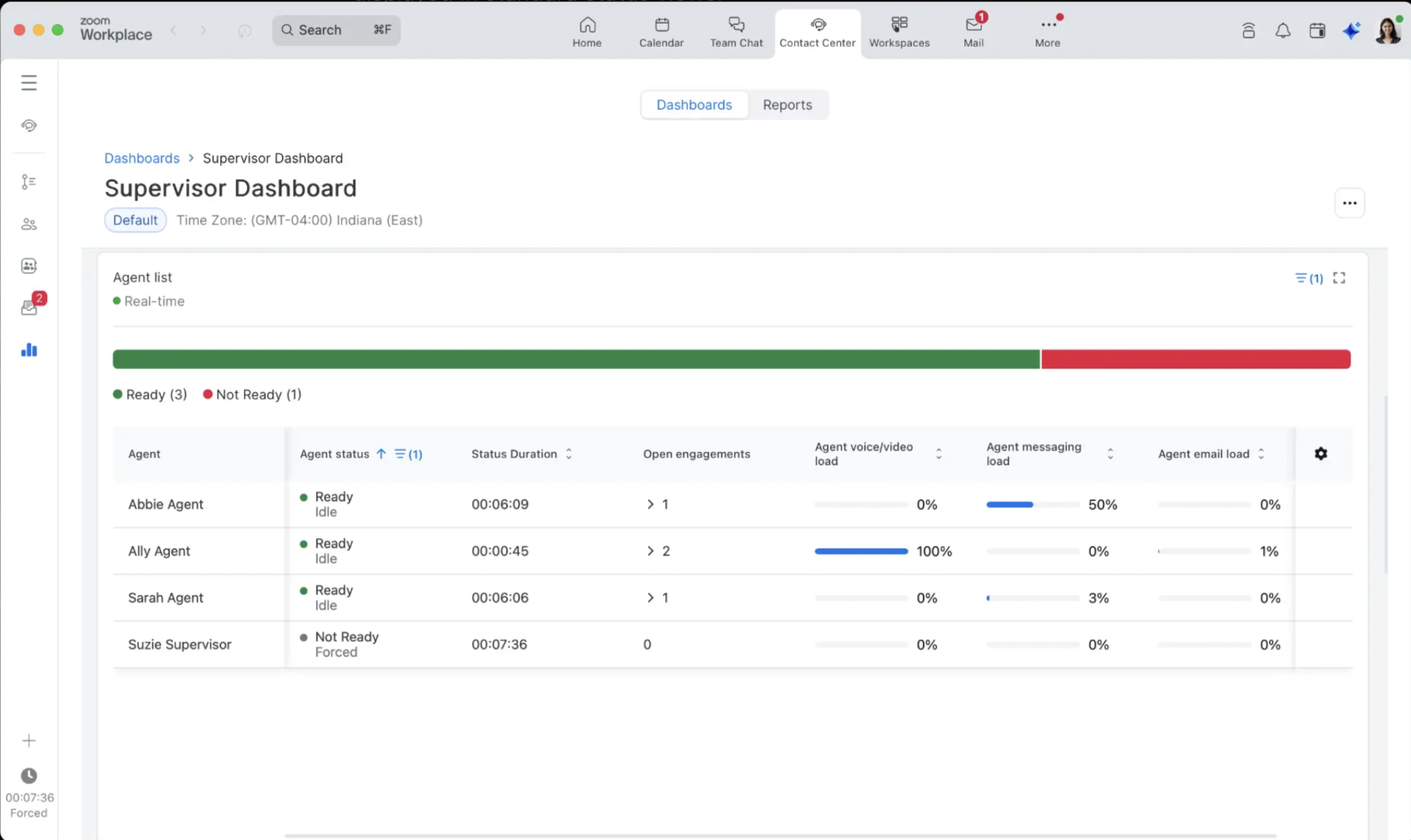
Giám sát viên có thể Truy cập Bảng điều khiển số liệu phân tích CX và các báo cáo để xem thông tin toàn diện về tải kênh, vì dữ liệu chi tiết này không được hiển thị trong các chế độ xem trạng thái Tiêu chuẩn.
**Giám sát viên nên theo dõi**:
* Số lượng tương tác hiện tại theo từng loại kênh
* Dung lượng còn lại trước khi ở trạng thái bận
* Các mẫu sử dụng theo từng kênh
* Hiệu quả của quy tắc bận và các cơ hội tối ưu hóa
**Các thực hành tốt nhất về số liệu phân tích**:
Thay vì chỉ đơn giản đếm các nhân viên "Sẵn sàng", giám sát viên nên:
1. Hiểu các Quy tắc Bận đã cấu hình cho nhóm của họ
2. Theo dõi các Cài đặt dung lượng tương tác trên các hồ sơ nhân viên khác nhau
3. Phân tích phân bổ tải kênh và các mẫu
4. Sử dụng số liệu phân tích toàn diện để đưa ra quyết định về nhân sự và Định tuyến
---
# Agent Instructions
This documentation is published with GitBook. GitBook is the documentation platform designed so that both humans and AI agents can read, navigate, and reason over technical content effectively. Learn more at gitbook.com.
## Querying This Documentation
If you need additional information that is not directly available in this page, you can query the documentation by asking a question.
Perform an HTTP GET request on the following URL with the `ask` and `goal` query parameters:
```
GET https://library.zoom.com/technical-library/vi/dich-vu-kinh-doanh/zoom-contact-center/expert-insights/configuring-agent-occupied-rules/channel-load-monitoring.md?ask=&goal=
```
`ask` is the immediate question: it should be specific, self-contained, and written in natural language.
`goal` is what the user is ultimately trying to achieve, the reason they need the answer. Sharing it helps GitBook give you a better, more relevant answer. A goal is most helpful when it describes the outcome the user wants rather than restating the question. For example, with `ask=how do I create an API token`, a goal like `automate deployments from our CI pipeline` lets GitBook tailor the answer to that use case.
The response will contain a direct answer to the question and relevant excerpts and sources from the documentation.
Use this mechanism when the answer is not explicitly present in the current page, you need clarification or additional context, or you want to retrieve related documentation sections.