> For the complete documentation index, see [llms.txt](https://library.zoom.com/llms.txt). Markdown versions of documentation pages are available by appending `.md` to page URLs; this page is available as [Markdown](https://library.zoom.com/technical-library/tr/isletme-hizmetleri/zoom-contact-center/expert-insights/configuring-agent-occupied-rules/implementation-best-practices.md). Agents can also search and read this documentation through its [MCP server](https://library.zoom.com/~gitbook/mcp).
# Uygulama En İyi Yöntemleri
### İşletme Gereksinimlerinizi Belirleyin
Kuralları yapılandırmadan önce, çok kanallılığın operasyonunuz için ne anlama geldiğini belirleyin:
**Önemli Sorular**:
* Bir temsilcinin meşgul veya başka bir işle uğraşıyor sayılması için hangi kanallar dikkate alınmalı?
* Belirli kanallar (ör. ses/video), diğerlerine (ör. mesajlaşma, e-posta) göre her zaman öncelikli olmalı mı?
* Kanal doluluğu her kanal için ayrı ayrı mı değerlendirilmeli, yoksa birden fazla kanal birlikte mi ele alınmalı?
* Temsilcileriniz sesli görüşme sırasında mesajlaşma etkileşimlerini yönetebilir mi, yoksa bu çoklu görev müşteri hizmetlerinin kalitesini düşürür mü?
Kurallarınız yalnızca teknik yeterlilikleri değil, gerçek hizmet standartlarını yansıtmalı. Temsilci verimliliğinin yanı sıra müşteri deneyimine etkisini de göz önünde bulundurun.
### Tutarlılık için Şablonları Kullanın
Farklı temsilci rolleri için aşağıdakileri içeren Kullanıcı Şablonları oluşturun:
* Her kanal için uygun Etkileşim Kapasitesi ayarları
* Meşgul Kuralları yapılandırması
* Benzer roller arasında tutarlı uygulama
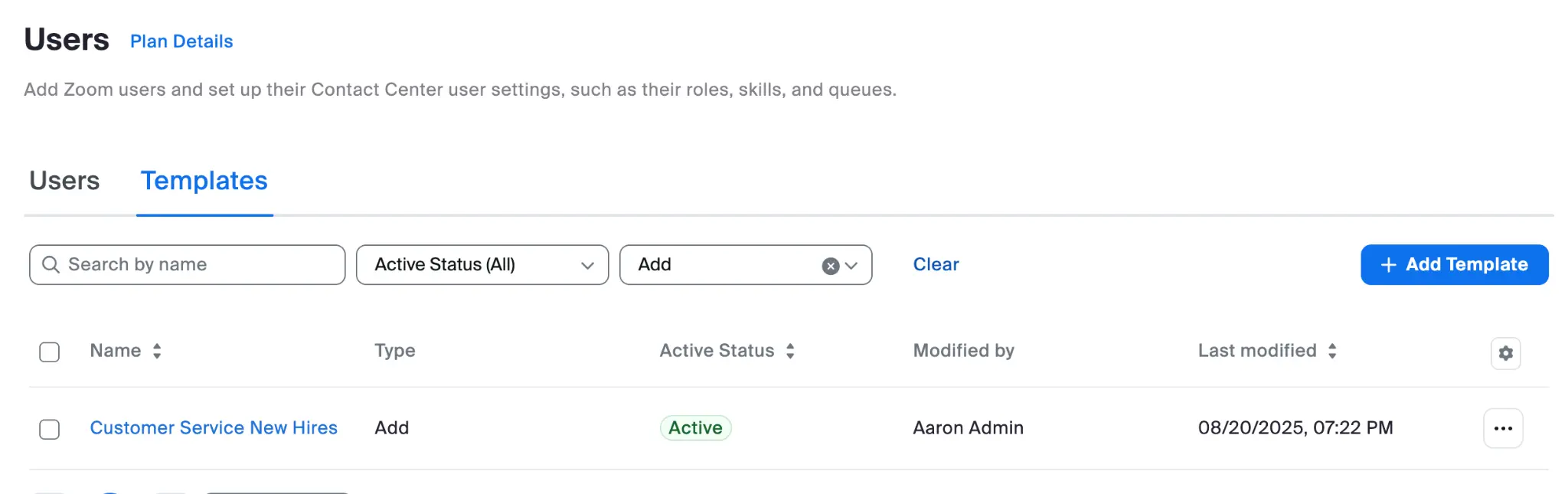
#### Yeni İşe Alınanlar için Şablon Örneği
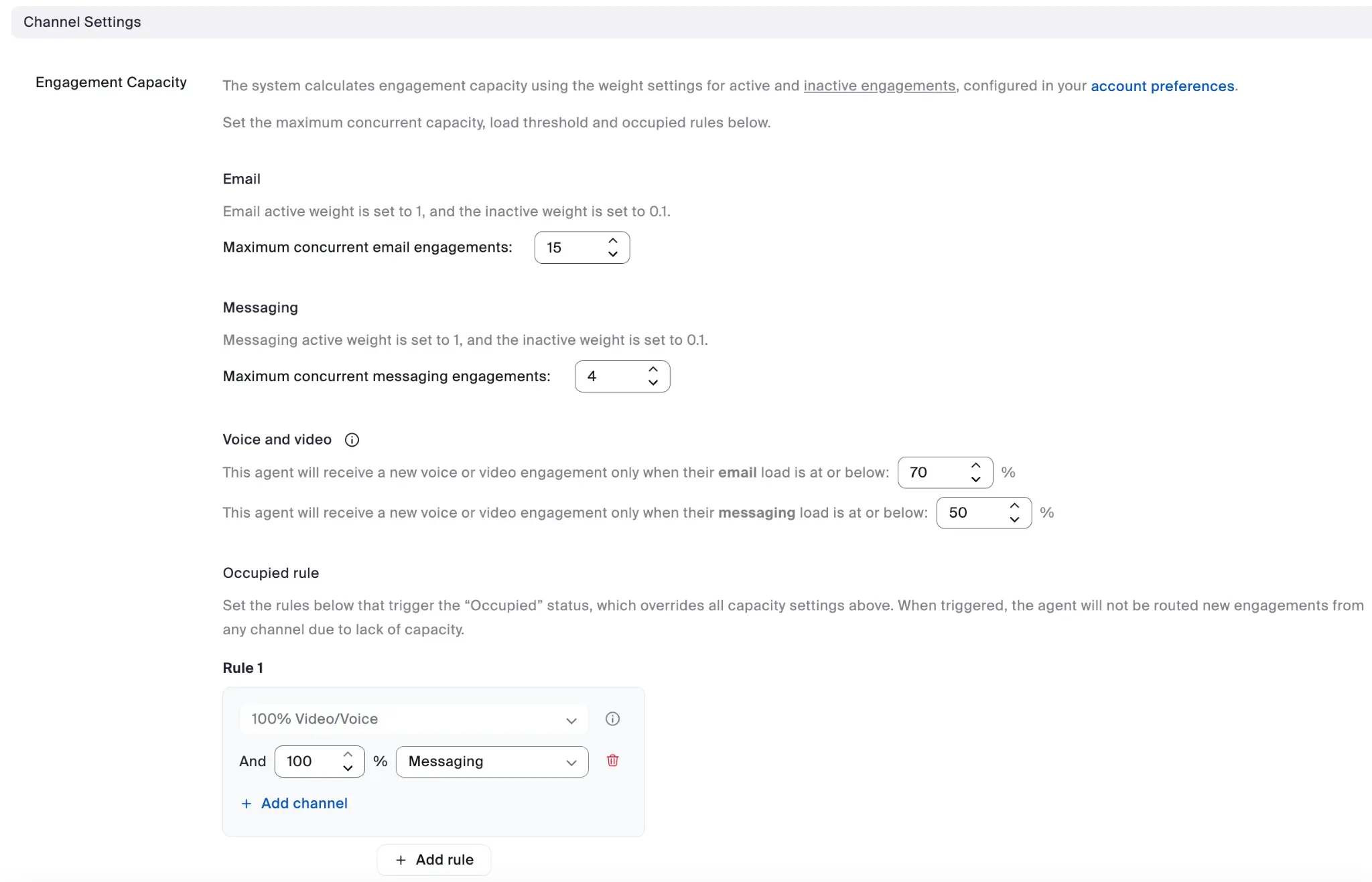
#### Kanal Ayarları Örneği
Her kullanıcı şablonunda, tüm kanal ayarlarına yönelik etkileşim kapasitesi yapılandırması belirtilebilir.
Şablon kullanmanın avantajları şunlardır:
* Temsilci grupları arasında tutarlı yapılandırma
* Yeni temsilciler için basitleştirilmiş Katılım süreci
* İşletme ihtiyaçları Değiştirildiğinde toplu güncellemeleri kolaylaştırır
---
# Agent Instructions
This documentation is published with GitBook. GitBook is the documentation platform designed so that both humans and AI agents can read, navigate, and reason over technical content effectively. Learn more at gitbook.com.
## Querying This Documentation
If you need additional information that is not directly available in this page, you can query the documentation by asking a question.
Perform an HTTP GET request on the following URL with the `ask` and `goal` query parameters:
```
GET https://library.zoom.com/technical-library/tr/isletme-hizmetleri/zoom-contact-center/expert-insights/configuring-agent-occupied-rules/implementation-best-practices.md?ask=&goal=
```
`ask` is the immediate question: it should be specific, self-contained, and written in natural language.
`goal` is what the user is ultimately trying to achieve, the reason they need the answer. Sharing it helps GitBook give you a better, more relevant answer. A goal is most helpful when it describes the outcome the user wants rather than restating the question. For example, with `ask=how do I create an API token`, a goal like `automate deployments from our CI pipeline` lets GitBook tailor the answer to that use case.
The response will contain a direct answer to the question and relevant excerpts and sources from the documentation.
Use this mechanism when the answer is not explicitly present in the current page, you need clarification or additional context, or you want to retrieve related documentation sections.