> For the complete documentation index, see [llms.txt](https://library.zoom.com/llms.txt). Markdown versions of documentation pages are available by appending `.md` to page URLs; this page is available as [Markdown](https://library.zoom.com/technical-library/tr/gelismis-kurumsal-hizmetler/zoom-node/zoom-conference-room-connector-hybrid.md).
# Zoom Konferans Odası Bağlayıcısı Hibrit
#### Zoom Konferans Odası Bağlayıcısı Hibrit: Konferans odaları için Hibrit Toplantılar
Zoom’un Konferans Odası Bağlayıcısı Hibrit’i, Zoom’unkine benzer [Meetings Hibrit](/technical-library/tr/gelismis-kurumsal-hizmetler/zoom-node/zoom-meetings-hybrid.md) çözüm, hibrit ve özel toplantılar için destek dahil olmak üzere, ancak Zoom Workplace uygulamalarını desteklemek yerine, eski SIP ve H.323 konferans odası sistemleri için destek sağlar.
Bu ürünle, birden fazla konferans odası, eş zamanlı olarak gelen ve giden medya akışlarını alıp çoklayabilen ve Zoom bulut'a yeniden dağıtabilen yerel, hibrit Zoom Node cihazına bağlanabilir; varsayılan olarak modül başına en fazla 8 eş zamanlı yüksek çözünürlüklü konferans odasını destekler. Konferans Odası Bağlayıcısı Hibrit modülü ayrıca, toplantı içi sohbet, tepkiler, düzen denetimleri ve tek düğmeyle katılma işlevi desteği dahil olmak üzere toplantı deneyimine yönelik diğer önemli özellikleri de destekler.
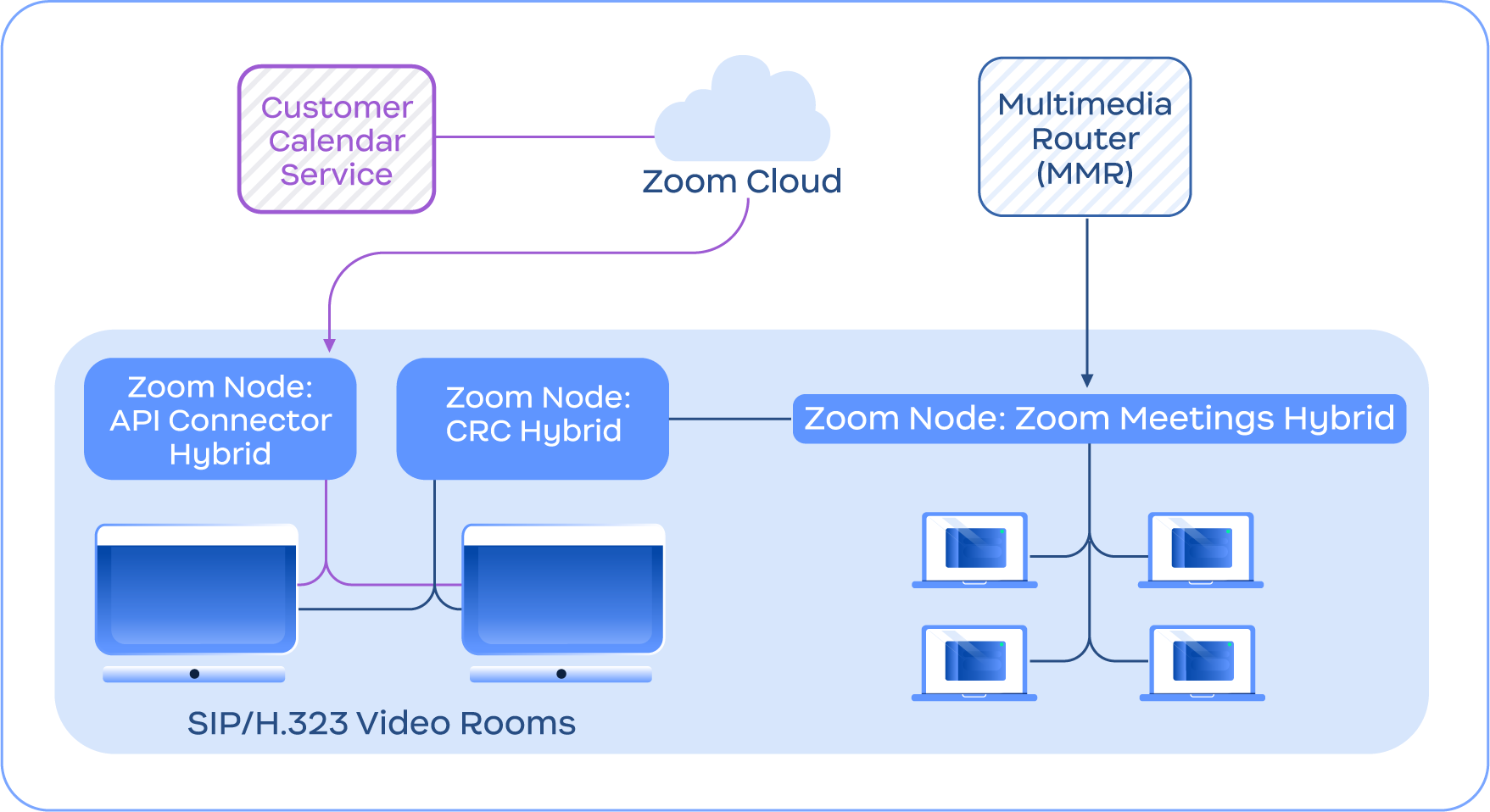
Aşağıdaki görsel, entegre takvimlendirme için API Bağlayıcı Hibrit gibi diğer Konferans Odası Bağlayıcısı Hibrit özelliklerine ek olarak, Konferans Odası Bağlayıcısı Hibrit hizmetinin Meetings Hibrit hizmetiyle entegre olduğunu gösteren bir örnek sunar.
Konferans Odası Bağlayıcısı Hibrit hizmetinin Zoom bulut ve Meetings Hibrit modülüyle Bağlanıyor olduğunu gösteren diyagram
{% hint style="info" %}
**Not**
Konferans Odası Bağlayıcısı Hibrit, Zoom Meetings Hibrit gerektirmez ve yalnızca örnekleme amacıyla dahil edilmiştir.
{% endhint %}
---
# Agent Instructions
This documentation is published with GitBook. GitBook is the documentation platform designed so that both humans and AI agents can read, navigate, and reason over technical content effectively. Learn more at gitbook.com.
## Querying This Documentation
If you need additional information that is not directly available in this page, you can query the documentation by asking a question.
Perform an HTTP GET request on the following URL with the `ask` and `goal` query parameters:
```
GET https://library.zoom.com/technical-library/tr/gelismis-kurumsal-hizmetler/zoom-node/zoom-conference-room-connector-hybrid.md?ask=&goal=
```
`ask` is the immediate question: it should be specific, self-contained, and written in natural language.
`goal` is what the user is ultimately trying to achieve, the reason they need the answer. Sharing it helps GitBook give you a better, more relevant answer. A goal is most helpful when it describes the outcome the user wants rather than restating the question. For example, with `ask=how do I create an API token`, a goal like `automate deployments from our CI pipeline` lets GitBook tailor the answer to that use case.
The response will contain a direct answer to the question and relevant excerpts and sources from the documentation.
Use this mechanism when the answer is not explicitly present in the current page, you need clarification or additional context, or you want to retrieve related documentation sections.