> For the complete documentation index, see [llms.txt](https://library.zoom.com/llms.txt). Markdown versions of documentation pages are available by appending `.md` to page URLs; this page is available as [Markdown](https://library.zoom.com/technical-library/tr/gelismis-kurumsal-hizmetler/zoom-node/zoom-conference-room-connector-hybrid.md).
# Zoom Konferans Odası Bağlayıcısı Hibrit
#### Zoom Konferans Odası Bağlayıcısı Hybrid: Konferans Odaları için Hibrit Toplantılar
Zoom’un Konferans Odası Bağlayıcısı Hybrid çözümü, Zoom’un [Meetings Hybrid](https://library.zoom.com/technical-library/tr/gelismis-kurumsal-hizmetler/zoom-node/zoom-meetings-hybrid.md) çözümüne benzer ve hibrit ve özel toplantıları da destekler; ancak Zoom Workplace uygulamaları yerine eski SIP ve H.323 konferans odası sistemlerini destekler.
Bu ürün sayesinde birden fazla konferans odası, Gelen ve Giden medya akışlarını aynı anda alabilen, çoklayabilen ve Zoom bulut ortamına yeniden dağıtabilen şirket içi hibrit Zoom Node cihazına bağlanabilir. Cihaz, varsayılan olarak modül başına 8 adede kadar Eş Zamanlı yüksek çözünürlüklü konferans odasını destekler. Konferans Odası Bağlayıcısı Hybrid modülü ayrıca toplantı deneyimi için önemli olan toplantı içi sohbet, tepkiler, düzenleri kontrol etme ve tek düğmeyle katılma gibi özellikleri de destekler.
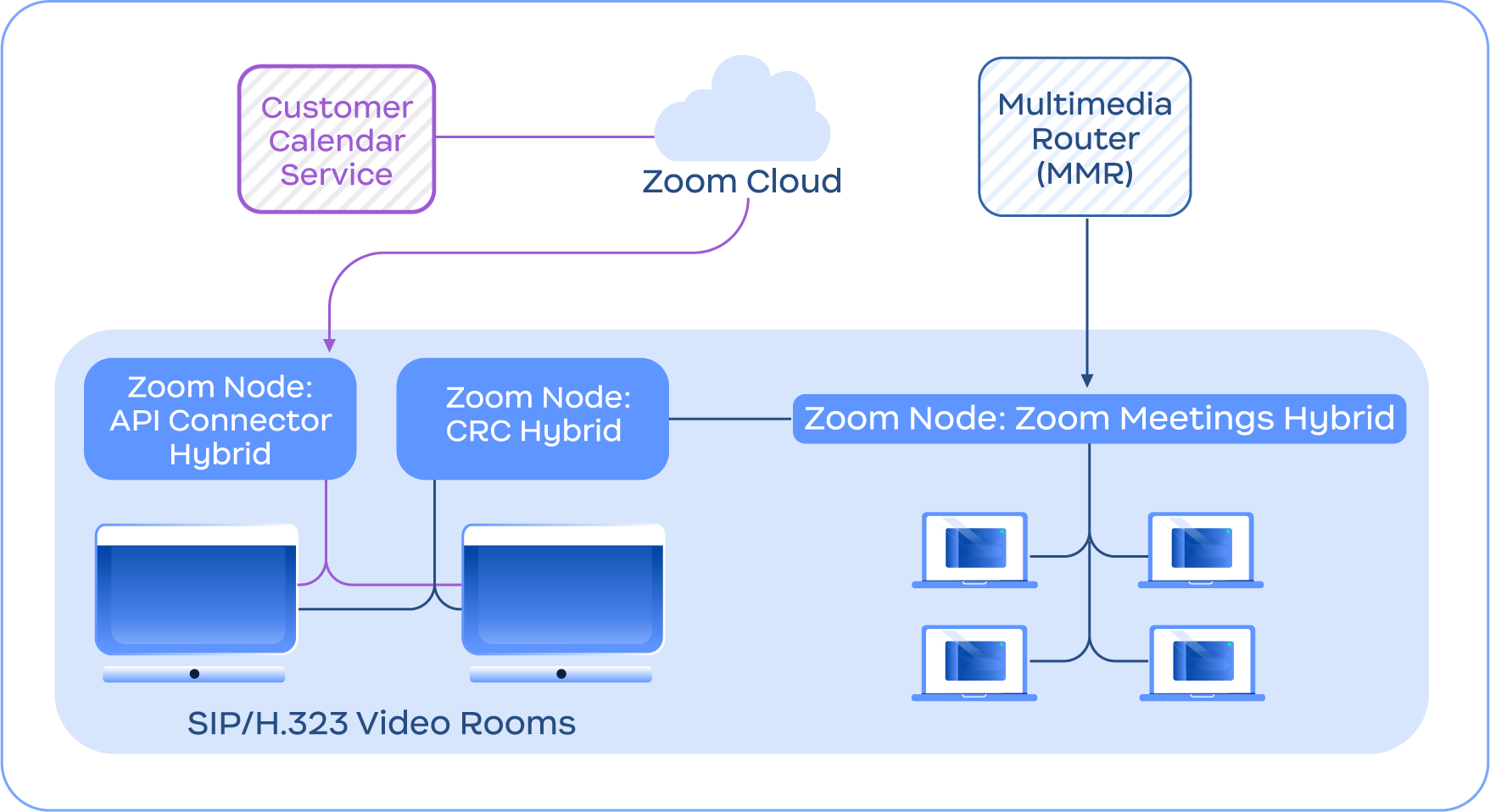
Aşağıdaki görselde, Konferans Odası Bağlayıcısı Hybrid hizmetinin Meetings Hybrid hizmetiyle entegrasyonuna ve Konferans Odası Bağlayıcısı Hybrid’in entegre takvim için API Bağlayıcı Hybrid gibi diğer özelliklerine bir örnek gösterilmektedir.
Konferans Odası Bağlayıcısı Hybrid hizmetinin Zoom bulut ortamına ve Meetings Hybrid modülüne bağlanmasını gösteren diyagram
{% hint style="info" %}
**Not**
Konferans Odası Bağlayıcısı Hybrid, Zoom Meetings Hybrid gerektirmez; Zoom Meetings Hybrid yalnızca örnek olarak gösterilmiştir.
{% endhint %}
---
# Agent Instructions
This documentation is published with GitBook. GitBook is the documentation platform designed so that both humans and AI agents can read, navigate, and reason over technical content effectively. Learn more at gitbook.com.
## Querying This Documentation
If you need additional information that is not directly available in this page, you can query the documentation by asking a question.
Perform an HTTP GET request on the following URL with the `ask` and `goal` query parameters:
```
GET https://library.zoom.com/technical-library/tr/gelismis-kurumsal-hizmetler/zoom-node/zoom-conference-room-connector-hybrid.md?ask=&goal=
```
`ask` is the immediate question: it should be specific, self-contained, and written in natural language.
`goal` is what the user is ultimately trying to achieve, the reason they need the answer. Sharing it helps GitBook give you a better, more relevant answer. A goal is most helpful when it describes the outcome the user wants rather than restating the question. For example, with `ask=how do I create an API token`, a goal like `automate deployments from our CI pipeline` lets GitBook tailor the answer to that use case.
The response will contain a direct answer to the question and relevant excerpts and sources from the documentation.
Use this mechanism when the answer is not explicitly present in the current page, you need clarification or additional context, or you want to retrieve related documentation sections.