> For the complete documentation index, see [llms.txt](https://library.zoom.com/llms.txt). Markdown versions of documentation pages are available by appending `.md` to page URLs; this page is available as [Markdown](https://library.zoom.com/technical-library/technical-library-ar/khdmat-enterprise-almtqdmh/zoom-node/zoom-conference-room-connector-hybrid.md).
# Zoom موصل غرفة المؤتمر الهجين
#### موصل الغرفة الخاص بغرفة المؤتمر الهجين من Zoom: الاجتماعات الهجينة لغرف المؤتمر
موصل الغرفة الخاص بغرفة المؤتمر الهجين من Zoom مشابهٌ لـ Zoom [الاجتماع الهجين](/technical-library/technical-library-ar/khdmat-enterprise-almtqdmh/zoom-node/zoom-meetings-hybrid.md) الحل، بما في ذلك دعم الاجتماع الهجين والاجتماع الخاص، ولكن بدلاً من دعم تطبيقات Zoom Workplace، فإنه يوفر دعمًا لأنظمة SIP وH.323 القديمة الخاصة بغرفة المؤتمر.
مع هذا المنتج، يمكن لعدة غرف مؤتمر الاتصال بجهاز Zoom Node الهجين المحلي الذي يمكنه في الوقت نفسه استقبال تدفقات الوسائط الواردة والصادرة، وتعددها، وإعادة توزيعها إلى سحابة Zoom، مع دعم ما يصل إلى 8 غرف مؤتمر عالية الدقة بشكل متزامن لكل وحدة بشكل افتراضي. كما تدعم وحدة موصل الغرفة الخاص بغرفة المؤتمر الهجين ميزات مهمة أخرى لتجربة الاجتماع، بما في ذلك الدردشة أثناء الاجتماع، والتفاعلات، والتحكم في التخطيطات، ودعم وظيفة الانضمام بزر واحد.
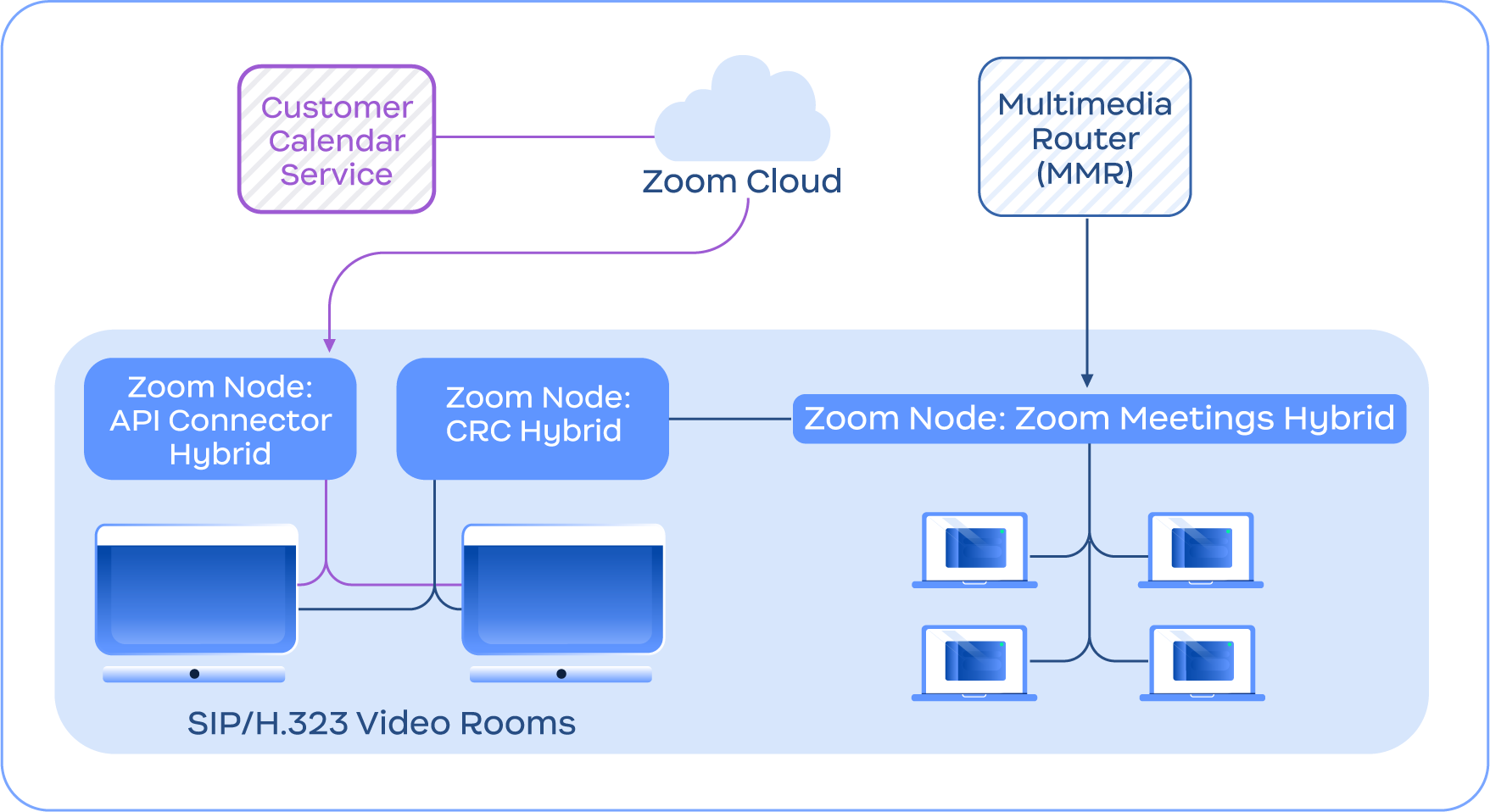
يوفر الرسم التوضيحي التالي مثالًا على خدمة موصل الغرفة الخاص بغرفة المؤتمر الهجين وهي في اتصال مع خدمة الاجتماع الهجين، بالإضافة إلى ميزات أخرى لخدمة موصل الغرفة الخاص بغرفة المؤتمر الهجين مثل موصل واجهة برمجة التطبيقات الهجين للتقويم المتكامل.
مخطط يوضح خدمة موصل الغرفة الخاص بغرفة المؤتمر الهجين وهي في اتصال مع سحابة Zoom ووحدة الاجتماع الهجين
{% hint style="info" %}
**ملاحظة**
لا يتطلب موصل الغرفة الخاص بغرفة المؤتمر الهجين اجتماع Zoom الهجين، وهو مُدرج لأغراض توضيحية فقط.
{% endhint %}
---
# Agent Instructions
This documentation is published with GitBook. GitBook is the documentation platform designed so that both humans and AI agents can read, navigate, and reason over technical content effectively. Learn more at gitbook.com.
## Querying This Documentation
If you need additional information that is not directly available in this page, you can query the documentation by asking a question.
Perform an HTTP GET request on the following URL with the `ask` and `goal` query parameters:
```
GET https://library.zoom.com/technical-library/technical-library-ar/khdmat-enterprise-almtqdmh/zoom-node/zoom-conference-room-connector-hybrid.md?ask=&goal=
```
`ask` is the immediate question: it should be specific, self-contained, and written in natural language.
`goal` is what the user is ultimately trying to achieve, the reason they need the answer. Sharing it helps GitBook give you a better, more relevant answer. A goal is most helpful when it describes the outcome the user wants rather than restating the question. For example, with `ask=how do I create an API token`, a goal like `automate deployments from our CI pipeline` lets GitBook tailor the answer to that use case.
The response will contain a direct answer to the question and relevant excerpts and sources from the documentation.
Use this mechanism when the answer is not explicitly present in the current page, you need clarification or additional context, or you want to retrieve related documentation sections.