> For the complete documentation index, see [llms.txt](https://library.zoom.com/llms.txt). Markdown versions of documentation pages are available by appending `.md` to page URLs; this page is available as [Markdown](https://library.zoom.com/technical-library/technical-library-ar/khdmat-alaamal/zoom-workforce-management/workforce-management-explainer/agent-experience.md).
# تجربة الوكيل
يوفر هذا القسم نظرة عامة موجزة على تجربة الوكيل ضمن Workforce Management.
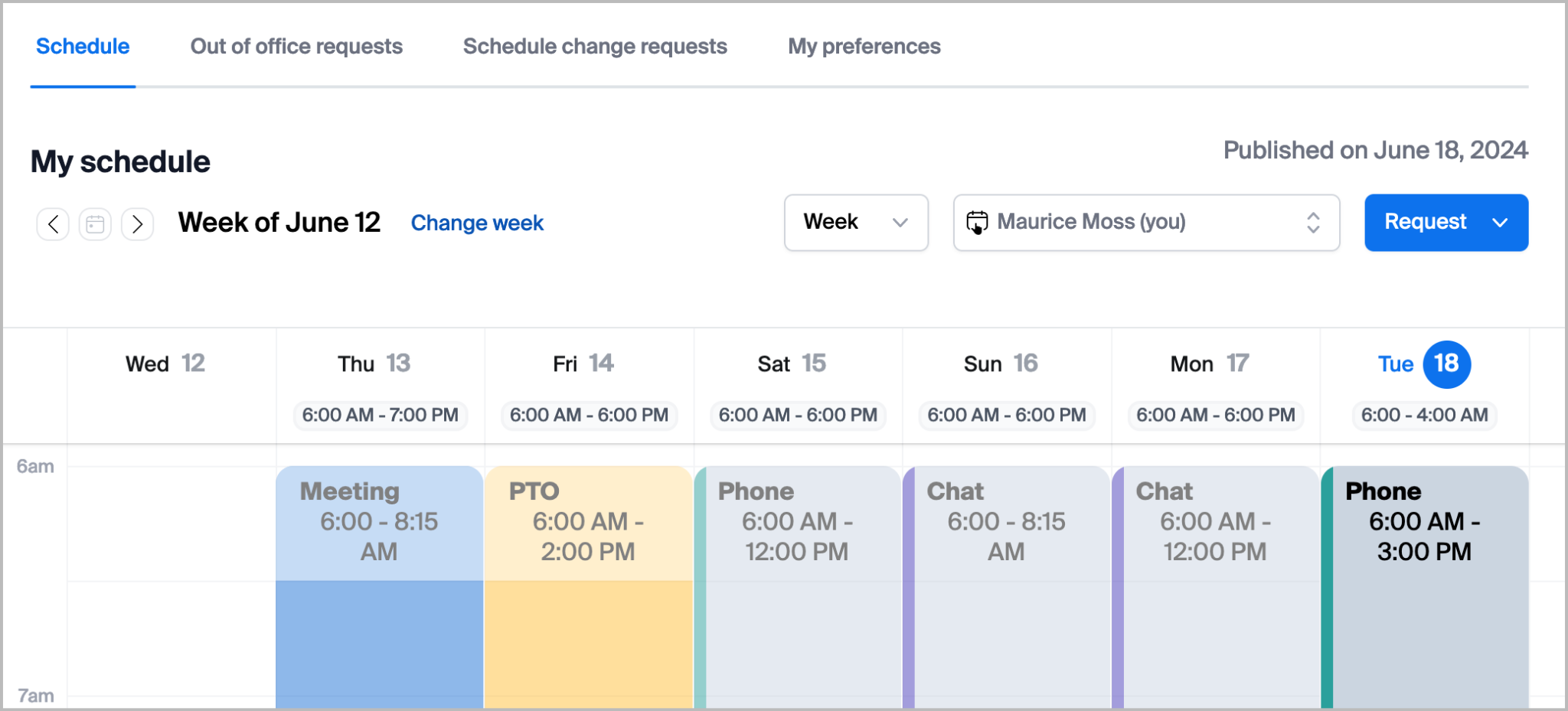
## عرض الجدولة
من كلٍ من بوابة الويب وتطبيق Zoom Workplace (الحد الأدنى للإصدار 6.7.5)، يمكن لوكلاء Workforce Management عرض جداولهم المنشورة، بما في ذلك الأنشطة المجدولة طوال مدة نوباتهم. ويمكن للوكلاء المصرح لهم عرض جداول الوكلاء الآخرين ضمن مجموعة الجدولة نفسها.
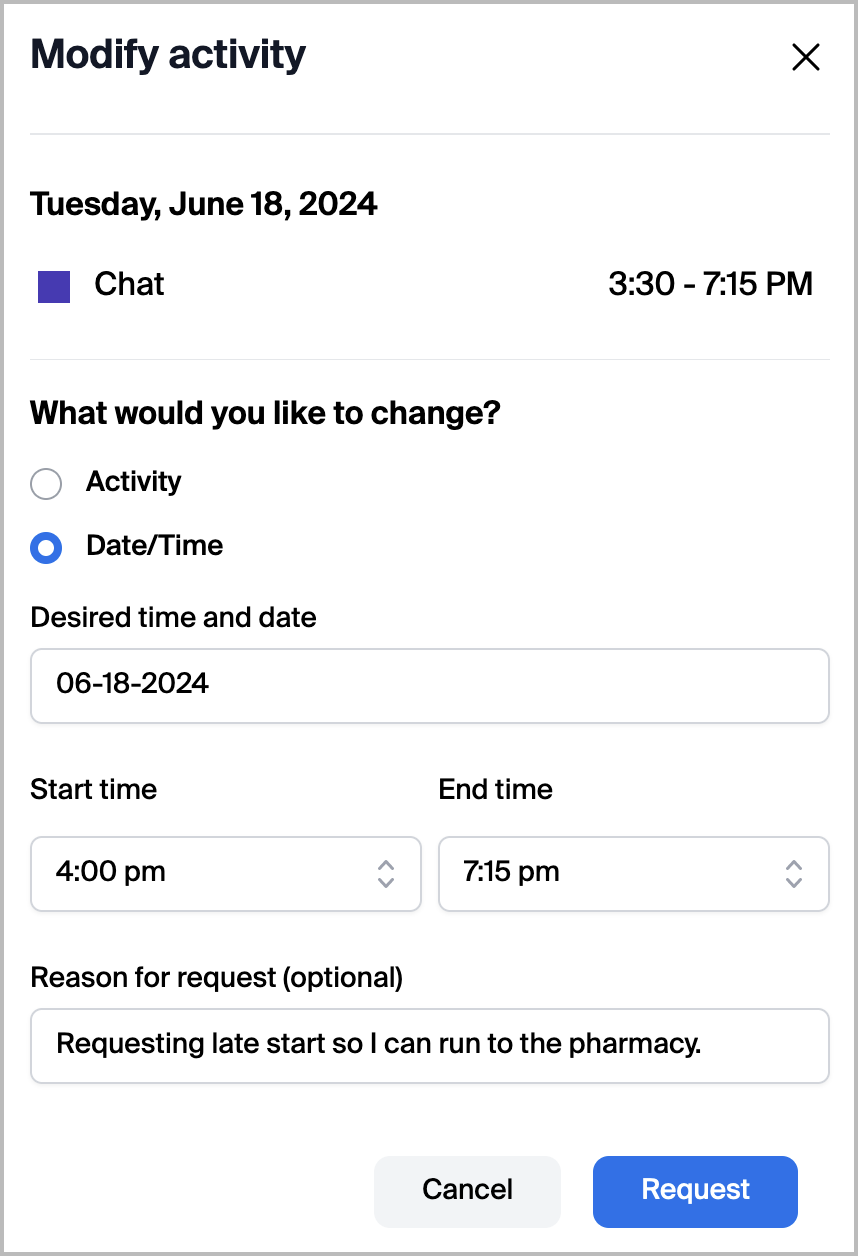
## طلبات تغيير الجدولة
يمكن للوكلاء المصرح لهم طلب إضافة أو تغيير أو حذف نشاطهم المجدول أو وقت البدء/الانتهاء لنشاط من جدولتهم. يتيح ذلك للوكلاء مرونة لطلب تغييرات فورية على جدولتهم في حال وقوع فعالية غير متوقعة أو لنقل استراحة إلى وقت آخر. إذا تمت الموافقة من قبل مشرف، فسيتم تطبيق النشاط المعدل تلقائيًا على جدولة المستخدم.
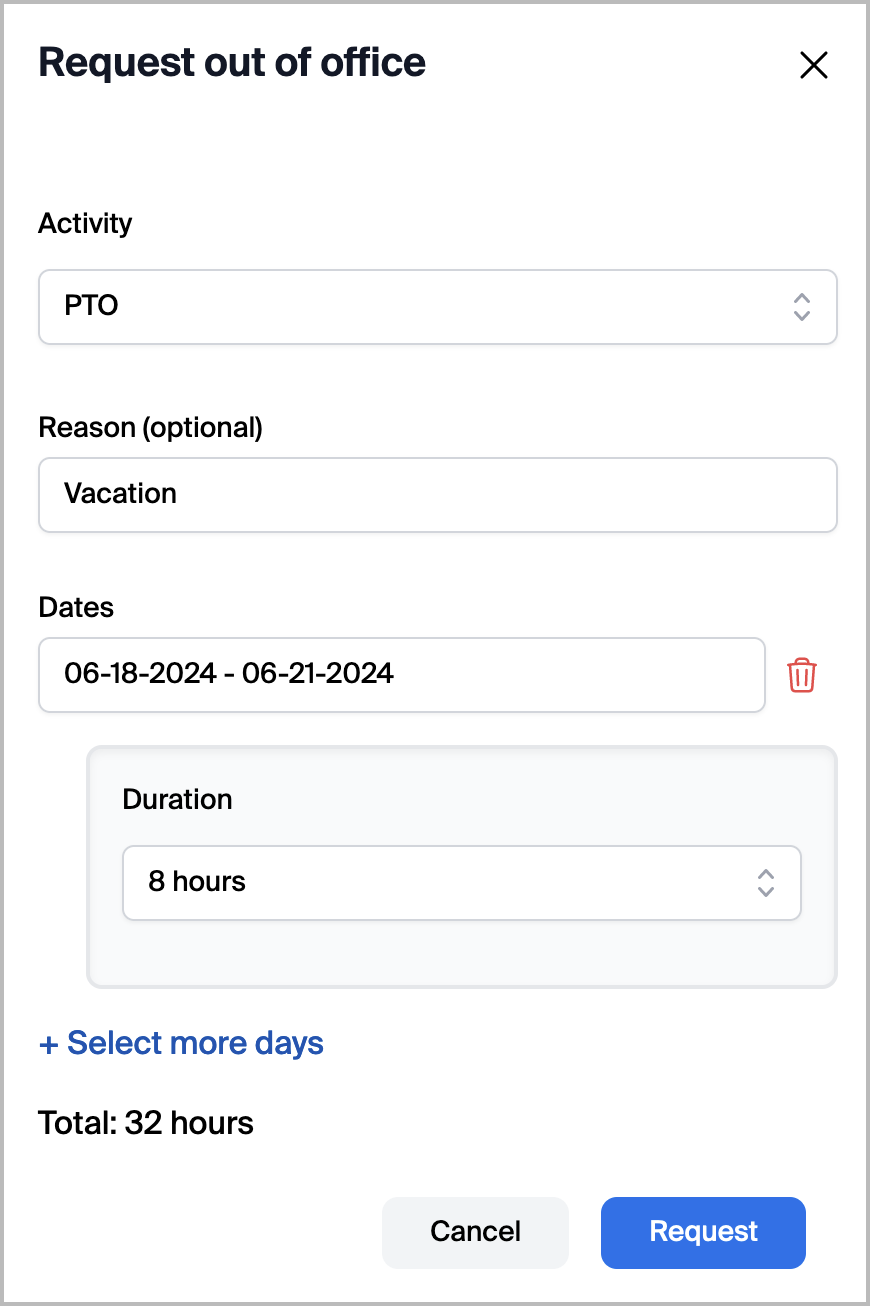
## طلبات خارج المكتب
على غرار طلبات تغيير الجدولة، يمكن للوكلاء استخدام بوابة الويب الخاصة بـ Workforce Management لطلب وقت خارج المكتب. إذا تمت الموافقة من قبل مشرف، فسيتم تطبيق نشاط خارج المكتب ذي الصلة تلقائيًا على جدولة المستخدم.
## لوحة الوكيل
#### يمكن للوكلاء استخدام لوحة الوكيل للوصول إلى فرص المناوبات وإدارة تغييرات الجدولة
توفر لوحة الوكيل للوكلاء مساحة العمل لعرض عروض المناوبات المتاحة، وتتبع المطالبات المقدمة، والرد على رسائل المشرف. يتفاعل الوكلاء مع لوحة الوكيل لاقتناص مناوبات إضافية، أو طلب إجازة تطوعية، أو بدء عمليات تبادل المناوبات مع وكلاء آخرين.
#### الوكلاء يقتنصون العروض التي ينشئها المشرفون
تعرض واجهة لوحة الوكيل العروض التي ينشئها المشرفون. قد تتضمن هذه العروض مناوبات إضافية عندما يكون مركز الاتصال غير كافٍ في عدد الموظفين، أو فرص إجازة تطوعية عندما يكون مركز الاتصال مفرطًا في عدد الموظفين. يراجع الوكلاء العروض المتاحة ويقدمون مطالبات للعروض التي يرغبون في قبولها.
#### تنتظر المطالبات الموافقة بعد الإرسال
بمجرد أن يقتنص الوكيل عرضًا، تدخل المطالبة في حالة مراجعة. تتم الموافقة على بعض المطالبات تلقائيًا بناءً على قواعد أتمتة محددة مسبقًا. وتتطلب مطالبات أخرى موافقة يدوية من مشرف. يمكن للوكلاء تتبع حالة المطالبات المقدمة عبر واجهة لوحة الوكيل.
#### طلبات المبادلة هي آلية السماح للوكلاء بالعثور على شركاء تبادل
طلبات المبادلة هي السماح للوكلاء بنشر طلبات تبادل المناوبات عندما لا يكون لديهم شريك تبادل محدد في ذهنهم. ينشر الوكلاء طلبات المبادلة عبر واجهة لوحة الوكيل، مما يجعلها مرئية للوكلاء الآخرين الذين قد يقترحون تبادلًا. وهذا يختلف عن المبادلات المباشرة الفردية، التي يتفاوض عليها الوكلاء بشكل مستقل.
{% hint style="info" %}
تحدث المبادلات المباشرة خارج واجهة لوحة الوكيل. قد يتفاوض الوكلاء على مبادلات مناوبات فردية مع وكلاء آخرين عبر واجهة الجدولة، وليس عبر لوحة الوكيل. وتقتصر المبادلات المباشرة على تبادلات يوم كامل فقط.
{% endhint %}
---
# Agent Instructions
This documentation is published with GitBook. GitBook is the documentation platform designed so that both humans and AI agents can read, navigate, and reason over technical content effectively. Learn more at gitbook.com.
## Querying This Documentation
If you need additional information that is not directly available in this page, you can query the documentation by asking a question.
Perform an HTTP GET request on the following URL with the `ask` and `goal` query parameters:
```
GET https://library.zoom.com/technical-library/technical-library-ar/khdmat-alaamal/zoom-workforce-management/workforce-management-explainer/agent-experience.md?ask=&goal=
```
`ask` is the immediate question: it should be specific, self-contained, and written in natural language.
`goal` is what the user is ultimately trying to achieve, the reason they need the answer. Sharing it helps GitBook give you a better, more relevant answer. A goal is most helpful when it describes the outcome the user wants rather than restating the question. For example, with `ask=how do I create an API token`, a goal like `automate deployments from our CI pipeline` lets GitBook tailor the answer to that use case.
The response will contain a direct answer to the question and relevant excerpts and sources from the documentation.
Use this mechanism when the answer is not explicitly present in the current page, you need clarification or additional context, or you want to retrieve related documentation sections.