> For the complete documentation index, see [llms.txt](https://library.zoom.com/llms.txt). Markdown versions of documentation pages are available by appending `.md` to page URLs; this page is available as [Markdown](https://library.zoom.com/technical-library/technical-library-ar/khdmat-alaamal/zoom-contact-center/expert-insights/integrate-zoom-contact-center-features-into-your-website/web-chat-and-video-configuration-tasks/advanced-features.md).
# ميزات متقدمة
يوفّر Zoom CX Web SDK ميزات متقدمة تعزّز الفعالية الشاملة للحل. وعلى الرغم من أن هذه الميزات اختيارية، فإنها تساهم بشكل كبير في إنشاء تجربة أكثر شمولًا.
***
### تمرير البيانات من موقعك الإلكتروني إلى Zoom CX
هناك طريقتان متاحتان لمشاركة البيانات من موقعك الإلكتروني إلى Zoom CX:
* جمع بيانات الموقع الإلكتروني باستخدام ميزة From Website Data
* مصادقة المستهلك
تتيح لك كلتا الطريقتين تخزين المعلومات في المتغيرات العالمية لـ Zoom CX، لكنهما تخدمان أغراضًا ومستويات أمان مختلفة.
#### **جمع بيانات الموقع الإلكتروني باستخدام ميزة From Website Data**
تتيح لك هذه الطريقة استخراج البيانات العامة من متصفحات زوّارك، بما في ذلك:
* متغيرات JavaScript
* LocalStorage
* تخزين الجلسة
* ملفات تعريف الارتباط
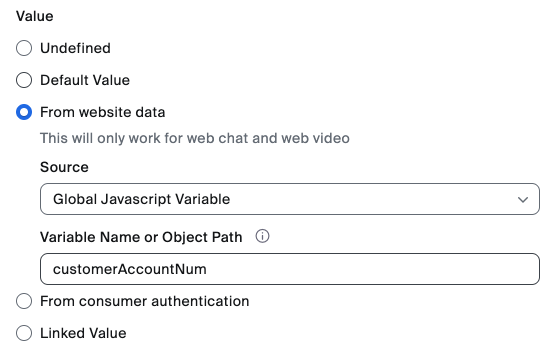
كجزء من تكوين المتغير العالمي لـ ZCX، يمكن للمسؤولين كوَّن تعيينًا بين مكوّنات بيانات الموقع الإلكتروني أعلاه والمتغير العالمي لـ ZCX، كما هو موضح في المثال أدناه.
وبمجرد تخزينها في المتغيرات العالمية لـ Zoom CX، يمكن بعد ذلك استخدام البيانات المستخرجة في أمور مثل:
* تمرير معلومات الصفحة العامة (على سبيل المثال: معلومات الصفحة الحالية، والعناصر في سلة التسوق، وما إلى ذلك)
* تمكين تجارب مخصصة لجميع الزوار
#### **مصادقة المستهلك**
تُصمَّم هذه الطريقة خصيصًا لنقل معلومات المستخدم المصادَق عليه بشكل آمن من موقعك الإلكتروني إلى Zoom CX. وهي تستخدم JWT موقّعة (رموز JSON المميزة على الويب) لضمان سلامة البيانات وأصالتها، مما يجعلها مثالية لـ:
* تحديد المستخدمين المعروفين
* تمرير معلومات العميل الحساسة
* تمكين تجارب مخصصة للزوار المصادَق عليهم
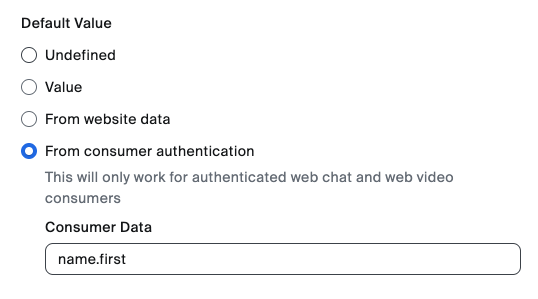
تخزن كلتا الطريقتين البيانات في المتغيرات العالمية لـ Zoom CX، لكن مصادقة المستهلك تضيف طبقة أخرى من الأمان عبر التحقق من الشهادة حتى تظل بيانات تعريف العميل الحساسة محمية. يوضح الشكل أدناه كيفية استخراج البيانات من JWT وتخزينها في متغير عالمي. في هذا المثال، نستخرج الاسم الأول للمستخدم من حقل JSON في JWT name.first.
تتطلب ميزة مصادقة المستهلك أن يبني فريق تطوير موقعك الإلكتروني نقطة نهاية خاصة تقدّم بيانات مصادقة المستهلك، بما في ذلك JWT الموقّعة.
للمزيد من المعلومات، راجع مقالات دعم Zoom التالية:
* [المتغيرات العالمية](https://support.zoom.com/hc/en/article?id=zm_kb\&sysparm_article=KB0059058)
* [بيانات الموقع الإلكتروني](https://support.zoom.com/hc/en/article?id=zm_kb\&sysparm_article=KB0059058)
* [مصادقة المستهلك](https://support.zoom.com/hc/en/article?id=zm_kb\&sysparm_article=KB0057542)
***
### أساليب/أحداث Campaign SDK
تمكين المطورين من التحكم البرمجي في Zoom CX Web SDK لإدارة نوافذ المشاركة والدعوات بكفاءة.
من خلال هذه الوظيفة، يمكن للمطورين استخدام كود الواجهة الأمامية JavaScript لموقعهم الإلكتروني لإدارة دعوات Zoom CX ونوافذ المشاركة بسلاسة، بما في ذلك فتحها أو إغلاقها أو إخفاؤها تلقائيًا.
لمزيد من المعلومات حول الأساليب والأحداث، اطّلع على وثائق المطور التالية:
* [Zoom مركز الاتصال](https://developers.zoom.us/docs/contact-center/)
* [Zoom Virtual Agent](https://developers.zoom.us/docs/virtual-agent/web/reference/)
---
# Agent Instructions
This documentation is published with GitBook. GitBook is the documentation platform designed so that both humans and AI agents can read, navigate, and reason over technical content effectively. Learn more at gitbook.com.
## Querying This Documentation
If you need additional information that is not directly available in this page, you can query the documentation dynamically by asking a question.
Perform an HTTP GET request on the current page URL with the `ask` query parameter, and the optional `goal` query parameter:
```
GET https://library.zoom.com/technical-library/technical-library-ar/khdmat-alaamal/zoom-contact-center/expert-insights/integrate-zoom-contact-center-features-into-your-website/web-chat-and-video-configuration-tasks/advanced-features.md?ask=&goal=
```
`ask` is the immediate question: it should be specific, self-contained, and written in natural language.
`goal` is optional and describes the broader end goal you are ultimately trying to accomplish on behalf of the user. GitBook uses it to tailor the answer towards what is most useful for that goal.
The response will contain a direct answer to the question and relevant excerpts and sources from the documentation.
Use this mechanism when the answer is not explicitly present in the current page, you need clarification or additional context, or you want to retrieve related documentation sections.