> For the complete documentation index, see [llms.txt](https://library.zoom.com/llms.txt). Markdown versions of documentation pages are available by appending `.md` to page URLs; this page is available as [Markdown](https://library.zoom.com/technical-library/sv/business-tjanster/zoom-contact-center/expert-insights/configuring-agent-occupied-rules/implementation-best-practices.md).
# Bästa praxis för implementation
### Definiera dina Business-krav
Innan du konfigurerar regler bör du fastställa vad omnikanal innebär för din verksamhet:
**Viktiga frågor**:
* Vilka kanaler ska räknas in när en agent bedöms vara upptagen?
* Ska vissa kanaler (t.ex. röst/video) alltid prioriteras framför andra (t.ex. meddelanden, e-post)?
* Ska kanalbeläggning bedömas separat för varje kanal eller kombineras för flera kanaler?
* Kan dina agenter hantera meddelandekontakter medan de sitter i röstsamtal, eller skulle den här typen av multitasking försämra kvaliteten på den kundservice de tillhandahåller?
Dina regler bör återspegla faktiska servicestandarder, inte bara tekniska möjligheter. Tänk på påverkan på kundupplevelsen såväl som agenternas effektivitet.
### Använd mallar för konsekvens
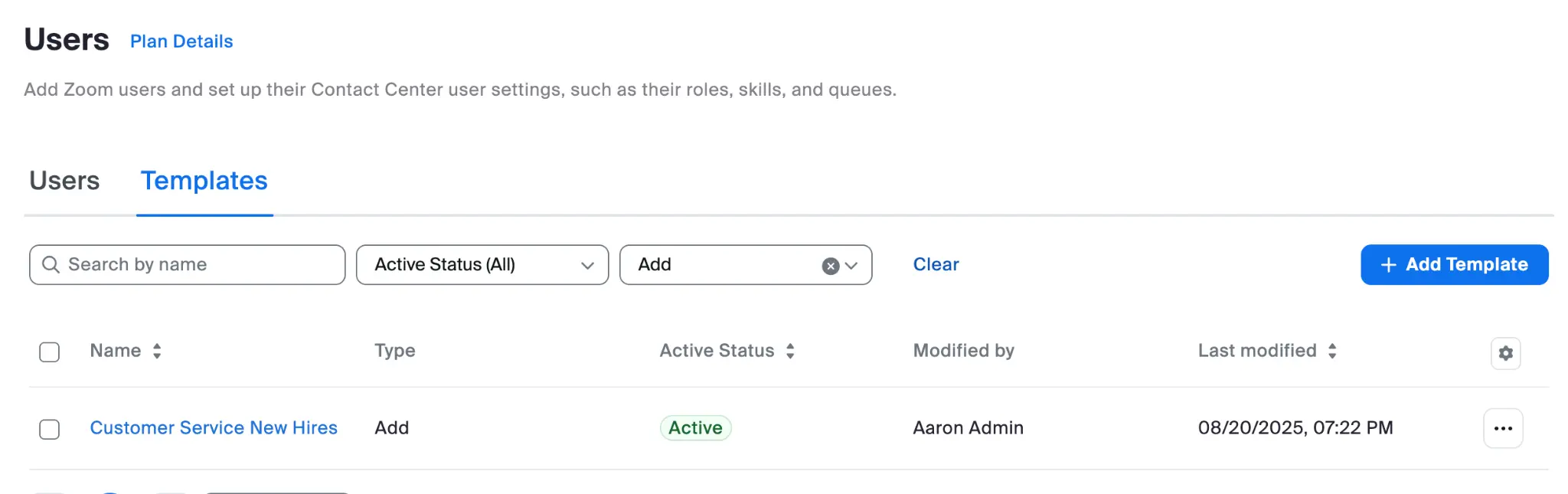
Skapa användarmallar för olika agentroller som innehåller:
* Lämpliga inställningar för kontaktkapacitet för varje kanal
* Konfiguration av regler för när agenter räknas som upptagna
* Konsekvent tillämpning för liknande roller
#### Exempel på mall för nyanställda
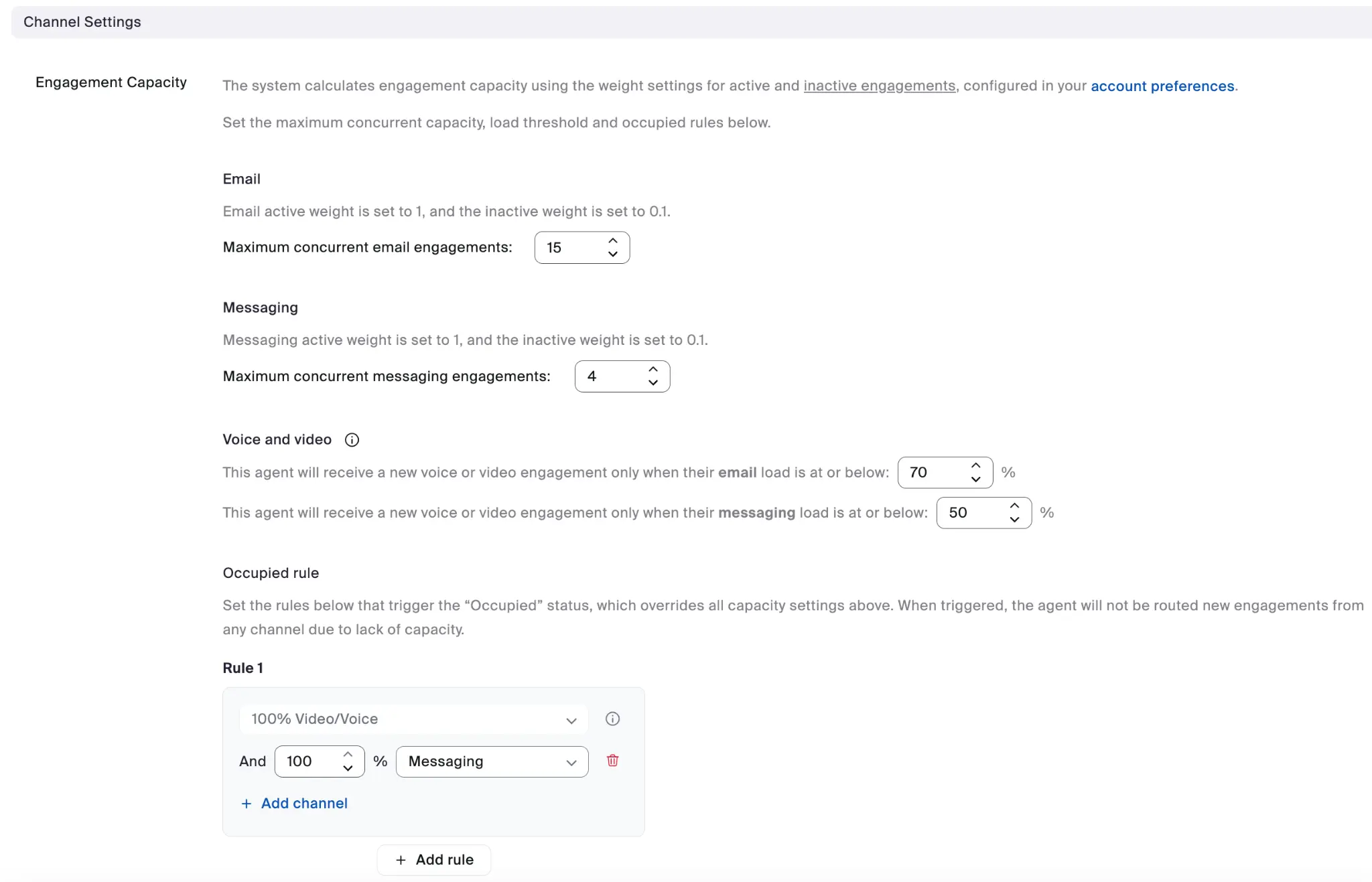
#### Exempel på kanalinställningar
Varje användarmall kan ange den fullständiga konfigurationen av kanalinställningar för kontaktkapacitet.
Fördelarna med att använda mallar är bland annat:
* Konsekvent konfiguration för agentgrupper
* Förenklad introduktion för nya agenter
* Gör det enklare att utföra massuppdateringar när verksamhetens behov ändras
---
# Agent Instructions
This documentation is published with GitBook. GitBook is the documentation platform designed so that both humans and AI agents can read, navigate, and reason over technical content effectively. Learn more at gitbook.com.
## Querying This Documentation
If you need additional information that is not directly available in this page, you can query the documentation by asking a question.
Perform an HTTP GET request on the following URL with the `ask` and `goal` query parameters:
```
GET https://library.zoom.com/technical-library/sv/business-tjanster/zoom-contact-center/expert-insights/configuring-agent-occupied-rules/implementation-best-practices.md?ask=&goal=
```
`ask` is the immediate question: it should be specific, self-contained, and written in natural language.
`goal` is what the user is ultimately trying to achieve, the reason they need the answer. Sharing it helps GitBook give you a better, more relevant answer. A goal is most helpful when it describes the outcome the user wants rather than restating the question. For example, with `ask=how do I create an API token`, a goal like `automate deployments from our CI pipeline` lets GitBook tailor the answer to that use case.
The response will contain a direct answer to the question and relevant excerpts and sources from the documentation.
Use this mechanism when the answer is not explicitly present in the current page, you need clarification or additional context, or you want to retrieve related documentation sections.