> For the complete documentation index, see [llms.txt](https://library.zoom.com/llms.txt). Markdown versions of documentation pages are available by appending `.md` to page URLs; this page is available as [Markdown](https://library.zoom.com/technical-library/sv/avancerade-enterprise-tjanster/zoom-node/zoom-conference-room-connector-hybrid.md).

# anslutningsprogram för Zoom-konferensrum Hybrid

#### <mark style="color:blå;">anslutningsprogram för Zoom-konferensrum Hybrid: Hybridmöten för konferensrum</mark> <a href="#vwn78dbs8d9m" id="vwn78dbs8d9m"></a>

Zooms anslutningsprogram för konferensrum Hybrid liknar Zooms [Hybridmöten](/technical-library/sv/avancerade-enterprise-tjanster/zoom-node/zoom-meetings-hybrid.md) lösning, inklusive Support för hybrid- och privata möten, men i stället för att stödja Zoom Workplace-appar ger den Support för äldre SIP- och H.323-konferensrumssystem.

Med den här produkten kan flera konferensrum ansluta till den lokala, hybrida Zoom Node-enheten som samtidigt kan ta emot, multiplexera och omfördela inkommande och utgående medieströmmar till Zoom-molnet, vilket som standard stöder upp till 8 samtidiga konferensrum i hög definition per modul. Hybridmodulen för anslutningsprogram för konferensrum stöder också andra viktiga funktioner för mötesupplevelsen, inklusive möteschatt, reaktioner, kontrolllayouter och stöd för funktionaliteten att gå med med ett knapptryck.

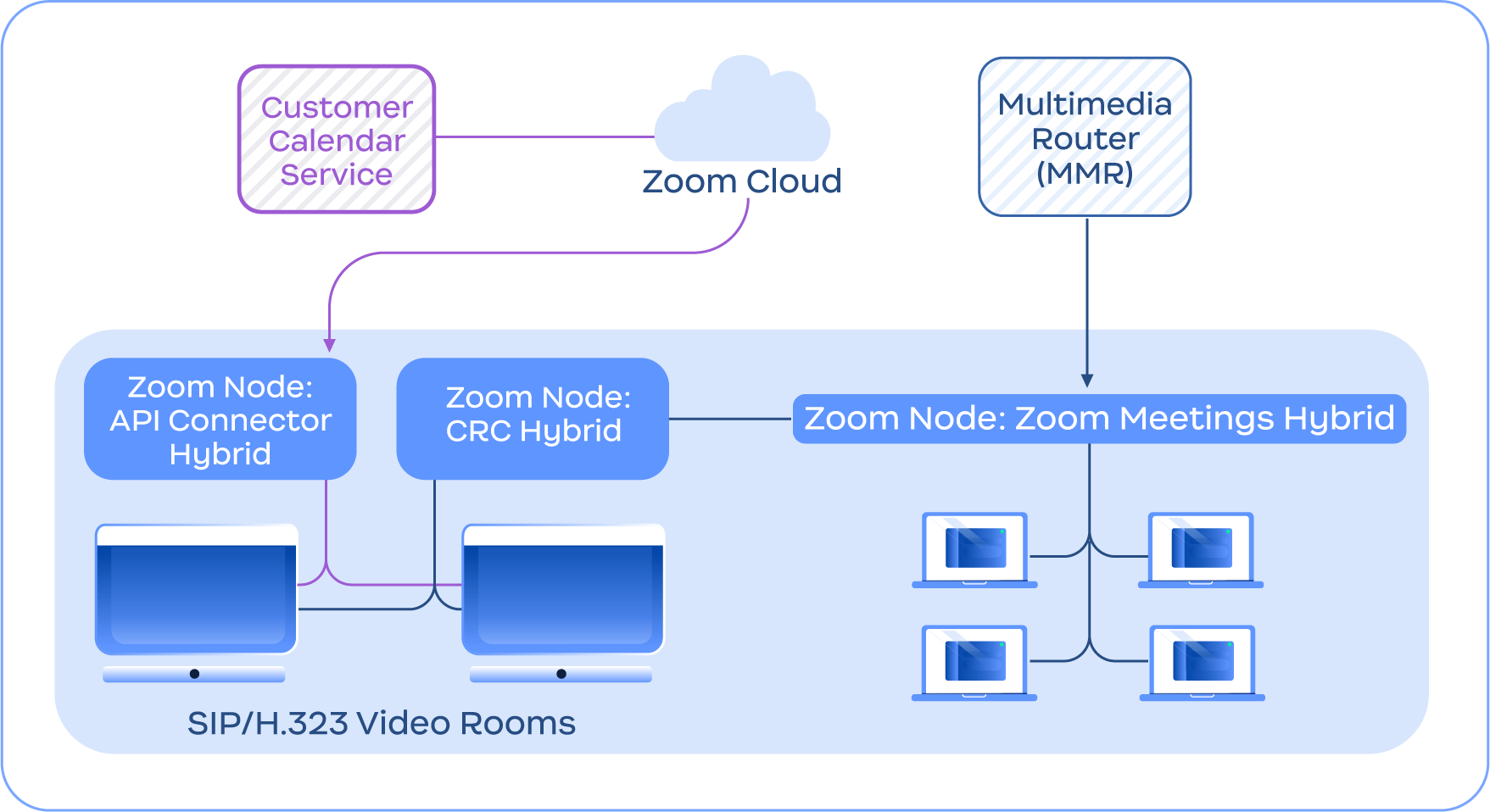
Följande bild visar ett exempel på tjänsten anslutningsprogram för konferensrum Hybrid som integreras med Meetings Hybrid-tjänsten, utöver andra funktioner i anslutningsprogram för konferensrum Hybrid, till exempel API anslutningsprogram Hybrid för integrerad kalenderhantering.

<figure><img src="https://460446308-files.gitbook.io/~/files/v0/b/gitbook-x-prod.appspot.com/o/spaces%2FctBXUMeBy4rtLMmMkKRG%2Fuploads%2Fgit-blob-f1ba193991649171c56f065cc7909c4ed5ec9213%2F10.png?alt=media" alt="Diagram depicting the Conference Room Connector Hybrid service connecting with the Zoom Cloud and Meetings Hybrid module" width="563"><figcaption><p>Diagram som visar anslutningsprogram för konferensrum Hybrid-tjänsten som ansluter till Zoom-moln och Meetings Hybrid-modulen</p></figcaption></figure>

{% hint style="info" %}
**Notering**

anslutningsprogram för konferensrum Hybrid kräver inte Zoom Meetings Hybrid och ingår endast i illustrativt syfte.
{% endhint %}


---

# Agent Instructions
This documentation is published with GitBook. GitBook is the documentation platform designed so that both humans and AI agents can read, navigate, and reason over technical content effectively. Learn more at gitbook.com.

## Querying This Documentation
If you need additional information that is not directly available in this page, you can query the documentation by asking a question.

Perform an HTTP GET request on the following URL with the `ask` and `goal` query parameters:

```
GET https://library.zoom.com/technical-library/sv/avancerade-enterprise-tjanster/zoom-node/zoom-conference-room-connector-hybrid.md?ask=<question>&goal=<user_goal>
```

`ask` is the immediate question: it should be specific, self-contained, and written in natural language.
`goal` is what the user is ultimately trying to achieve, the reason they need the answer. Sharing it helps GitBook give you a better, more relevant answer. A goal is most helpful when it describes the outcome the user wants rather than restating the question. For example, with `ask=how do I create an API token`, a goal like `automate deployments from our CI pipeline` lets GitBook tailor the answer to that use case.

The response will contain a direct answer to the question and relevant excerpts and sources from the documentation.

Use this mechanism when the answer is not explicitly present in the current page, you need clarification or additional context, or you want to retrieve related documentation sections.
