> For the complete documentation index, see [llms.txt](https://library.zoom.com/llms.txt). Markdown versions of documentation pages are available by appending `.md` to page URLs; this page is available as [Markdown](https://library.zoom.com/technical-library/pt/zoom-workplace/zoom-phone/zoom-phone-bluepaper/user-experience/the-zoom-assistant.md).

# O Zoom Assistente

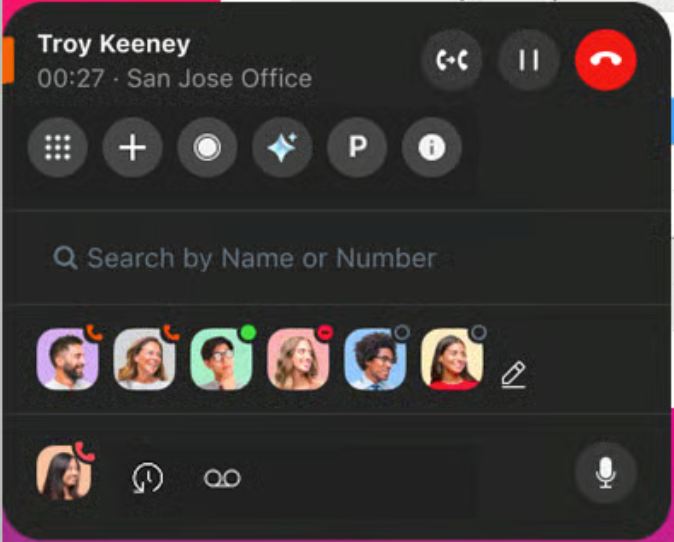
O Zoom Assistente é um widget leve que é executado na área de trabalho de um usuário como uma extensão do aplicativo Zoom Workplace, oferecendo aos usuários do Zoom Phone Pro  e aos usuários Licenciado uma interface telefônica consolidada.

Com capacidades de encaixe, o Zoom Assistente permanece oculto quando não está em uso e expande-se quando o cursor passa por cima ou quando há uma ligação Ativo para ligar. Este design compacto permite aos utilizadores aproveitar totalmente o espaço do ambiente de trabalho enquanto trabalham, permitindo-lhes minimizar o painel do Zoom Assistente quando não está em uso.

<div data-with-frame="true"><figure><img src="https://1821044411-files.gitbook.io/~/files/v0/b/gitbook-x-prod.appspot.com/o/spaces%2FctBXUMeBy4rtLMmMkKRG%2Fuploads%2FCfufGOTce6ZRvwfTGB4s%2Funknown.png?alt=media&amp;token=18bed06b-bcff-4978-9f12-ed0181916645" alt=""><figcaption></figcaption></figure></div>

Com esta ferramenta sempre Disponível, os usuários podem simplificar seus fluxos de trabalho e processos em conjunto com praticamente qualquer outro aplicativo, proporcionando flexibilidade e facilidade de uso. Os principais recursos do Zoom Assistente incluem:

<table><thead><tr><th valign="top">Zoom Phone</th><th valign="top">Zoom Phone com o Customer Engagement Pack add-on</th><th valign="top">Lista de contato</th></tr></thead><tbody><tr><td valign="top"><ul><li>Ligar</li><li>Receber um ligar</li><li>Teclado de marcação</li><li>Consulta de contato</li><li>Discagem rápida</li><li>Gravar uma ligar</li><li>Reter ligar</li><li>Transferir ligar</li><li>Mesclar ligar</li><li>Auto-Silenciar</li><li>Abrir histórico de ligar*</li><li>Abrir correio de voz*</li></ul></td><td valign="top"><ul><li>Visibilidade da fila de chamadas</li><li>Abrir chat da fila de chamadas*</li><li>Visibilidade do recurso de linha compartilhada</li><li>Visibilidade do grupo de linha compartilhada</li><li>Captura de chamadas em grupo</li><li>Inscrever-se/Cancelar inscrição na fila de chamadas</li></ul></td><td valign="top"><ul><li>Iniciar reunião a partir do cartão de contato*</li><li>Iniciar chat a partir do cartão de contato*</li><li>Iniciar chamada telefônica a partir do cartão de contato*</li><li>Enviar SMS a partir do cartão de contato*</li></ul></td></tr></tbody></table>

{% hint style="info" %}
\*Abre o aplicativo Zoom Workplace quando em uso
{% endhint %}

Consulte a Central de suporte do Zoom para obter mais informações sobre [ativar e desativar](https://support.zoom.com/hc/en/article?id=zm_kb\&sysparm_article=KB0058042) ou [usando](https://support.zoom.com/hc/en/article?id=zm_kb\&sysparm_article=KB0058038) o Zoom Assistente.


---

# Agent Instructions
This documentation is published with GitBook. GitBook is the documentation platform designed so that both humans and AI agents can read, navigate, and reason over technical content effectively. Learn more at gitbook.com.

## Querying This Documentation
If you need additional information that is not directly available in this page, you can query the documentation by asking a question.

Perform an HTTP GET request on the following URL with the `ask` and `goal` query parameters:

```
GET https://library.zoom.com/technical-library/pt/zoom-workplace/zoom-phone/zoom-phone-bluepaper/user-experience/the-zoom-assistant.md?ask=<question>&goal=<user_goal>
```

`ask` is the immediate question: it should be specific, self-contained, and written in natural language.
`goal` is what the user is ultimately trying to achieve, the reason they need the answer. Sharing it helps GitBook give you a better, more relevant answer. A goal is most helpful when it describes the outcome the user wants rather than restating the question. For example, with `ask=how do I create an API token`, a goal like `automate deployments from our CI pipeline` lets GitBook tailor the answer to that use case.

The response will contain a direct answer to the question and relevant excerpts and sources from the documentation.

Use this mechanism when the answer is not explicitly present in the current page, you need clarification or additional context, or you want to retrieve related documentation sections.