> For the complete documentation index, see [llms.txt](https://library.zoom.com/llms.txt). Markdown versions of documentation pages are available by appending `.md` to page URLs; this page is available as [Markdown](https://library.zoom.com/technical-library/pt/servicos-empresariais-avancados/zoom-node/zoom-conference-room-connector-hybrid.md).

# Conector de Sala de Conferência Zoom Híbrido

#### <mark style="color:azul;">Conector de Sala de Conferência Zoom Hybrid: Reuniões híbridas para salas de conferência</mark> <a href="#vwn78dbs8d9m" id="vwn78dbs8d9m"></a>

O Conector da sala de conferência híbrido do Zoom é semelhante ao do Zoom [Reuniões híbridas](https://library.zoom.com/technical-library/pt/servicos-empresariais-avancados/zoom-node/zoom-meetings-hybrid.md) solução, incluindo suporte para reuniões híbridas e privadas, mas, em vez de oferecer suporte às aplicações do Zoom Workplace, oferece suporte a sistemas de sala de conferência legados com SIP e H.323.

Com este produto, várias salas de conferência podem se conectar ao dispositivo Zoom Node local ou híbrido, que pode simultaneamente receber, multiplexar e redistribuir fluxos de mídia Recebidas e Realizadas para a Zoom cloud, oferecendo suporte, por padrão, a até 8 salas de conferência simultâneas em alta definição por módulo. O módulo híbrido do Conector da sala de conferência também oferece suporte a outros recursos importantes para a experiência da reunião, incluindo chat na reunião, reações, controle de layouts e suporte à funcionalidade de entrada com um botão.

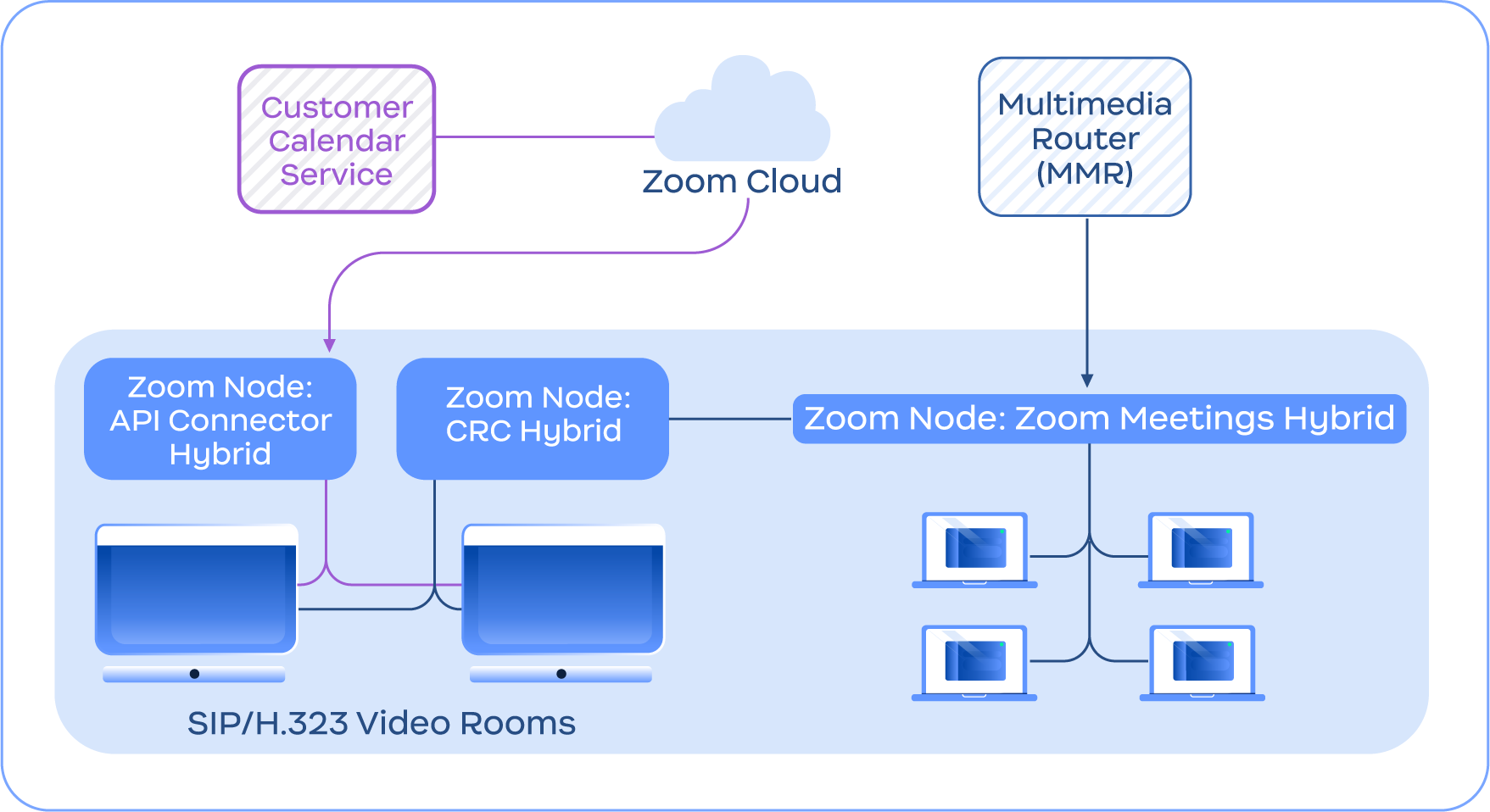
A imagem a seguir mostra um exemplo do serviço híbrido Conector da sala de conferência integrado ao serviço híbrido Meetings, além de outros recursos do Conector da sala de conferência híbrido, como o Conector da API híbrido para calendários integrados.

<figure><img src="https://1821044411-files.gitbook.io/~/files/v0/b/gitbook-x-prod.appspot.com/o/spaces%2FctBXUMeBy4rtLMmMkKRG%2Fuploads%2Fgit-blob-f1ba193991649171c56f065cc7909c4ed5ec9213%2F10.png?alt=media" alt="Diagram depicting the Conference Room Connector Hybrid service connecting with the Zoom Cloud and Meetings Hybrid module" width="563"><figcaption><p>Diagrama que representa o serviço Conector da sala de conferência Hybrid conectando-se ao Zoom cloud e ao módulo Meetings Hybrid</p></figcaption></figure>

{% hint style="info" %}
**Nota**

O Conector da sala de conferência Hybrid não requer o Zoom Meetings Hybrid e está incluído apenas para fins ilustrativos.
{% endhint %}


---

# Agent Instructions
This documentation is published with GitBook. GitBook is the documentation platform designed so that both humans and AI agents can read, navigate, and reason over technical content effectively. Learn more at gitbook.com.

## Querying This Documentation
If you need additional information that is not directly available in this page, you can query the documentation by asking a question.

Perform an HTTP GET request on the following URL with the `ask` and `goal` query parameters:

```
GET https://library.zoom.com/technical-library/pt/servicos-empresariais-avancados/zoom-node/zoom-conference-room-connector-hybrid.md?ask=<question>&goal=<user_goal>
```

`ask` is the immediate question: it should be specific, self-contained, and written in natural language.
`goal` is what the user is ultimately trying to achieve, the reason they need the answer. Sharing it helps GitBook give you a better, more relevant answer. A goal is most helpful when it describes the outcome the user wants rather than restating the question. For example, with `ask=how do I create an API token`, a goal like `automate deployments from our CI pipeline` lets GitBook tailor the answer to that use case.

The response will contain a direct answer to the question and relevant excerpts and sources from the documentation.

Use this mechanism when the answer is not explicitly present in the current page, you need clarification or additional context, or you want to retrieve related documentation sections.
