> For the complete documentation index, see [llms.txt](https://library.zoom.com/llms.txt). Markdown versions of documentation pages are available by appending `.md` to page URLs; this page is available as [Markdown](https://library.zoom.com/technical-library/nl/zakelijke-services/zoom-contact-center/expert-insights/integrate-zoom-contact-center-features-into-your-website/web-chat-and-video-configuration-tasks/advanced-features.md).
# Geavanceerde functies
De Zoom CX Web SDK biedt geavanceerde Functie(s) die de algehele doeltreffendheid van de oplossing verbeteren. Hoewel deze Functie(s) Optioneel zijn, dragen ze aanzienlijk bij aan het creëren van een uitgebreidere ervaring.
***
### Gegevens doorgeven van uw website naar Zoom CX
Er zijn twee methoden die Beschikbaar zijn voor het delen van gegevens van uw website naar Zoom CX:
* Websitegegevensverzameling met de Functie(s) From Website Data
* Authenticatie van de consument
Beide methoden Inschakelen u om informatie op te slaan in Zoom CX Global Variables, maar ze dienen verschillende doeleinden en beveiligingsniveaus.
#### **Websitegegevensverzameling met de Functie(s) From Website Data**
Deze methode stelt u in staat algemene gegevens uit de browsers van uw bezoekers te halen, waaronder:
* JavaScript-variabelen
* LocalStorage
* sessieopslag
* Cookies
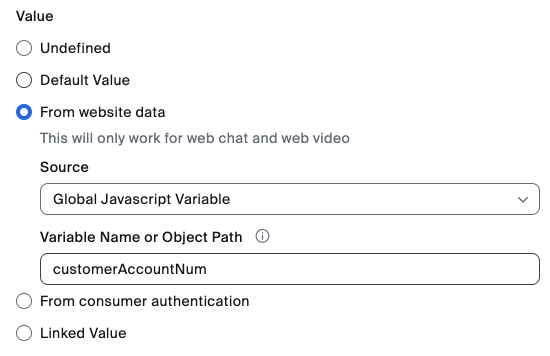
Als onderdeel van de configuratie van de ZCX globale variabele kunnen beheerders een koppeling Configureer tussen de bovenstaande websitegegevenscomponenten en de ZCX globale variabele, zoals weergegeven in het onderstaande voorbeeld.
Zodra de geëxtraheerde gegevens zijn opgeslagen in Zoom CX Global Variables, kunnen ze vervolgens worden gebruikt voor zaken zoals:
* Algemene webpaginagegevens doorgeven (bijvoorbeeld: huidige webpagina-informatie, items in een winkelwagen, enzovoort)
* Gepersonaliseerde ervaringen Inschakelen voor alle bezoekers
#### **Authenticatie van de consument**
Deze methode is specifiek ontworpen voor het veilig verzenden van geauthenticeerde gebruikersinformatie van uw website naar Zoom CX. Ze gebruikt ondertekende JWT (JSON Web Tokens) om de gegevensintegriteit en authenticiteit te waarborgen, waardoor het ideaal is voor:
* Bekende gebruikers identificeren
* Het doorgeven van gevoelige klantinformatie
* Gepersonaliseerde ervaringen Inschakelen voor geauthenticeerde bezoekers
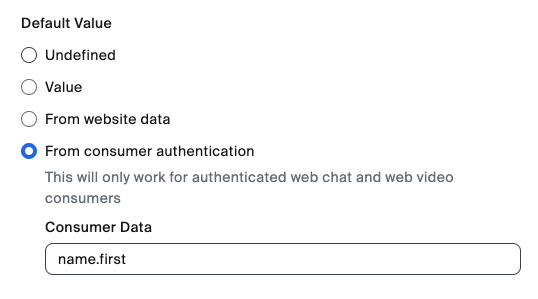
Beide methoden slaan gegevens op in Zoom CX globale variabelen, maar authenticatie van de consument voegt een extra beveiligingslaag toe via certificaat Verificatie, zodat gevoelige identificatiegegevens van klanten beschermd blijven. De onderstaande afbeelding laat zien hoe gegevens uit de JWT kunnen worden gehaald en opgeslagen in een globale variabele. In dit voorbeeld halen we de voornaam van de gebruiker uit het JWT JSON-veld name.first.
De Functie(s) Authenticatie van de consument vereist dat uw websiteontwikkelingsteam een speciaal Eindpunt bouwt dat de gegevens voor authenticatie van de consument levert, inclusief de ondertekende JWT.
Raadpleeg voor meer informatie de volgende artikelen van Zoom-ondersteuning:
* [Globale variabelen](https://support.zoom.com/hc/en/article?id=zm_kb\&sysparm_article=KB0059058)
* [Websitegegevens](https://support.zoom.com/hc/en/article?id=zm_kb\&sysparm_article=KB0059058)
* [Authenticatie van de consument](https://support.zoom.com/hc/en/article?id=zm_kb\&sysparm_article=KB0057542)
***
### Campaign SDK-methoden/gebeurtenissen
Stel ontwikkelaars in staat met programmatische controle over de Zoom CX Web SDK om engagementvensters en uitnodigingen efficiënt te beheren.
Via deze functionaliteit kunnen ontwikkelaars de JavaScript-front-endcode van hun website gebruiken om Zoom CX-uitnodigingen en engagementvensters naadloos te beheren, inclusief het automatisch openen, sluiten of verbergen ervan.
Raadpleeg voor meer informatie over de methoden en gebeurtenissen de volgende ontwikkelaarsdocumentatie:
* [Zoom contactcenter](https://developers.zoom.us/docs/contact-center/)
* [Zoom Virtual Agent](https://developers.zoom.us/docs/virtual-agent/web/reference/)
---
# Agent Instructions
This documentation is published with GitBook. GitBook is the documentation platform designed so that both humans and AI agents can read, navigate, and reason over technical content effectively. Learn more at gitbook.com.
## Querying This Documentation
If you need additional information that is not directly available in this page, you can query the documentation by asking a question.
Perform an HTTP GET request on the following URL with the `ask` and `goal` query parameters:
```
GET https://library.zoom.com/technical-library/nl/zakelijke-services/zoom-contact-center/expert-insights/integrate-zoom-contact-center-features-into-your-website/web-chat-and-video-configuration-tasks/advanced-features.md?ask=&goal=
```
`ask` is the immediate question: it should be specific, self-contained, and written in natural language.
`goal` is what the user is ultimately trying to achieve, the reason they need the answer. Sharing it helps GitBook give you a better, more relevant answer. A goal is most helpful when it describes the outcome the user wants rather than restating the question. For example, with `ask=how do I create an API token`, a goal like `automate deployments from our CI pipeline` lets GitBook tailor the answer to that use case.
The response will contain a direct answer to the question and relevant excerpts and sources from the documentation.
Use this mechanism when the answer is not explicitly present in the current page, you need clarification or additional context, or you want to retrieve related documentation sections.