> For the complete documentation index, see [llms.txt](https://library.zoom.com/llms.txt). Markdown versions of documentation pages are available by appending `.md` to page URLs; this page is available as [Markdown](https://library.zoom.com/technical-library/nl/zakelijke-services/zoom-contact-center/expert-insights/configuring-agent-occupied-rules/implementation-best-practices.md).
# Best practices voor implementatie
### Definieer uw Zakelijke vereisten
Voordat u regels configureert, bepaal wat omnichannel betekent voor uw operatie:
**Belangrijke vragen**:
* Welke kanalen moeten meetellen voor het beschouwen van een agent als Bezet of in gebruik?
* Moeten bepaalde kanalen (bijv. spraak/video) altijd prioriteit hebben boven andere (bijv. berichtenverkeer, E-mail)?
* Moet bezetting per kanaal afzonderlijk worden geëvalueerd, of gecombineerd over meerdere kanalen?
* Zijn uw agenten in staat om berichtenverkeer-interacties af te handelen tijdens telefoongesprekken, of zou deze multitasking de kwaliteit van de klantenservice die zij bieden compromitteren?
Uw regels moeten de feitelijke servicenormen weerspiegelen, niet alleen technische mogelijkheden. Houd naast de efficiëntie van de agent ook rekening met de impact op de klantervaring.
### Gebruik sjablonen voor consistentie
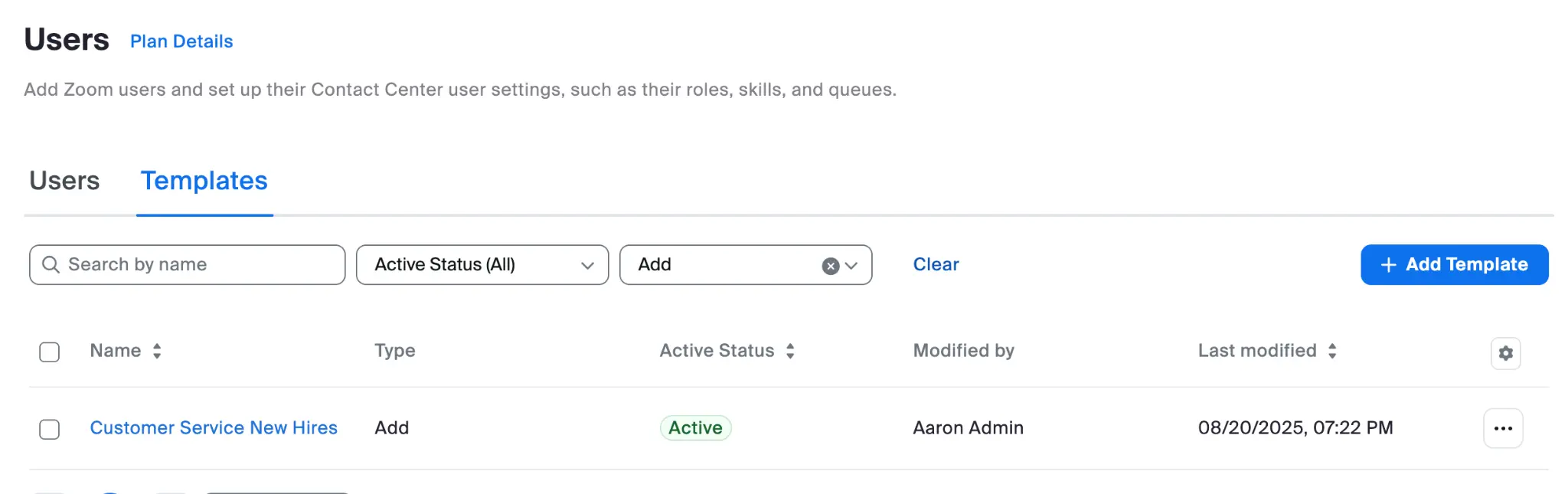
Maak gebruiker-sjablonen voor verschillende agentrollen die het volgende bevatten:
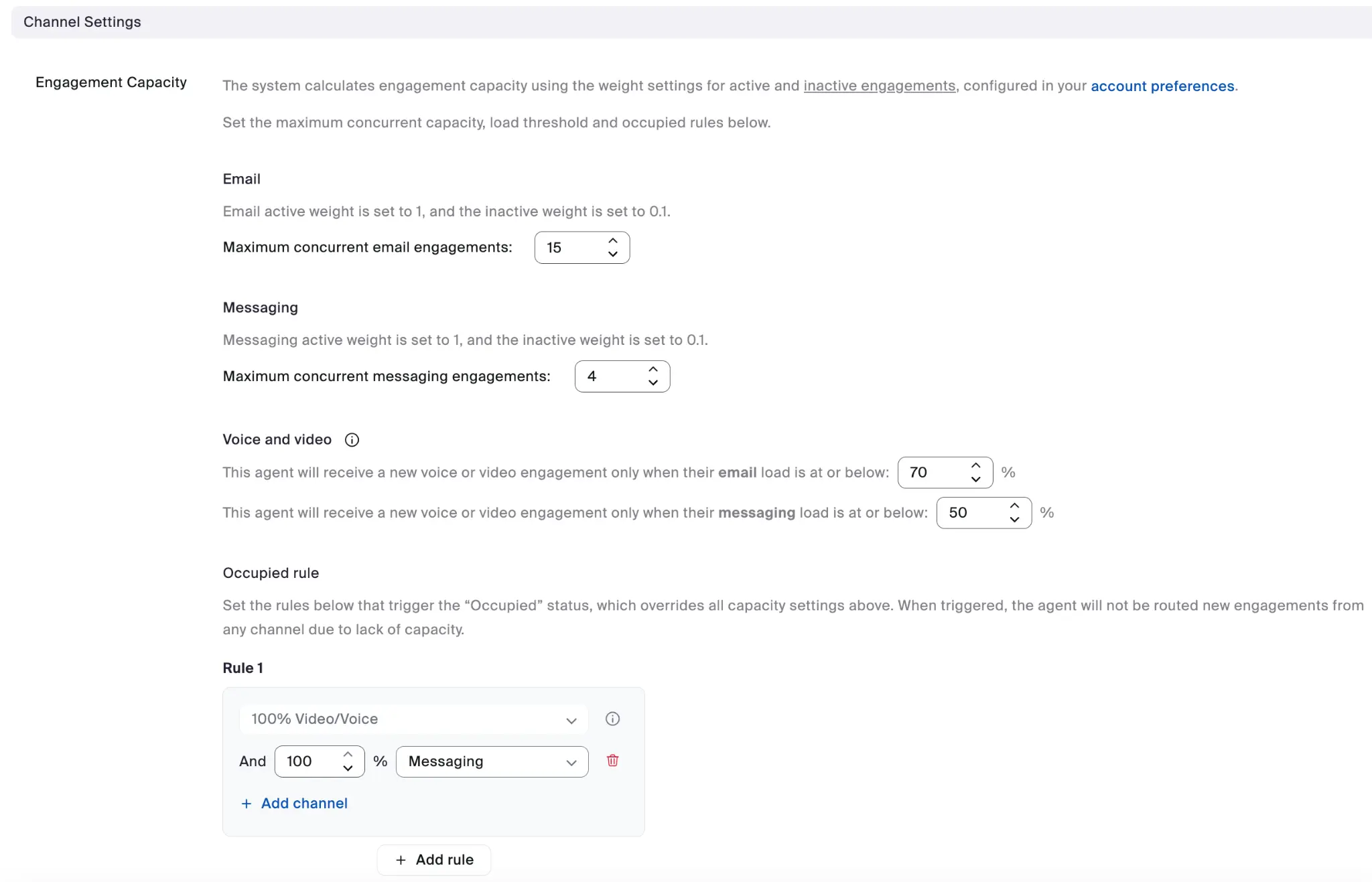
* Passende Instellingen voor Capaciteit van betrokkenheid voor elk kanaal
* Configuratie van Bezet-regels
* Consistente applicatie over vergelijkbare rollen
#### Voorbeeld van sjabloon voor nieuwe medewerker
#### Voorbeeld van kanaal Instellingen
Elk gebruiker-sjabloon kan de volledige kanaal Instellingen-configuratie voor Capaciteit van betrokkenheid specificeren.
De voordelen van het gebruik van sjablonen zijn onder meer:
* Consistente configuratie over agentgroepen heen
* Vereenvoudigde Onboarding voor nieuwe agenten
* Maakt bulkupdates eenvoudiger wanneer zakelijke behoeften Wijzigen
---
# Agent Instructions
This documentation is published with GitBook. GitBook is the documentation platform designed so that both humans and AI agents can read, navigate, and reason over technical content effectively. Learn more at gitbook.com.
## Querying This Documentation
If you need additional information that is not directly available in this page, you can query the documentation by asking a question.
Perform an HTTP GET request on the following URL with the `ask` and `goal` query parameters:
```
GET https://library.zoom.com/technical-library/nl/zakelijke-services/zoom-contact-center/expert-insights/configuring-agent-occupied-rules/implementation-best-practices.md?ask=&goal=
```
`ask` is the immediate question: it should be specific, self-contained, and written in natural language.
`goal` is what the user is ultimately trying to achieve, the reason they need the answer. Sharing it helps GitBook give you a better, more relevant answer. A goal is most helpful when it describes the outcome the user wants rather than restating the question. For example, with `ask=how do I create an API token`, a goal like `automate deployments from our CI pipeline` lets GitBook tailor the answer to that use case.
The response will contain a direct answer to the question and relevant excerpts and sources from the documentation.
Use this mechanism when the answer is not explicitly present in the current page, you need clarification or additional context, or you want to retrieve related documentation sections.