> For the complete documentation index, see [llms.txt](https://library.zoom.com/llms.txt). Markdown versions of documentation pages are available by appending `.md` to page URLs; this page is available as [Markdown](https://library.zoom.com/technical-library/nl/geavanceerde-ondernemingsservices/zoom-node/zoom-conference-room-connector-hybrid.md).

# Zoom-vergaderruimteconnector hybride

#### <mark style="color:blauw;">Zoom-vergaderruimteconnector Hybride: Hybride vergaderingen voor vergaderzalen</mark> <a href="#vwn78dbs8d9m" id="vwn78dbs8d9m"></a>

Zooms Vergaderruimteconnector Hybride is vergelijkbaar met Zooms [Hybride vergaderingen](/technical-library/nl/geavanceerde-ondernemingsservices/zoom-node/zoom-meetings-hybrid.md) oplossing, inclusief ondersteuning voor hybride en privévergaderingen, maar in plaats van ondersteuning voor Zoom Workplace-apps biedt het ondersteuning voor verouderde SIP- en H.323-vergaderzaalsystemen.

Met dit product kunnen meerdere vergaderzalen Verbinden met de on-premises hybride Zoom Node-appliance, die Simultaan Inkomend en Uitgaand mediastreams naar de Zoom-cloud kan ontvangen, multiplexen en herverdelen, met Standaard ondersteuning voor maximaal 8 gelijktijdige high-definition vergaderzalen per module. De Vergaderruimteconnector Hybride-module ondersteunt ook andere belangrijke functies voor de vergaderingservaring, waaronder chatten tijdens vergadering, reacties, lay-outs beheren en ondersteuning voor functionaliteit voor Deelnemen met één knop.

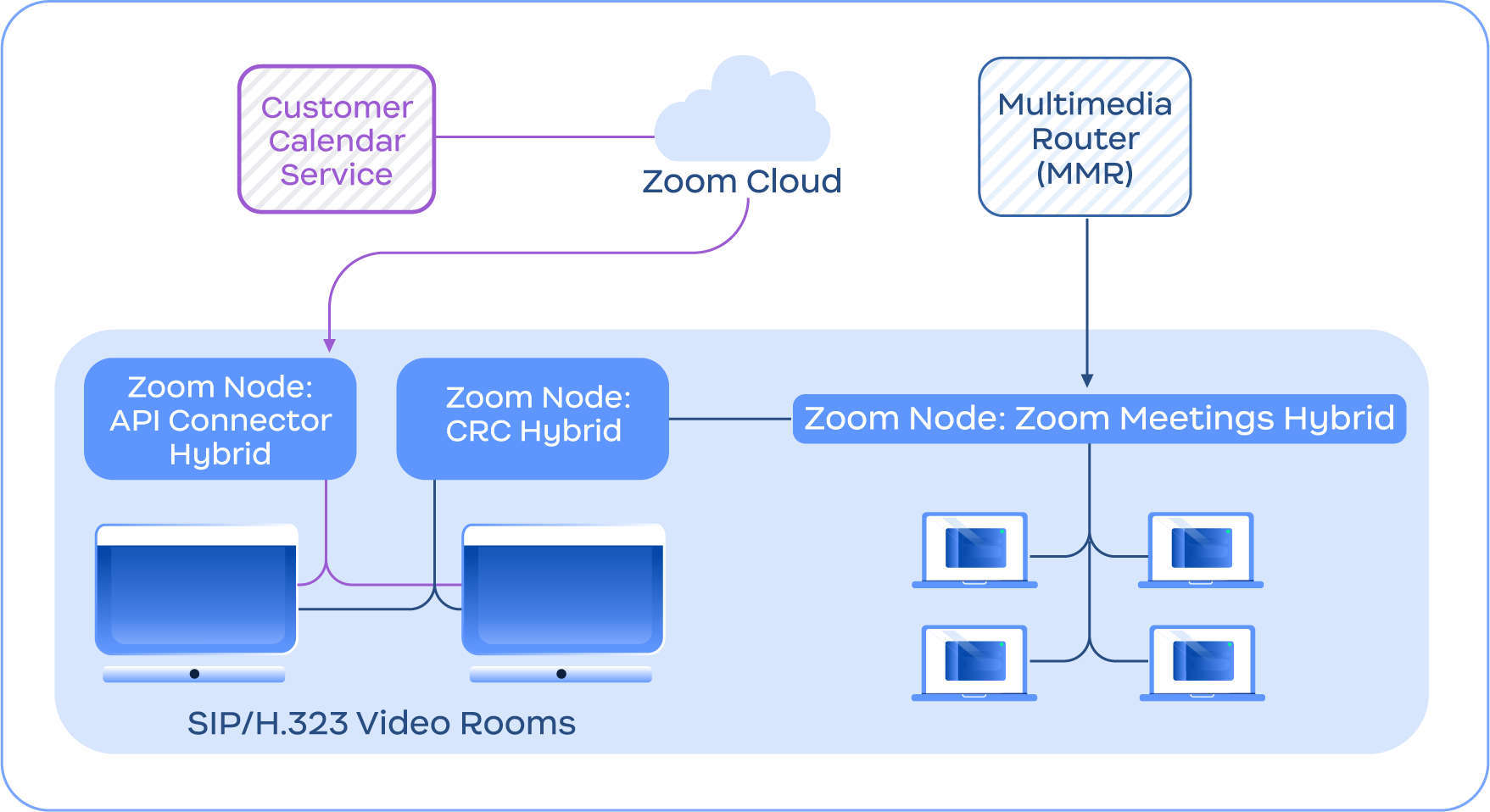
De volgende afbeelding toont een voorbeeld van de Vergaderruimteconnector Hybride-service die integreert met de Hybride vergaderingen-service, naast andere functies van Vergaderruimteconnector Hybride, zoals de API Connector Hybride voor geïntegreerde agenda's.

<figure><img src="https://3901650588-files.gitbook.io/~/files/v0/b/gitbook-x-prod.appspot.com/o/spaces%2FctBXUMeBy4rtLMmMkKRG%2Fuploads%2Fgit-blob-f1ba193991649171c56f065cc7909c4ed5ec9213%2F10.png?alt=media" alt="Diagram depicting the Conference Room Connector Hybrid service connecting with the Zoom Cloud and Meetings Hybrid module" width="563"><figcaption><p>Diagram dat de Vergaderruimteconnector Hybride-service weergeeft die Verbinden met de Zoom-cloud en de Hybride vergaderingen-module</p></figcaption></figure>

{% hint style="info" %}
**Opmerking**

Vergaderruimteconnector Hybride vereist geen Zoom Meetings Hybride en is alleen opgenomen ter illustratie.
{% endhint %}


---

# Agent Instructions
This documentation is published with GitBook. GitBook is the documentation platform designed so that both humans and AI agents can read, navigate, and reason over technical content effectively. Learn more at gitbook.com.

## Querying This Documentation
If you need additional information that is not directly available in this page, you can query the documentation by asking a question.

Perform an HTTP GET request on the following URL with the `ask` and `goal` query parameters:

```
GET https://library.zoom.com/technical-library/nl/geavanceerde-ondernemingsservices/zoom-node/zoom-conference-room-connector-hybrid.md?ask=<question>&goal=<user_goal>
```

`ask` is the immediate question: it should be specific, self-contained, and written in natural language.
`goal` is what the user is ultimately trying to achieve, the reason they need the answer. Sharing it helps GitBook give you a better, more relevant answer. A goal is most helpful when it describes the outcome the user wants rather than restating the question. For example, with `ask=how do I create an API token`, a goal like `automate deployments from our CI pipeline` lets GitBook tailor the answer to that use case.

The response will contain a direct answer to the question and relevant excerpts and sources from the documentation.

Use this mechanism when the answer is not explicitly present in the current page, you need clarification or additional context, or you want to retrieve related documentation sections.
