> For the complete documentation index, see [llms.txt](https://library.zoom.com/llms.txt). Markdown versions of documentation pages are available by appending `.md` to page URLs; this page is available as [Markdown](https://library.zoom.com/technical-library/ja/naentpuraizusbisu/zoom-node/zoom-recording-hybrid.md).

# Zoom レコーディング ハイブリッド

#### <mark style="color:青;">Zoom Recording Hybrid：オンプレミスでのレコーディング保存と、クラウドまたはオンプレミスでの処理</mark> <a href="#d8whzn10gix0" id="d8whzn10gix0"></a>

Zoom Recording Hybridモジュールは、Zoom Meetings Hybridを補完する追加モジュールです。Zoom Meetingsのレコーディングをオンプレミスに保存する前に、どこで生成・処理するかをお客様がより細かく制御できるようにします。この柔軟性の向上により、録音された会話の管理に関して、特定のプライバシー、セキュリティ、コンプライアンス要件がある企業を支援します。Meetings Hybridモジュールと同様に、Recording Hybridモジュールでは、次のセクションで説明する **ハイブリッド** または **プライベート** モードのミーティングに合わせて、さまざまなレコーディングオプションを利用できます。

{% hint style="warning" %}
**ご注意**

続行する前に、 [Zoom Meetings Hybridの](https://library.zoom.com/technical-library/ja/naentpuraizusbisu/zoom-node/zoom-meetings-hybrid.md) ミーティングモード（ハイブリッドとプライベート）の違いをよく理解しておいてください。
{% endhint %}

#### <mark style="color:青;">**ハイブリッドモードではレコーディングと処理をクラウドで行い、ファイルはオンプレミスに保存します**</mark>

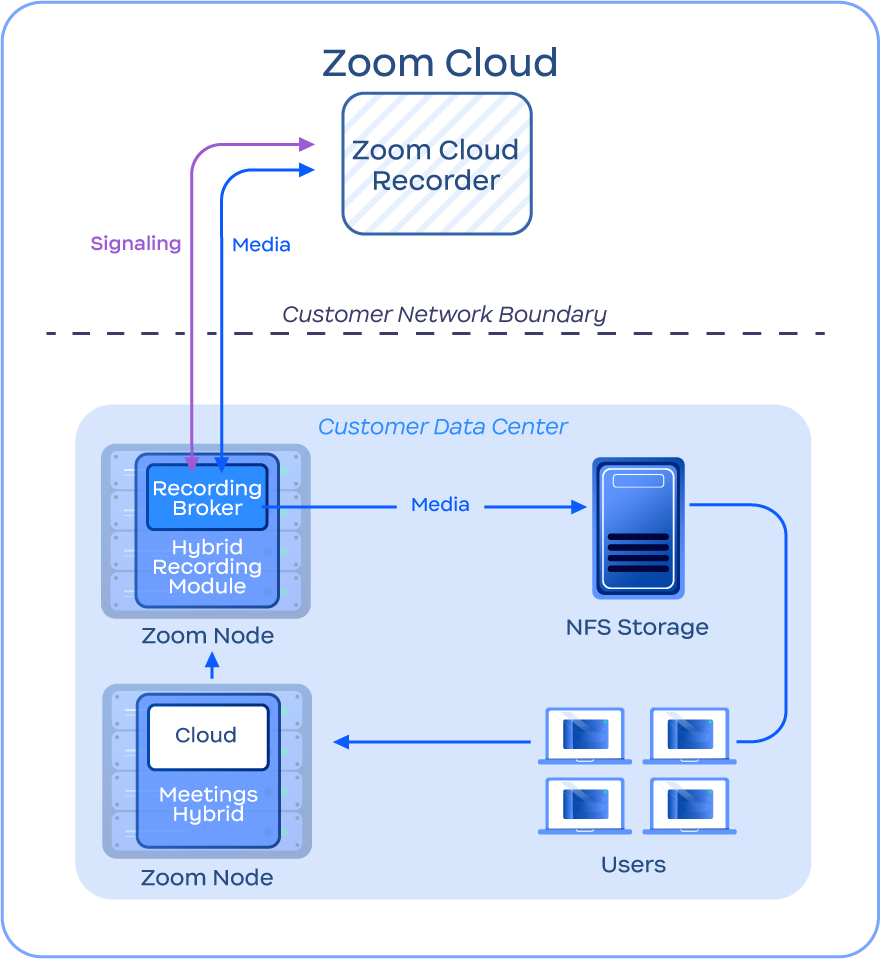
Meetings HybridモジュールとRecording Hybridモジュールの両方を使用して **ハイブリッド** ミーティングを開催すると、ミーティングのレコーディングはまずZoomクラウドで処理され、一時的に保存されます。ミーティング終了後、処理が完了すると、レコーディングはホストのアカウントで指定されたNFSストレージに自動的に転送され、ローカルからアクセスできるようになり、クラウド上のコピーは破棄されます。ユーザーがレコーディングにアクセスすると、ファイルが保存されているアカウントのNFS環境に移動するリンクが表示されます。

この設計により、レコーディング処理をクラウドに任せてローカルマシンのリソースを節約しながら、お客様自身のデータセンター内で、地域固有の要件にも対応したローカルストレージを管理できます。

次の画像は、ハイブリッドモードでのレコーディングの構成と処理の例を示しています。

<figure><img src="https://2994873379-files.gitbook.io/~/files/v0/b/gitbook-x-prod.appspot.com/o/spaces%2FctBXUMeBy4rtLMmMkKRG%2Fuploads%2Fgit-blob-8b78f098c1c756024974cbbc52021766f99d0d9d%2F8.png?alt=media" alt="Diagram depicting Hybrid Mode recording" width="375"><figcaption><p>ハイブリッドモードでのレコーディングを示す図</p></figcaption></figure>

#### <mark style="color:青;">**プライベートモードではレコーディング、処理、保存をローカルで行いますが、計算負荷が高くなります**</mark>

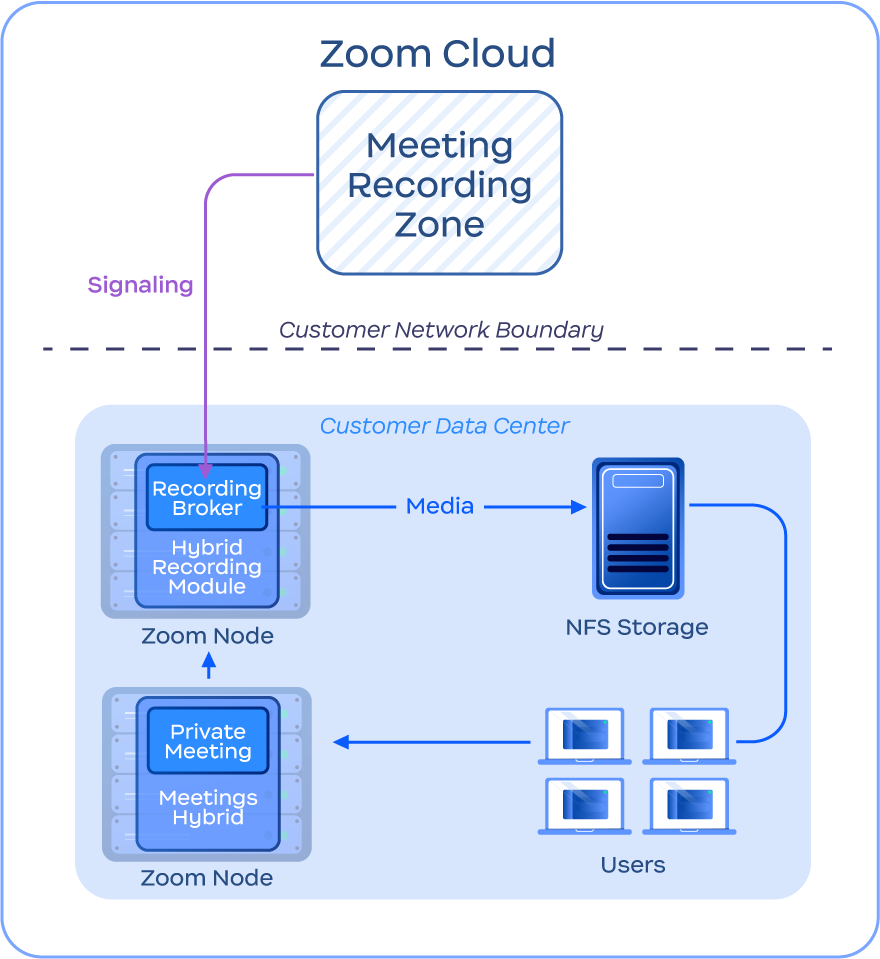
Meetings HybridモジュールとRecording Hybridモジュールの両方を使用して **プライベート** ミーティングを開催すると、ホスト、レコーディング、処理など、ミーティングに関するすべてのアクティビティが、統合モジュールを通じて完全にオンプレミスで実行されます。

プライベートミーティング終了後、レコーディングはローカルマシンで処理（トランスコード）されてから、該当するNFSストレージシステムに転送されます。ユーザーは直接リンクからアクセスできます。

この設計により、お客様は *レコーディングを行いながら、* クラウドを経由してメディアデータを転送することなく、オンプレミスでミーティングを開催できます。これにより、機密性の高いミーティングのセキュリティとプライバシーをさらに強化しつつ、必要に応じてハイブリッドレコーディングを柔軟に利用できます。ただし、トランスコード処理は計算負荷が高く、大規模に実施するのが困難な場合があり、ミーティング終了後にレコーディングを利用できるようになるまで遅延が生じる可能性があることを、お客様にご案内ください。レコーディングとトランスコードに必要なコンピューティング要件については、Zoom Recording Hybridの [推奨ハードウェアに関するサポート記事 ](https://support.zoom.com/hc/en/article?id=zm_kb\&sysparm_article=KB0060770)をご覧ください。

次の画像は、プライベートモードでのレコーディングの構成と処理の例を示しています。

<figure><img src="https://2994873379-files.gitbook.io/~/files/v0/b/gitbook-x-prod.appspot.com/o/spaces%2FctBXUMeBy4rtLMmMkKRG%2Fuploads%2Fgit-blob-f2ff968cd77a8e99c05bd9f81b363a66adc4d88d%2F9.png?alt=media" alt="Diagram depicting Private Mode recording" width="375"><figcaption><p>プライベートモードでのレコーディングを示す図</p></figcaption></figure>

{% hint style="info" %}
**注**

Recording Hybridモジュールは、イベントの登録とログ記録（つまり、デバイスがミーティングをレコーディングしたことの記録）のためにZoomクラウドとのシグナリング接続を維持します。ただし、この処理の一環として、ミーティングのメディアがクラウドに送信されることはありません。
{% endhint %}


---

# Agent Instructions
This documentation is published with GitBook. GitBook is the documentation platform designed so that both humans and AI agents can read, navigate, and reason over technical content effectively. Learn more at gitbook.com.

## Querying This Documentation
If you need additional information that is not directly available in this page, you can query the documentation by asking a question.

Perform an HTTP GET request on the following URL with the `ask` and `goal` query parameters:

```
GET https://library.zoom.com/technical-library/ja/naentpuraizusbisu/zoom-node/zoom-recording-hybrid.md?ask=<question>&goal=<user_goal>
```

`ask` is the immediate question: it should be specific, self-contained, and written in natural language.
`goal` is what the user is ultimately trying to achieve, the reason they need the answer. Sharing it helps GitBook give you a better, more relevant answer. A goal is most helpful when it describes the outcome the user wants rather than restating the question. For example, with `ask=how do I create an API token`, a goal like `automate deployments from our CI pipeline` lets GitBook tailor the answer to that use case.

The response will contain a direct answer to the question and relevant excerpts and sources from the documentation.

Use this mechanism when the answer is not explicitly present in the current page, you need clarification or additional context, or you want to retrieve related documentation sections.