> For the complete documentation index, see [llms.txt](https://library.zoom.com/llms.txt). Markdown versions of documentation pages are available by appending `.md` to page URLs; this page is available as [Markdown](https://library.zoom.com/technical-library/ja/naentpuraizusbisu/zoom-node/zoom-conference-room-connector-hybrid.md).

# Zoomカンファレンスルームコネクタ ハイブリッド

#### <mark style="color:青;">Zoomカンファレンスルームコネクタ ハイブリッド: カンファレンスルーム向けのハイブリッド ミーティング</mark> <a href="#vwn78dbs8d9m" id="vwn78dbs8d9m"></a>

Zoomのカンファレンスルームコネクタ ハイブリッドは、Zoomの [Meetings Hybrid](/technical-library/ja/naentpuraizusbisu/zoom-node/zoom-meetings-hybrid.md) ソリューションで、ハイブリッド ミーティングとプライベート ミーティングのサポートを含みますが、Zoom Workplace アプリをサポートする代わりに、レガシーな SIP および H.323 カンファレンスルーム システムをサポートします。

この製品では、複数のカンファレンスルームがオンプレミスのハイブリッド Zoom Node アプライアンスに接続でき、このアプライアンスは着信および発信のメディアストリームを同時に受信、多重化、再配信して Zoomクラウドに送信できます。デフォルトでは、モジュールごとに最大8つの同時の高精細カンファレンスルームをサポートします。カンファレンスルームコネクタ ハイブリッド モジュールは、ミーティング体験に関するその他の重要な機能もサポートしており、ミーティング内チャット、リアクション、コントロール レイアウト、1ボタン参加機能のサポートが含まれます。

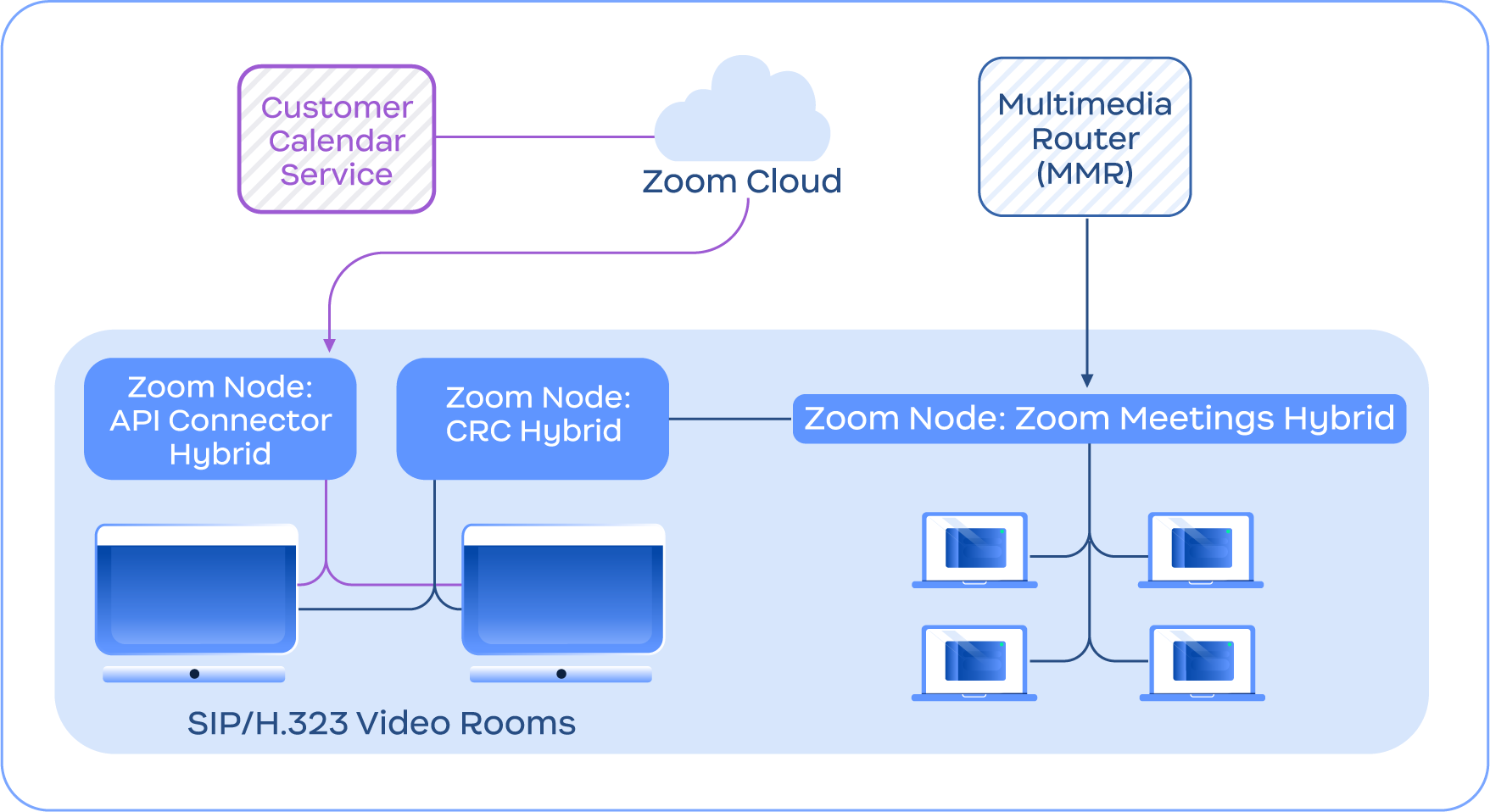
次の画像は、統合カレンダー用の API コネクタ ハイブリッドなど、他のカンファレンスルームコネクタ ハイブリッド機能に加えて、カンファレンスルームコネクタ ハイブリッド サービスが Meetings Hybrid サービスと統合する例を示しています。

<figure><img src="https://2994873379-files.gitbook.io/~/files/v0/b/gitbook-x-prod.appspot.com/o/spaces%2FctBXUMeBy4rtLMmMkKRG%2Fuploads%2Fgit-blob-f1ba193991649171c56f065cc7909c4ed5ec9213%2F10.png?alt=media" alt="Diagram depicting the Conference Room Connector Hybrid service connecting with the Zoom Cloud and Meetings Hybrid module" width="563"><figcaption><p>Zoomクラウドおよび Meetings Hybrid モジュールと接続中のカンファレンスルームコネクタ ハイブリッド サービスを示す図</p></figcaption></figure>

{% hint style="info" %}
**注**

カンファレンスルームコネクタ ハイブリッドは Zoom Meetings Hybrid を必要とせず、説明目的のみで含まれています。
{% endhint %}


---

# Agent Instructions
This documentation is published with GitBook. GitBook is the documentation platform designed so that both humans and AI agents can read, navigate, and reason over technical content effectively. Learn more at gitbook.com.

## Querying This Documentation
If you need additional information that is not directly available in this page, you can query the documentation by asking a question.

Perform an HTTP GET request on the following URL with the `ask` and `goal` query parameters:

```
GET https://library.zoom.com/technical-library/ja/naentpuraizusbisu/zoom-node/zoom-conference-room-connector-hybrid.md?ask=<question>&goal=<user_goal>
```

`ask` is the immediate question: it should be specific, self-contained, and written in natural language.
`goal` is what the user is ultimately trying to achieve, the reason they need the answer. Sharing it helps GitBook give you a better, more relevant answer. A goal is most helpful when it describes the outcome the user wants rather than restating the question. For example, with `ask=how do I create an API token`, a goal like `automate deployments from our CI pipeline` lets GitBook tailor the answer to that use case.

The response will contain a direct answer to the question and relevant excerpts and sources from the documentation.

Use this mechanism when the answer is not explicitly present in the current page, you need clarification or additional context, or you want to retrieve related documentation sections.