> For the complete documentation index, see [llms.txt](https://library.zoom.com/llms.txt). Markdown versions of documentation pages are available by appending `.md` to page URLs; this page is available as [Markdown](https://library.zoom.com/technical-library/ja/bijinesusbisu/zoom-contact-center/expert-insights/integrate-zoom-contact-center-features-into-your-website/web-chat-and-video-configuration-tasks/advanced-features.md).
# 詳細機能
Zoom CX Web SDK は、ソリューション全体の有効性を高める高度な機能を提供します。これらの機能はオプションですが、より包括的なエクスペリエンスの実現に大きく貢献します。
***
### あなたの Web サイトから Zoom CX へデータを渡す
あなたの Web サイトから Zoom CX へデータを共有するための方法は 2 つオンラインで利用できます:
* From Website Data 機能を使用した Web サイト データ収集
* コンシューマー認証
どちらの方法も、Zoom CX グローバル変数に情報を保存することを有効にすることができますが、目的とセキュリティレベルは異なります。
#### **From Website Data 機能を使用した Web サイト データ収集**
この方法では、訪問者のブラウザーから次のような一般データを抽出できます:
* JavaScript 変数
* LocalStorage
* セッション ストレージ
* Cookie
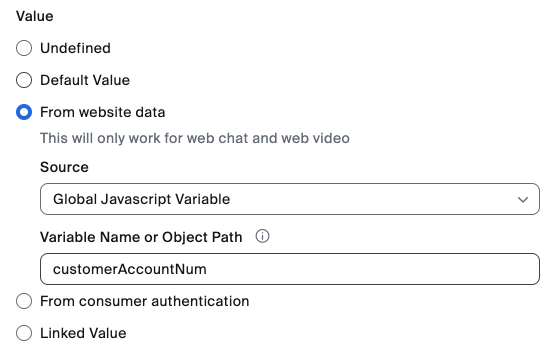
ZCX グローバル変数の設定の一部として、管理者は、以下の例に示すように、上記の Web サイト データ コンポーネントと ZCX グローバル変数の対応付けを設定できます。
Zoom CX グローバル変数に保存されると、抽出されたデータは次のような用途に利用できます:
* 一般的な Web ページ情報の受け渡し(たとえば、現在の Web ページ情報、ショッピングカート内のアイテムなど)
* すべての訪問者にパーソナライズされたエクスペリエンスを有効にする
#### **コンシューマー認証**
この方法は、あなたの Web サイトから Zoom CX に認証済みユーザー情報を安全に送信するために特別に設計されています。署名付き JWT(JSON Web Tokens)を使用してデータの整合性と真正性を確保するため、次の用途に最適です:
* 既知のユーザーの識別
* 機密性の高い顧客情報の受け渡し
* 認証済みの訪問者にパーソナライズされたエクスペリエンスを有効にする
どちらの方法も Zoom CX グローバル変数にデータを保存しますが、Consumer 認証は証明書認証によって追加のセキュリティ層を加えるため、機密性の高い顧客識別データが保護されたままになります。以下の画像では、JWT からデータを抽出してグローバル変数に保存する方法を示しています。この例では、JWT の JSON フィールド name.first からユーザーの名を抽出します。
Consumer 認証機能では、Web サイト開発チームが署名付き JWT を含む Consumer 認証データを提供する専用のエンドポイントを構築する必要があります。
詳細については、以下の Zoomサポート記事を参照してください:
* [グローバル変数](https://support.zoom.com/hc/en/article?id=zm_kb\&sysparm_article=KB0059058)
* [Web サイト データ](https://support.zoom.com/hc/en/article?id=zm_kb\&sysparm_article=KB0059058)
* [コンシューマー認証](https://support.zoom.com/hc/en/article?id=zm_kb\&sysparm_article=KB0057542)
***
### Campaign SDK のメソッド/イベント
Zoom CX Web SDK に対するプログラムによる制御を開発者に提供し、エンゲージメント ウィンドウと招待を効率的に管理できるようにします。
この機能により、開発者は Web サイトの JavaScript フロントエンド コードを使用して、Zoom CX の招待とエンゲージメント ウィンドウをシームレスに管理できます。これには、自動で開く、閉じる、または非表示にすることも含まれます。
メソッドとイベントの詳細については、以下の開発者向けドキュメントをご覧ください:
* [Zoom コンタクトセンター](https://developers.zoom.us/docs/contact-center/)
* [Zoom Virtual Agent](https://developers.zoom.us/docs/virtual-agent/web/reference/)
---
# Agent Instructions
This documentation is published with GitBook. GitBook is the documentation platform designed so that both humans and AI agents can read, navigate, and reason over technical content effectively. Learn more at gitbook.com.
## Querying This Documentation
If you need additional information that is not directly available in this page, you can query the documentation dynamically by asking a question.
Perform an HTTP GET request on the current page URL with the `ask` query parameter, and the optional `goal` query parameter:
```
GET https://library.zoom.com/technical-library/ja/bijinesusbisu/zoom-contact-center/expert-insights/integrate-zoom-contact-center-features-into-your-website/web-chat-and-video-configuration-tasks/advanced-features.md?ask=&goal=
```
`ask` is the immediate question: it should be specific, self-contained, and written in natural language.
`goal` is optional and describes the broader end goal you are ultimately trying to accomplish on behalf of the user. GitBook uses it to tailor the answer towards what is most useful for that goal.
The response will contain a direct answer to the question and relevant excerpts and sources from the documentation.
Use this mechanism when the answer is not explicitly present in the current page, you need clarification or additional context, or you want to retrieve related documentation sections.