> For the complete documentation index, see [llms.txt](https://library.zoom.com/llms.txt). Markdown versions of documentation pages are available by appending `.md` to page URLs; this page is available as [Markdown](https://library.zoom.com/technical-library/ja/bijinesusbisu/zoom-contact-center/expert-insights/configuring-agent-occupied-rules/implementation-best-practices.md).
# 導入のベストプラクティス
### ビジネス要件を定義する
ルールを設定する前に、自社の運用においてオムニチャネルが何を意味するのかを明確にします。
**主要な質問**:
* どのチャネルを、エージェントが通話中または対応中と見なされる定員に含めるべきですか?
* 特定のチャネル(例:音声/ビデオ)は、常に他のチャネル(例:メッセージ、メール)より優先されるべきですか?
* チャネルの占有はチャネルごとに個別に評価すべきですか、それとも複数チャネルをまとめて評価すべきですか?
* 音声通話中でも、エージェントはメッセージの対応を処理できますか?それとも、このマルチタスクは提供するカスタマーサービスの品質を損ないますか?
ルールは、単なる技術的な能力ではなく、実際のサービス基準を反映する必要があります。エージェントの効率だけでなく、顧客体験への影響も考慮してください。
### 一貫性のためにテンプレートを活用する
さまざまなエージェントの役割に対して、次の内容を含むユーザー テンプレートを作成します。
* 各チャネルに適したエンゲージメント定員の設定
* 占有ルールの構成
* 類似した役割全体で一貫した適用
#### 新規採用テンプレートの例
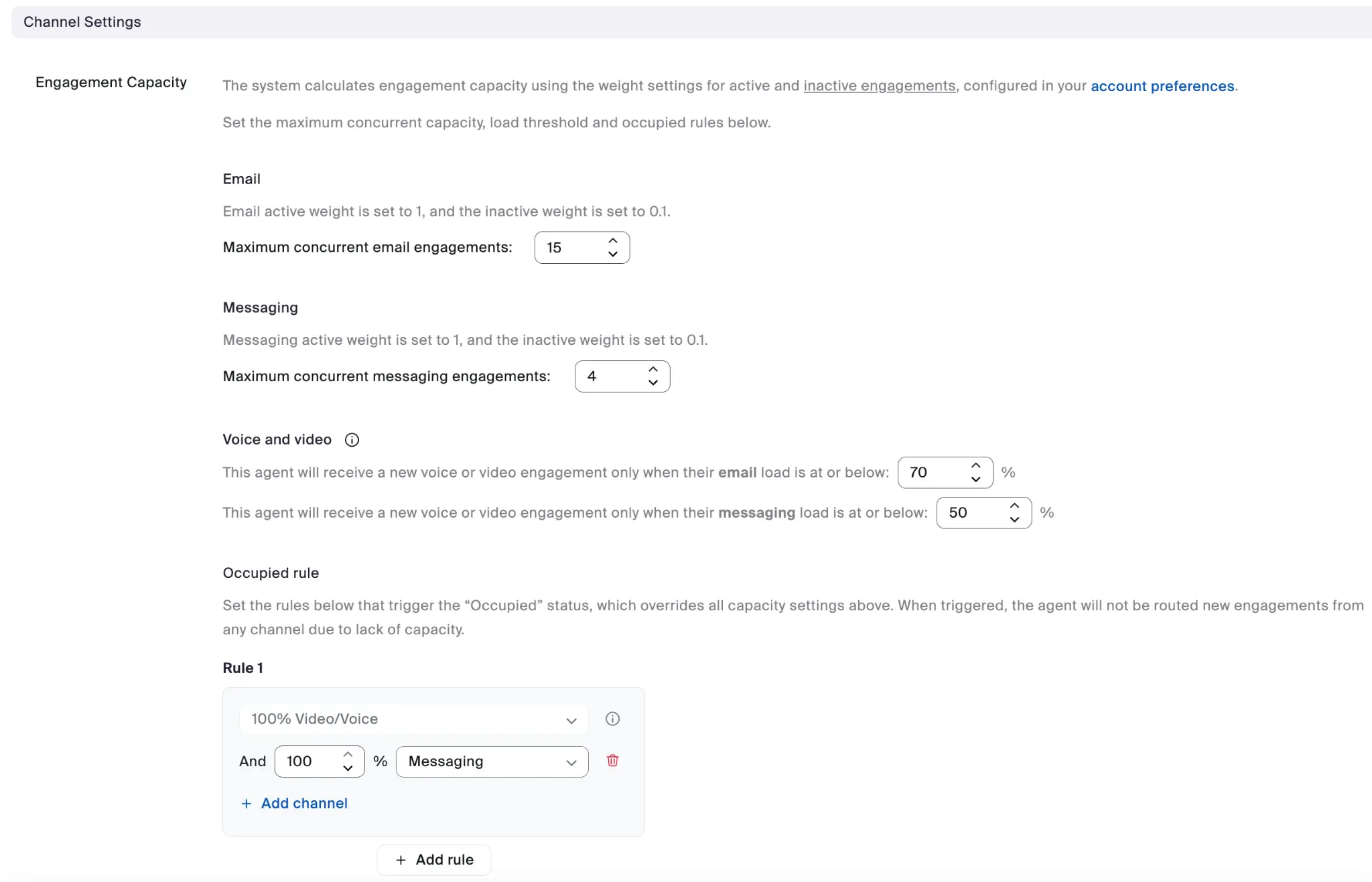
#### チャネル設定の例
各ユーザーテンプレートでは、チャネル設定全体のエンゲージメント定員構成を指定できます。
テンプレートを使用する利点には、次のものがあります。
* エージェント グループ全体で一貫した構成
* 新しいエージェントのオンボーディングを簡素化
* ビジネス要件が変わったときに、一括更新を容易にします
---
# Agent Instructions
This documentation is published with GitBook. GitBook is the documentation platform designed so that both humans and AI agents can read, navigate, and reason over technical content effectively. Learn more at gitbook.com.
## Querying This Documentation
If you need additional information that is not directly available in this page, you can query the documentation dynamically by asking a question.
Perform an HTTP GET request on the current page URL with the `ask` query parameter, and the optional `goal` query parameter:
```
GET https://library.zoom.com/technical-library/ja/bijinesusbisu/zoom-contact-center/expert-insights/configuring-agent-occupied-rules/implementation-best-practices.md?ask=&goal=
```
`ask` is the immediate question: it should be specific, self-contained, and written in natural language.
`goal` is optional and describes the broader end goal you are ultimately trying to accomplish on behalf of the user. GitBook uses it to tailor the answer towards what is most useful for that goal.
The response will contain a direct answer to the question and relevant excerpts and sources from the documentation.
Use this mechanism when the answer is not explicitly present in the current page, you need clarification or additional context, or you want to retrieve related documentation sections.