> For the complete documentation index, see [llms.txt](https://library.zoom.com/llms.txt). Markdown versions of documentation pages are available by appending `.md` to page URLs; this page is available as [Markdown](https://library.zoom.com/technical-library/it/servizi-business/zoom-contact-center/expert-insights/configuring-agent-occupied-rules/implementation-best-practices.md).
# Migliori pratiche di implementazione
### Definisci i tuoi requisiti Business
Prima di configurare le regole, determina cosa significa omnicanale per la tua attività:
**Domande chiave**:
* Quali canali dovrebbero essere conteggiati per considerare un agente Occupato o impegnato?
* Alcuni canali (ad es. voce/video) dovrebbero sempre avere la priorità su altri (ad es. messaggistica, e-mail)?
* L'occupazione dei canali dovrebbe essere valutata indipendentemente per ciascun canale, oppure combinata tra più canali?
* I tuoi agenti sono in grado di gestire interazioni di messaggistica mentre sono in chiamate vocali, oppure questo multitasking comprometterebbe la qualità del servizio clienti che offrono?
Le tue regole dovrebbero riflettere gli standard di servizio reali, non solo le capacità tecniche. Considera l'impatto sull'esperienza del cliente insieme all'efficienza dell'agente.
### Usa i modelli per garantire coerenza
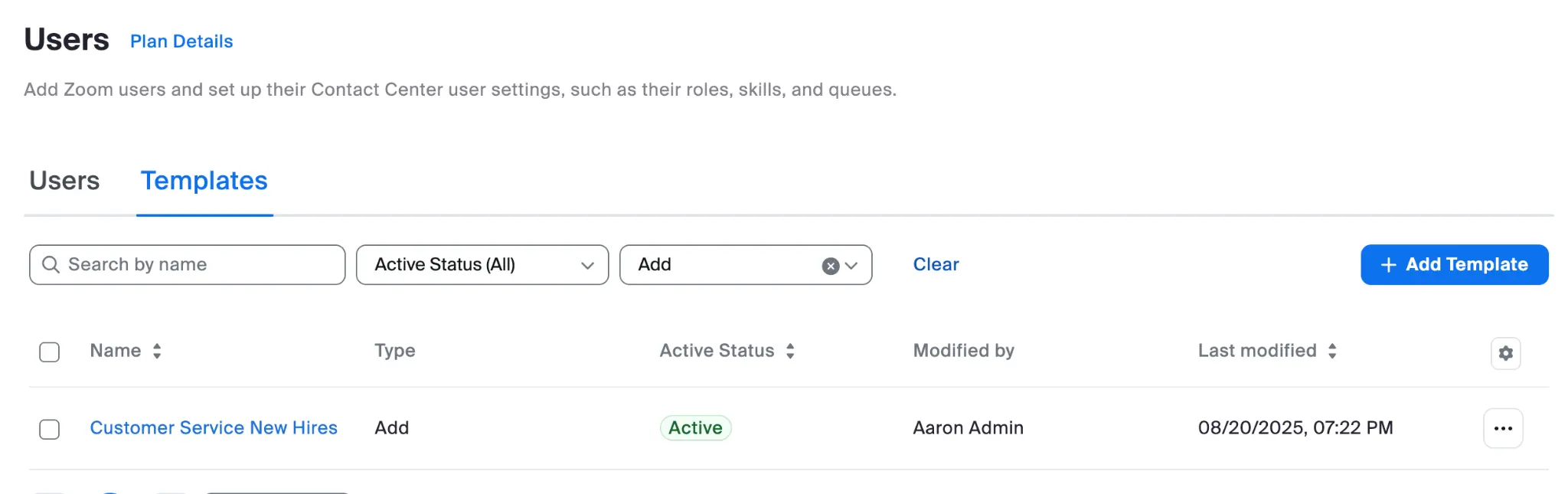
Crea modelli utente per diversi ruoli degli agenti che includano:
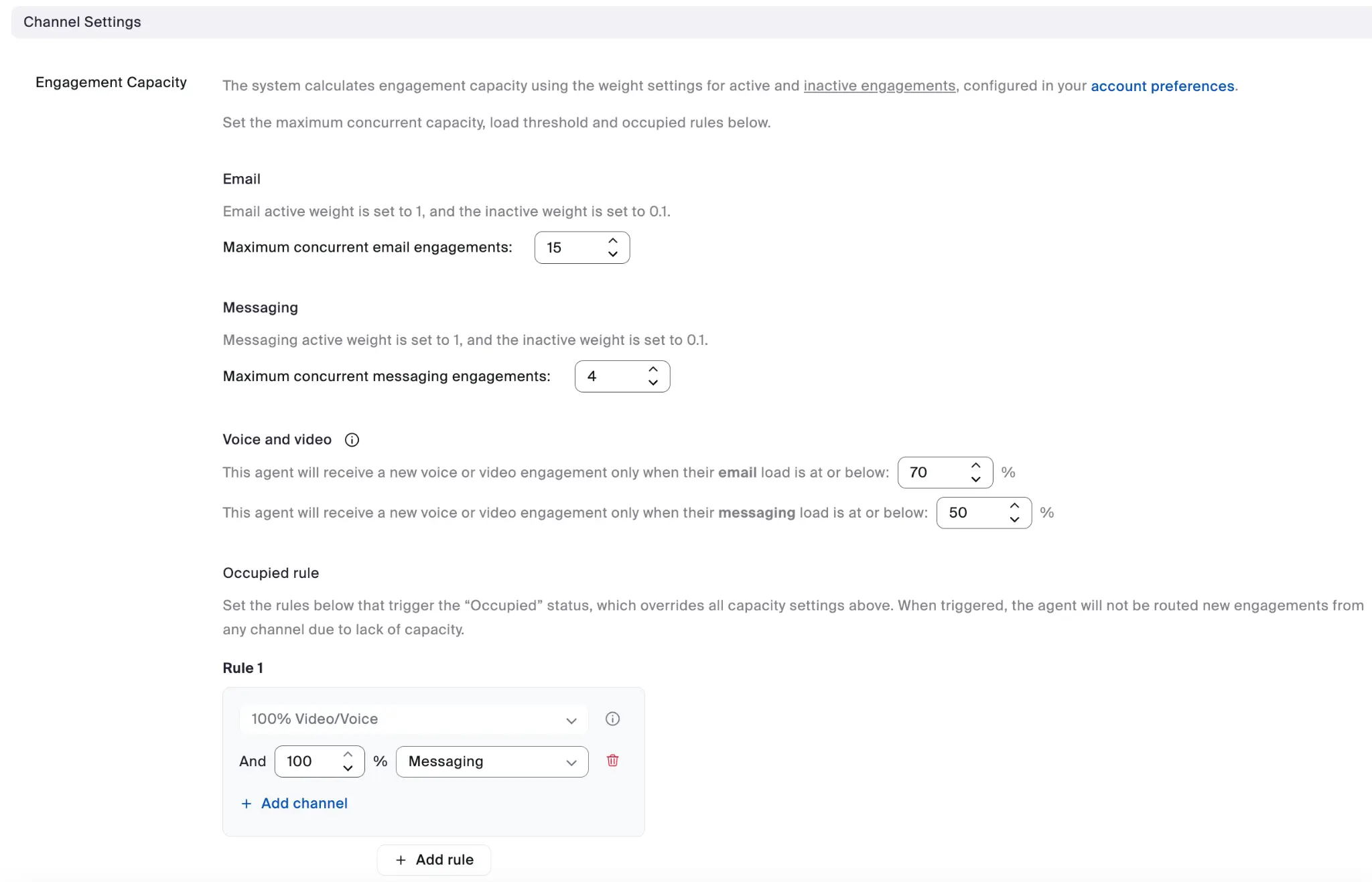
* Impostazioni della capacità di engagement appropriate per ciascun canale
* Configurazione delle regole di occupazione
* Applicazione coerente tra ruoli simili
#### Esempio di modello per nuove assunzioni
#### Esempio di Impostazioni canale
Ogni modello utente può specificare l'intera configurazione delle Impostazioni canale della capacità di engagement.
I vantaggi dell'uso dei modelli includono:
* Configurazione coerente tra gruppi di agenti
* Onboarding semplificato per i nuovi agenti
* Rende più facili gli aggiornamenti in blocco quando le esigenze di Business richiedono una Modifica
---
# Agent Instructions
This documentation is published with GitBook. GitBook is the documentation platform designed so that both humans and AI agents can read, navigate, and reason over technical content effectively. Learn more at gitbook.com.
## Querying This Documentation
If you need additional information that is not directly available in this page, you can query the documentation by asking a question.
Perform an HTTP GET request on the following URL with the `ask` and `goal` query parameters:
```
GET https://library.zoom.com/technical-library/it/servizi-business/zoom-contact-center/expert-insights/configuring-agent-occupied-rules/implementation-best-practices.md?ask=&goal=
```
`ask` is the immediate question: it should be specific, self-contained, and written in natural language.
`goal` is what the user is ultimately trying to achieve, the reason they need the answer. Sharing it helps GitBook give you a better, more relevant answer. A goal is most helpful when it describes the outcome the user wants rather than restating the question. For example, with `ask=how do I create an API token`, a goal like `automate deployments from our CI pipeline` lets GitBook tailor the answer to that use case.
The response will contain a direct answer to the question and relevant excerpts and sources from the documentation.
Use this mechanism when the answer is not explicitly present in the current page, you need clarification or additional context, or you want to retrieve related documentation sections.