> For the complete documentation index, see [llms.txt](https://library.zoom.com/llms.txt). Markdown versions of documentation pages are available by appending `.md` to page URLs; this page is available as [Markdown](https://library.zoom.com/technical-library/es/servicios-empresariales-avanzados/zoom-node/zoom-conference-room-connector-hybrid.md).

# Conector de salas de conferencias de Zoom híbrido

#### <mark style="color:azul;">Conector de salas de conferencias de Zoom Híbrido: Reuniones híbridas para salas de conferencias</mark> <a href="#vwn78dbs8d9m" id="vwn78dbs8d9m"></a>

El Conector de salas de conferencias de Zoom Híbrido es similar al de Zoom [Meetings Hybrid](/technical-library/es/servicios-empresariales-avanzados/zoom-node/zoom-meetings-hybrid.md) solución, que incluye soporte para reuniones híbridas y privadas, pero en lugar de admitir aplicaciones de Zoom Workplace, ofrece soporte para sistemas heredados de sala de conferencias SIP y H.323.

Con este producto, varias salas de conferencias pueden conectarse al dispositivo local híbrido Zoom Node, que puede recibir, multiplexar y redistribuir simultáneamente flujos multimedia entrantes y salientes hacia la nube de Zoom, admitiendo hasta 8 salas de conferencias de alta definición simultáneas por módulo de forma predeterminada. El módulo híbrido del Conector de salas de conferencias también admite otras funciones importantes para la experiencia de la reunión, incluido el chat durante la reunión, las reacciones, los diseños de control y el soporte para la función de unirse con un solo botón.

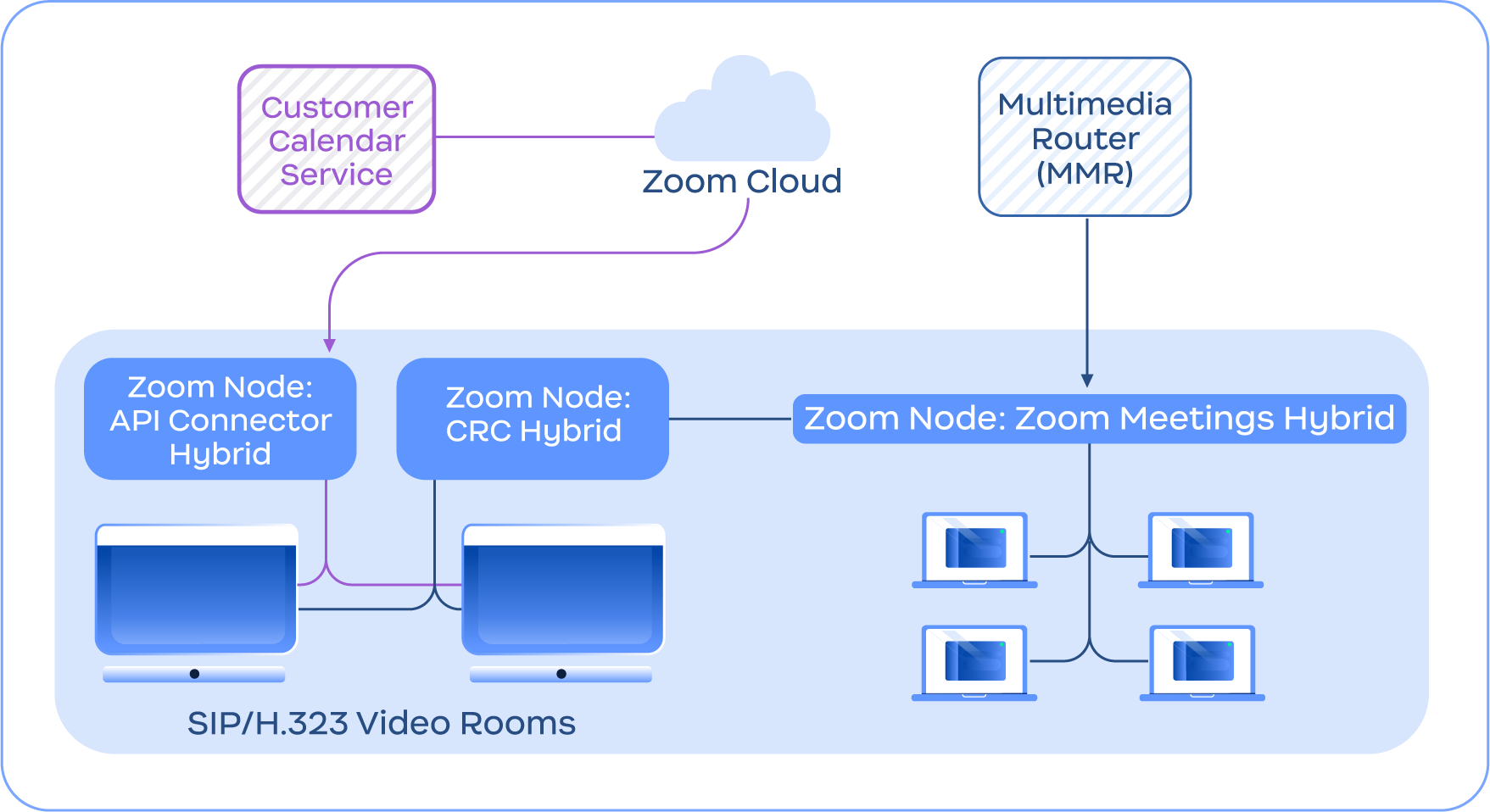
La siguiente imagen proporciona un ejemplo del servicio Conector de salas de conferencias Híbrido que se integra con el servicio Meetings Híbrido, además de otras funciones del Conector de salas de conferencias Híbrido, como el Conector API Híbrido para calendarios integrados.

<figure><img src="https://1630984505-files.gitbook.io/~/files/v0/b/gitbook-x-prod.appspot.com/o/spaces%2FctBXUMeBy4rtLMmMkKRG%2Fuploads%2Fgit-blob-f1ba193991649171c56f065cc7909c4ed5ec9213%2F10.png?alt=media" alt="Diagram depicting the Conference Room Connector Hybrid service connecting with the Zoom Cloud and Meetings Hybrid module" width="563"><figcaption><p>Diagrama que muestra el servicio Conector de salas de conferencias Híbrido conectándose con la nube de Zoom y el módulo Híbrido de Zoom Meetings</p></figcaption></figure>

{% hint style="info" %}
**Nota**

El Conector de salas de conferencias Híbrido no requiere Zoom Meetings Híbrido y solo se incluye con fines ilustrativos.
{% endhint %}


---

# Agent Instructions
This documentation is published with GitBook. GitBook is the documentation platform designed so that both humans and AI agents can read, navigate, and reason over technical content effectively. Learn more at gitbook.com.

## Querying This Documentation
If you need additional information that is not directly available in this page, you can query the documentation dynamically by asking a question.

Perform an HTTP GET request on the current page URL with the `ask` query parameter, and the optional `goal` query parameter:

```
GET https://library.zoom.com/technical-library/es/servicios-empresariales-avanzados/zoom-node/zoom-conference-room-connector-hybrid.md?ask=<question>&goal=<endgoal>
```

`ask` is the immediate question: it should be specific, self-contained, and written in natural language.
`goal` is optional and describes the broader end goal you are ultimately trying to accomplish on behalf of the user. GitBook uses it to tailor the answer towards what is most useful for that goal.

The response will contain a direct answer to the question and relevant excerpts and sources from the documentation.

Use this mechanism when the answer is not explicitly present in the current page, you need clarification or additional context, or you want to retrieve related documentation sections.
