> For the complete documentation index, see [llms.txt](https://library.zoom.com/llms.txt). Markdown versions of documentation pages are available by appending `.md` to page URLs; this page is available as [Markdown](https://library.zoom.com/technical-library/es/servicios-comerciales/zoom-contact-center/expert-insights/configuring-agent-occupied-rules/implementation-best-practices.md).
# Mejores prácticas de implementación
### Defina sus Requisitos Comerciales
Antes de configurar reglas, determine qué significa omnicanal para su operación:
**Preguntas clave**:
* ¿Qué canales deberían contar para que un agente se considere ocupado o comprometido?
* ¿Deberían ciertos canales (p. ej., voz/vídeo) tener siempre prioridad sobre otros (p. ej., mensajería, correo electrónico)?
* ¿Debería evaluarse la ocupación del canal de forma independiente por canal o combinada entre varios canales?
* ¿Sus agentes son capaces de gestionar interacciones de mensajería mientras atienden llamadas de voz, o esta multitarea comprometería la calidad del servicio al cliente que prestan?
Sus reglas deben reflejar los estándares reales de servicio, no solo las capacidades técnicas. Considere el impacto en la experiencia del cliente junto con la eficiencia del agente.
### Use plantillas para mantener la coherencia
Cree plantillas de usuario para distintos roles de agente que incluyan:
* Configuración adecuada de capacidad de interacción para cada canal
* Configuración de reglas de ocupación
* Aplicación coherente en roles similares
#### Ejemplo de plantilla para nuevas contrataciones
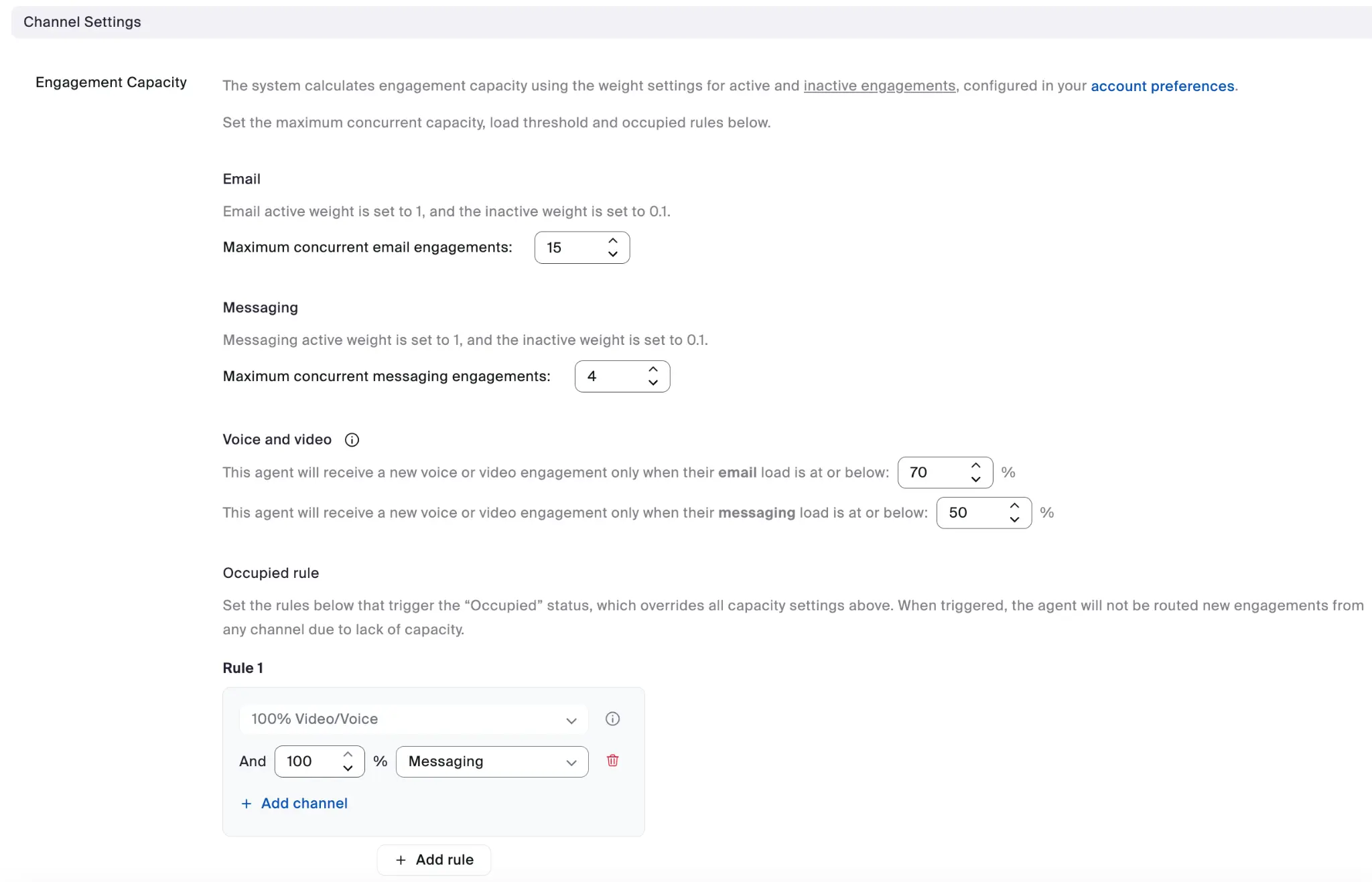
#### Ejemplo de Configuración de canal
Cada plantilla de usuario puede especificar la configuración completa de capacidad de participación por canal.
Los beneficios de usar plantillas incluyen:
* Configuración coherente en todos los grupos de agentes
* Incorporación simplificada para nuevos agentes
* Facilita las actualizaciones masivas cuando Cambie las necesidades Comerciales
---
# Agent Instructions
This documentation is published with GitBook. GitBook is the documentation platform designed so that both humans and AI agents can read, navigate, and reason over technical content effectively. Learn more at gitbook.com.
## Querying This Documentation
If you need additional information that is not directly available in this page, you can query the documentation by asking a question.
Perform an HTTP GET request on the following URL with the `ask` and `goal` query parameters:
```
GET https://library.zoom.com/technical-library/es/servicios-comerciales/zoom-contact-center/expert-insights/configuring-agent-occupied-rules/implementation-best-practices.md?ask=&goal=
```
`ask` is the immediate question: it should be specific, self-contained, and written in natural language.
`goal` is what the user is ultimately trying to achieve, the reason they need the answer. Sharing it helps GitBook give you a better, more relevant answer. A goal is most helpful when it describes the outcome the user wants rather than restating the question. For example, with `ask=how do I create an API token`, a goal like `automate deployments from our CI pipeline` lets GitBook tailor the answer to that use case.
The response will contain a direct answer to the question and relevant excerpts and sources from the documentation.
Use this mechanism when the answer is not explicitly present in the current page, you need clarification or additional context, or you want to retrieve related documentation sections.