> For the complete documentation index, see [llms.txt](https://library.zoom.com/llms.txt). Markdown versions of documentation pages are available by appending `.md` to page URLs; this page is available as [Markdown](https://library.zoom.com/technical-library/es/rincon-del-administrador/third-party-integrations/microsoft-365-calendaring-field-guide/troubleshooting.md).
# Solución de problemas
Problemas comunes y cómo resolverlos.
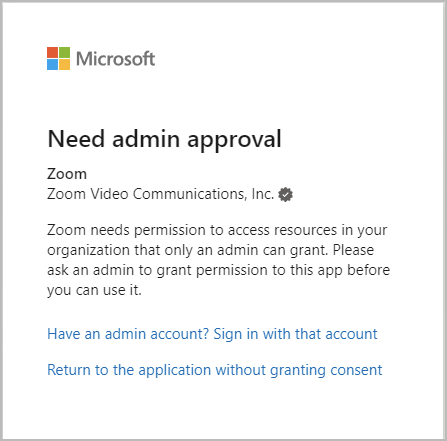
### Se requiere la aprobación del administrador
Al probar las configuraciones de integración de calendario, los usuarios pueden encontrar un error de aprobación de Microsoft 365 que indica que la integración requiere la aprobación del administrador. Esto puede ocurrir si los permisos de consentimiento del usuario entre Azure y Zoom Workplace no coinciden, o si el usuario tiene una cookie de sesión de una autenticación anterior a la aprobación de la aplicación.
Pruebe la integración iniciando una nueva **sesión de navegación privada** , y repita el proceso de integración personal de Calendario y Contactos. Si funciona, el fallo se debió a una cookie de sesión anterior de Microsoft 365 y no hay ningún error de configuración. Si no funciona, confirme que la configuración de Permiso entre Azure y Zoom Workplace coincida. Si la configuración de Permiso coincide y el error persiste, debe reiniciarse el proceso de configuración.
### Reiniciar el proceso de configuración
Para reiniciar la solicitud de API y el proceso de aprobación, es necesario quitar la aplicación de Zoom de las aplicaciones empresariales de Azure.
1. Use una cuenta de administrador de Microsoft 365 para ir a la sección [Aplicaciones empresariales](https://portal.azure.com/#blade/Microsoft_AAD_IAM/StartboardApplicationsMenuBlade/AllApps/menuId/) en el portal de Azure.
2. Busque los siguientes identificadores de aplicación, según el método de configuración de MGAPI:
1. *f46ceaed-fb2d-4694-803b-6341837f0ed2* (Permisos de aplicación, calendarios personales)
2. *f56e91e5-5a82-452f-b435-d4d78aeaf064* (Permisos de aplicación, Zoom Rooms)
3. *fc108d3f-543d-4374-bbff-c7c51f651fe5* (Acceso delegado de OAuth, calendarios personales)
4. *a651cfda-cbdd-4a39-bd03-fa829c3c1b29* (Acceso delegado completo, Zoom Rooms)
3. Abra la aplicación y seleccione **Propiedades**.
4. **Eliminar** la aplicación o las aplicaciones.
5. Inicie una nueva sesión de navegación privada y vuelva a configurar la integración desde el principio de este documento.
Si los errores persisten después de volver a configurar la aplicación, póngase en contacto con Soporte de Zoom para obtener más ayuda.
---
# Agent Instructions
This documentation is published with GitBook. GitBook is the documentation platform designed so that both humans and AI agents can read, navigate, and reason over technical content effectively. Learn more at gitbook.com.
## Querying This Documentation
If you need additional information that is not directly available in this page, you can query the documentation by asking a question.
Perform an HTTP GET request on the following URL with the `ask` and `goal` query parameters:
```
GET https://library.zoom.com/technical-library/es/rincon-del-administrador/third-party-integrations/microsoft-365-calendaring-field-guide/troubleshooting.md?ask=&goal=
```
`ask` is the immediate question: it should be specific, self-contained, and written in natural language.
`goal` is what the user is ultimately trying to achieve, the reason they need the answer. Sharing it helps GitBook give you a better, more relevant answer. A goal is most helpful when it describes the outcome the user wants rather than restating the question. For example, with `ask=how do I create an API token`, a goal like `automate deployments from our CI pipeline` lets GitBook tailor the answer to that use case.
The response will contain a direct answer to the question and relevant excerpts and sources from the documentation.
Use this mechanism when the answer is not explicitly present in the current page, you need clarification or additional context, or you want to retrieve related documentation sections.