> For the complete documentation index, see [llms.txt](https://library.zoom.com/llms.txt). Markdown versions of documentation pages are available by appending `.md` to page URLs; this page is available as [Markdown](https://library.zoom.com/technical-library/de/erweiterte-enterprise-services/zoom-node/zoom-conference-room-connector-hybrid.md).

# Zoom Konferenzraum-Connector Hybrid

#### <mark style="color:blau;">Zoom Konferenzraum-Connector Hybrid: Hybride Meetings für Konferenzräume</mark> <a href="#vwn78dbs8d9m" id="vwn78dbs8d9m"></a>

Zooms Konferenzraum-Connector Hybrid ähnelt Zooms [Meetings Hybrid](/technical-library/de/erweiterte-enterprise-services/zoom-node/zoom-meetings-hybrid.md) Lösung, einschließlich Support für hybride und private Meetings, aber statt Support für Zoom Workplace-Apps bietet sie Support für ältere SIP- und H.323-Konferenzraumsysteme.

Mit diesem Produkt können mehrere Konferenzräume mit dem lokalen, hybriden Zoom Node-Gerät verbinden, das eingehende und ausgehende Medienströme simultan empfangen, multiplexen und an die Zoom Cloud weiterverteilen kann und standardmäßig bis zu 8 simultane High-Definition-Konferenzräume pro Modul unterstützt. Das Modul Konferenzraum-Connector Hybrid unterstützt außerdem weitere wichtige Funktionen für das Meeting-Erlebnis, einschließlich Meeting-Chat, Reaktionen, Steuerungs-Layouts und Support für die One-Button-Beitreten-Funktion.

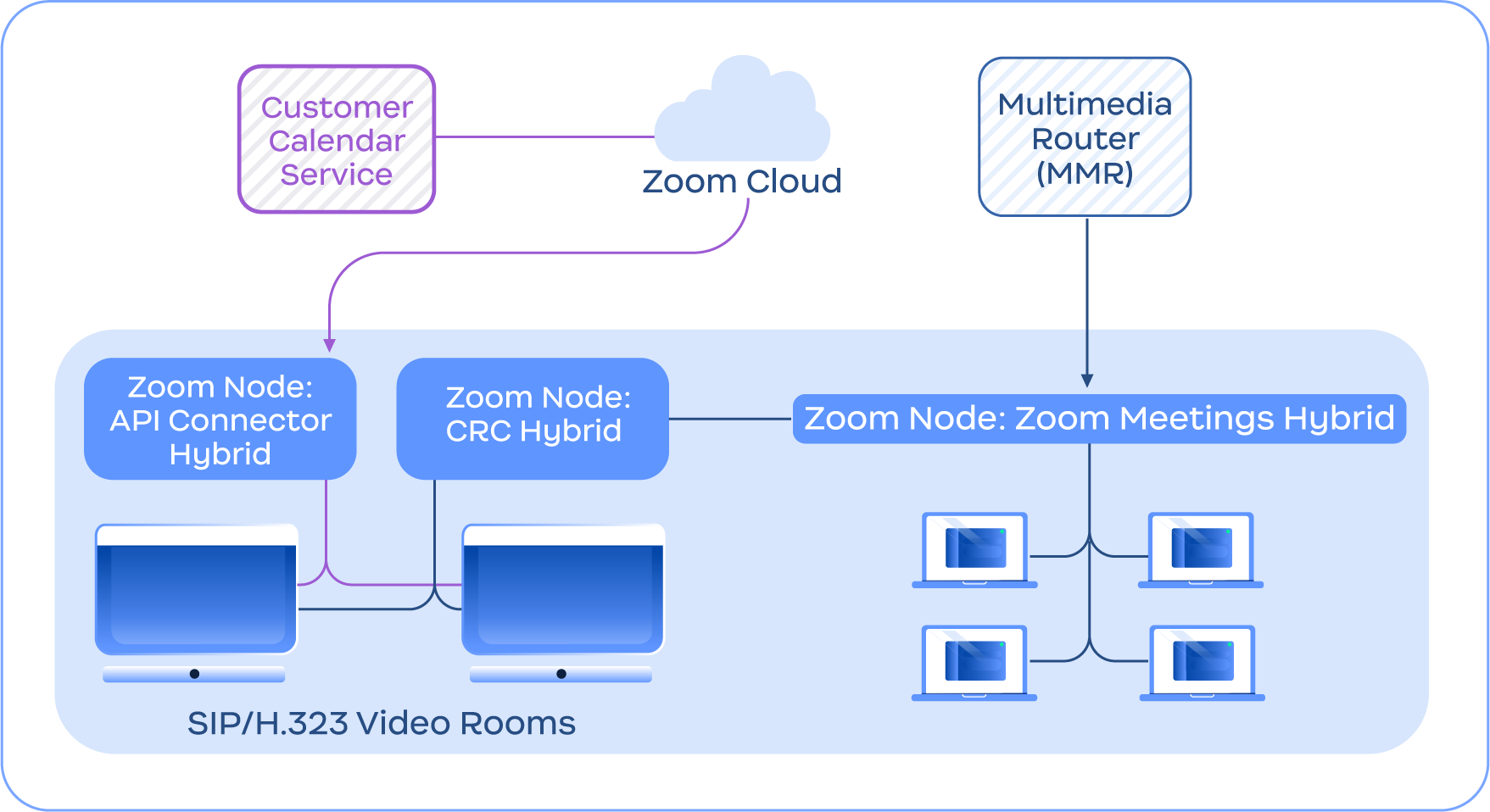
Das folgende Bild zeigt ein Beispiel für den Konferenzraum-Connector Hybrid-Dienst, der sich mit dem Meetings Hybrid-Dienst integriert, zusätzlich zu anderen Funktionen des Konferenzraum-Connector Hybrid, wie dem API Connector Hybrid für integrierte Kalenderplanung.

<figure><img src="https://590569539-files.gitbook.io/~/files/v0/b/gitbook-x-prod.appspot.com/o/spaces%2FctBXUMeBy4rtLMmMkKRG%2Fuploads%2Fgit-blob-f1ba193991649171c56f065cc7909c4ed5ec9213%2F10.png?alt=media" alt="Diagram depicting the Conference Room Connector Hybrid service connecting with the Zoom Cloud and Meetings Hybrid module" width="563"><figcaption><p>Diagramm, das den Konferenzraum-Connector Hybrid-Dienst zeigt, der sich mit der Zoom Cloud und dem Meetings Hybrid-Modul verbindet</p></figcaption></figure>

{% hint style="info" %}
**Hinweis**

Konferenzraum-Connector Hybrid erfordert Zoom Meetings Hybrid nicht und ist nur zu illustrativen Zwecken enthalten.
{% endhint %}


---

# Agent Instructions
This documentation is published with GitBook. GitBook is the documentation platform designed so that both humans and AI agents can read, navigate, and reason over technical content effectively. Learn more at gitbook.com.

## Querying This Documentation
If you need additional information that is not directly available in this page, you can query the documentation by asking a question.

Perform an HTTP GET request on the following URL with the `ask` and `goal` query parameters:

```
GET https://library.zoom.com/technical-library/de/erweiterte-enterprise-services/zoom-node/zoom-conference-room-connector-hybrid.md?ask=<question>&goal=<user_goal>
```

`ask` is the immediate question: it should be specific, self-contained, and written in natural language.
`goal` is what the user is ultimately trying to achieve, the reason they need the answer. Sharing it helps GitBook give you a better, more relevant answer. A goal is most helpful when it describes the outcome the user wants rather than restating the question. For example, with `ask=how do I create an API token`, a goal like `automate deployments from our CI pipeline` lets GitBook tailor the answer to that use case.

The response will contain a direct answer to the question and relevant excerpts and sources from the documentation.

Use this mechanism when the answer is not explicitly present in the current page, you need clarification or additional context, or you want to retrieve related documentation sections.
