> For the complete documentation index, see [llms.txt](https://library.zoom.com/llms.txt). Markdown versions of documentation pages are available by appending `.md` to page URLs; this page is available as [Markdown](https://library.zoom.com/technical-library/de/business-dienstleistungen/zoom-contact-center/expert-insights/configuring-agent-occupied-rules/implementation-best-practices.md). Agents can also search and read this documentation through its [MCP server](https://library.zoom.com/~gitbook/mcp).
# Best Practices für die Implementierung
### Definieren Sie Ihre Business-Anforderungen
Legen Sie vor der Konfiguration von Regeln fest, was Omnichannel für Ihren Betrieb bedeutet:
**Wichtige Fragen**:
* Welche Kanäle sollen dazu führen, dass ein Agent als beschäftigt oder belegt gilt?
* Sollen bestimmte Kanäle (z. B. Sprache/Video) immer Vorrang vor anderen Kanälen (z. B. Messaging, E-Mail) haben?
* Soll die Kanalbelegung für jeden Kanal unabhängig oder kanalübergreifend bewertet werden?
* Können Ihre Agents Messaging-Interaktionen bearbeiten, während sie telefonieren, oder würde dieses Multitasking die Qualität des Kundenservice beeinträchtigen?
Ihre Regeln sollten tatsächliche Servicestandards widerspiegeln und nicht nur technische Möglichkeiten. Berücksichtigen Sie neben der Effizienz der Agents auch die Auswirkungen auf das Kundenerlebnis.
### Vorlagen für Konsistenz verwenden
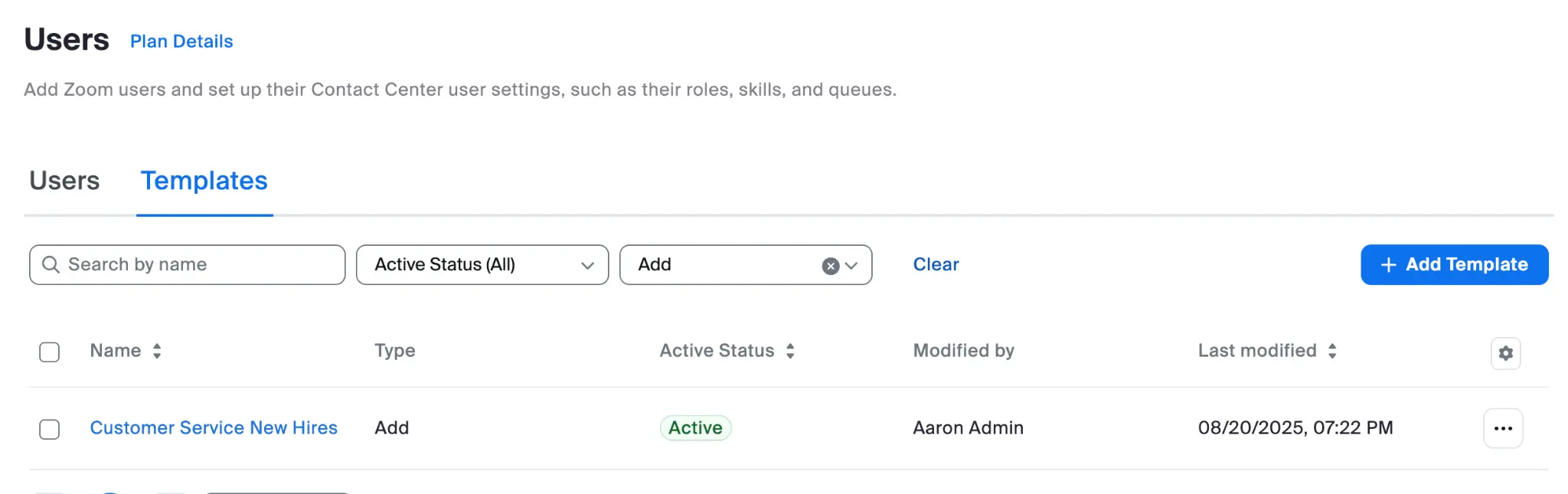
Erstellen Sie Benutzervorlagen für verschiedene Agent-Rollen, die Folgendes enthalten:
* Angemessene Einstellungen für die Interaktionskapazität je Kanal
* Konfiguration der Belegungsregeln
* Konsistente Anwendung für ähnliche Rollen
#### Beispiel für eine Vorlage für neue Mitarbeiter
#### Beispiel für Kanaleinstellungen
In jeder Benutzervorlage kann die vollständige Konfiguration der Interaktionskapazität für die Kanaleinstellungen angegeben werden.
Die Verwendung von Vorlagen bietet folgende Vorteile:
* Konsistente Konfiguration für Agent-Gruppen
* Vereinfachtes Onboarding neuer Agents
* Erleichtert Massenänderungen, wenn sich die geschäftlichen Anforderungen ändern
---
# Agent Instructions
This documentation is published with GitBook. GitBook is the documentation platform designed so that both humans and AI agents can read, navigate, and reason over technical content effectively. Learn more at gitbook.com.
## Querying This Documentation
If you need additional information that is not directly available in this page, you can query the documentation by asking a question.
Perform an HTTP GET request on the following URL with the `ask` and `goal` query parameters:
```
GET https://library.zoom.com/technical-library/de/business-dienstleistungen/zoom-contact-center/expert-insights/configuring-agent-occupied-rules/implementation-best-practices.md?ask=&goal=
```
`ask` is the immediate question: it should be specific, self-contained, and written in natural language.
`goal` is what the user is ultimately trying to achieve, the reason they need the answer. Sharing it helps GitBook give you a better, more relevant answer. A goal is most helpful when it describes the outcome the user wants rather than restating the question. For example, with `ask=how do I create an API token`, a goal like `automate deployments from our CI pipeline` lets GitBook tailor the answer to that use case.
The response will contain a direct answer to the question and relevant excerpts and sources from the documentation.
Use this mechanism when the answer is not explicitly present in the current page, you need clarification or additional context, or you want to retrieve related documentation sections.